
 Product Announcements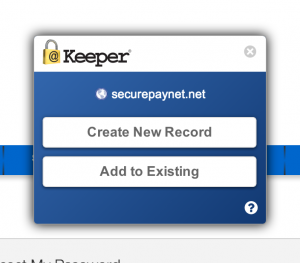



With the release of Desktop and Web Vault Update 17.4, Keeper Security’s desktop app is now available on the Linux Snap Store, bringing zero-trust, zero-knowledge password
It’s been a long, hard winter, Keepies. But on the bright side, we’ve had plenty of time to hunker down and come up with more ways to make Keeper even better. And now that spring is (kinda sorta) finally here, it’s time to roll down the windows and roll out some cool new updates.
Cool update #1: New Desktop Versions
Do you use Keeper for Mac? What about Keeper for Windows? Well, either way, you’re in luck. We’ve updated Keeper for both older and newer Mac and Windows platforms. Just click the link below that pertains to you!
| Mac | Windows |
| Keeper Desktop for MacMac 10.4+ with offline & online access, cloud and Wi-Fi sync. | Keeper for Windows DesktopWin XP/7/8 with offline & online access, cloud and Wi-Fi sync. |
| Keeper Cloud for MacMac 10.6+ – Fast and lightweight with cloud sync. | Keeper for Windows 8Win 8/8.1/Touch/Surface with offline & online access and cloud sync. |
Cool update #2: New & Improved Browser Extensions
We’ve majorly improved our browser extensions by allowing you to save new login credentials either to a new record OR to an existing one! This is great for websites that use the same account to access a few different domains. The browser extensions also now have full retina image support for Mac laptops and desktop computers for awesome clarity and resolution! As always, we’re just trying to make Keeper the best it can be. Happy spring!

