الميزة: مراقبة الشبكة الخفية للاستخدام الشخصي

Keeper BreachWatch® for personal use

تراقب BreachWatch الشبكة الخفية باستمرار لاكتشاف ما إذا كانت أي من بيانات الاعتماد المخزنة في خزنة Keeper لديك قد انكشفت، مع الحفاظ على بنية انعدام المعرفة لدى Keeper.
افحص بريدك الإلكتروني
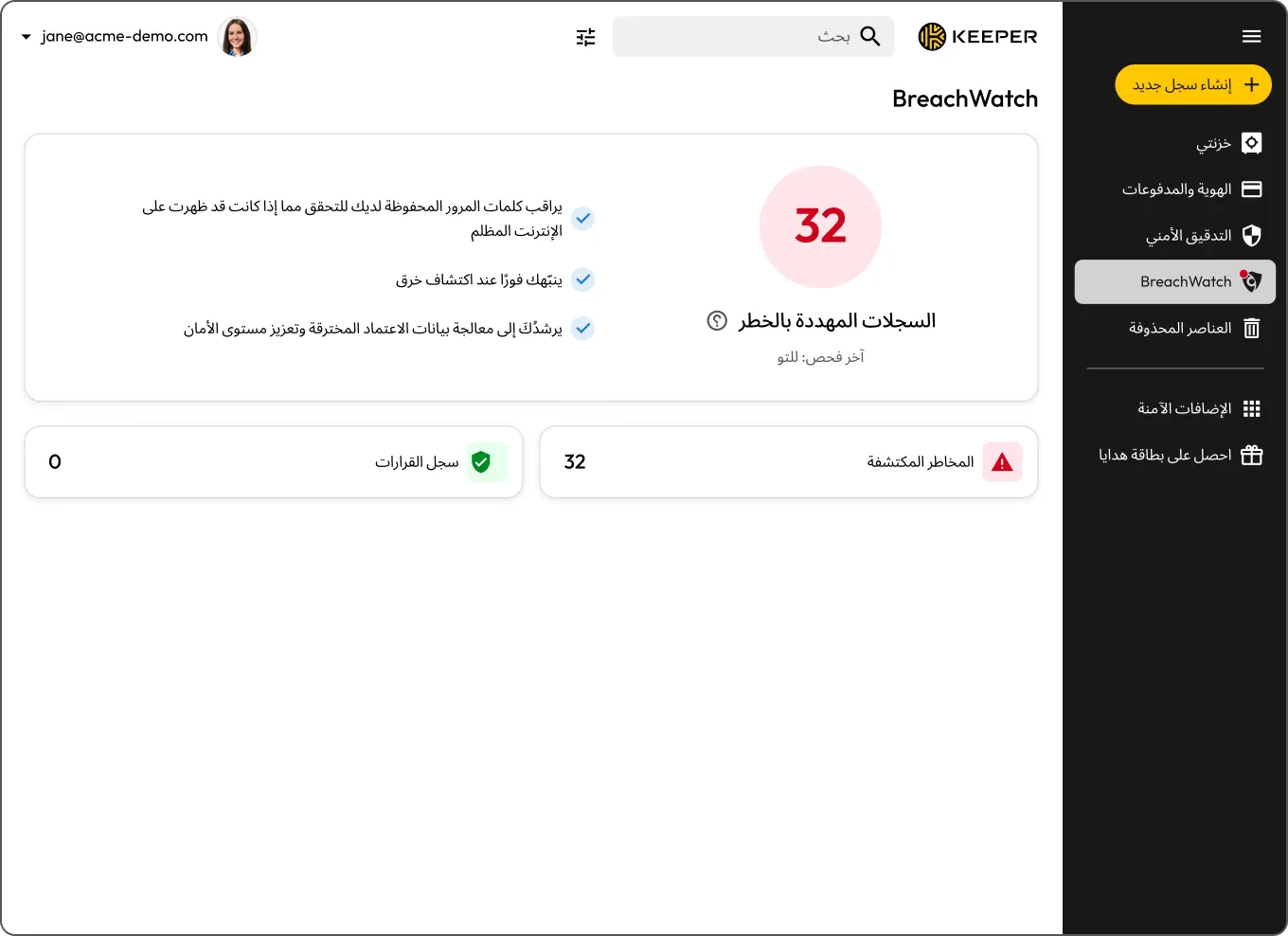
Keeper BreachWatch dashboard showing 32 records at risk and monitoring details.
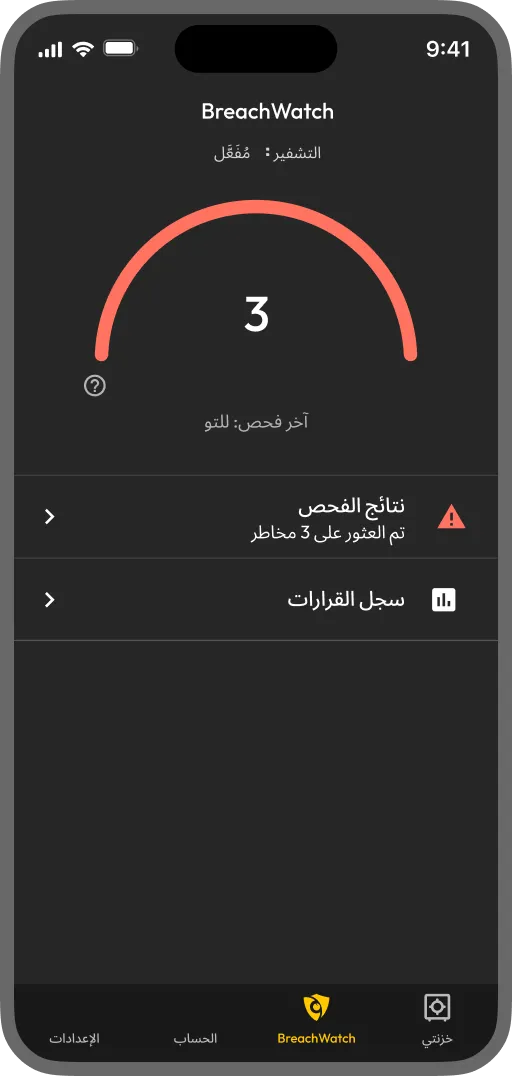
Keeper BreachWatch mobile app showing 3 records at risk and scan results

ما المقصود بميزة BreachWatch للمستخدمين الأفراد؟

إضافة BreachWatch تراقب كلمات المرور المخزنة في خزنة Keeper لديك عبر مقارنتها ببيانات اختراقات معروفة، وتنبهك إذا تبيّن وجود إحدى بيانات اعتمادك ضمن بيانات أحد الاختراقات. وتعمل باستمرار في الخلفية، فلا تحتاج إلى تذكّر إجراء الفحص بنفسك.

How BreachWatch works for personal users

Save your credentials in your Keeper Vault

Save your credentials in your Keeper Vault

BreachWatch checks your passwords against known breach datasets

BreachWatch checks your passwords against known breach datasets

If a match is found, you'll receive an alert

If a match is found, you'll receive an alert

Change your password to resolve the alert

Change your password to resolve the alert

Dark web monitoring designed for your personal security

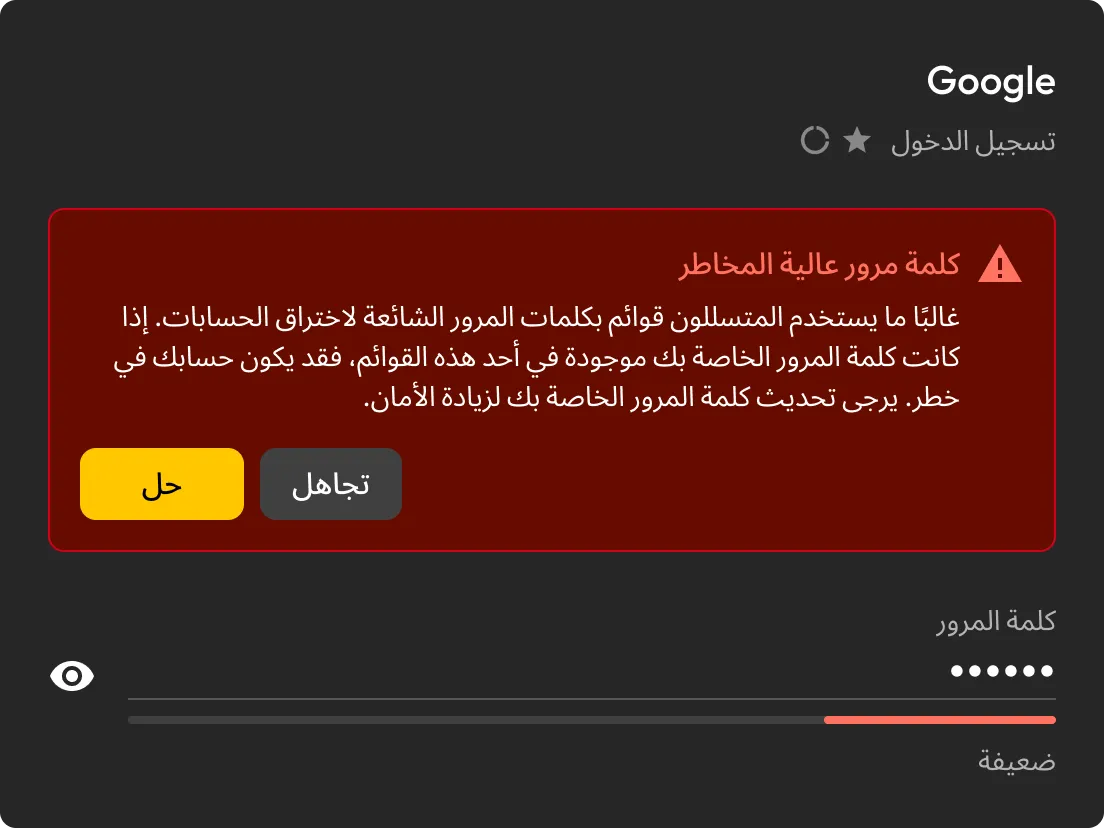
تنبيه من Keeper بشأن كلمة مرور عالية الخطورة في سجل تسجيل دخول إلى Google، مع خياري تجاهل التنبيه ومعالجة الخطر.

Detect compromised passwords instantly

تُجري BreachWatch مسحًا مستمرًا لكلمات المرور المخزنة في خزنة Keeper لديك، وتقارنها ببيانات اختراقات معروفة، ثم تنبهك فور اكتشاف أي تطابق.

See which accounts are at risk

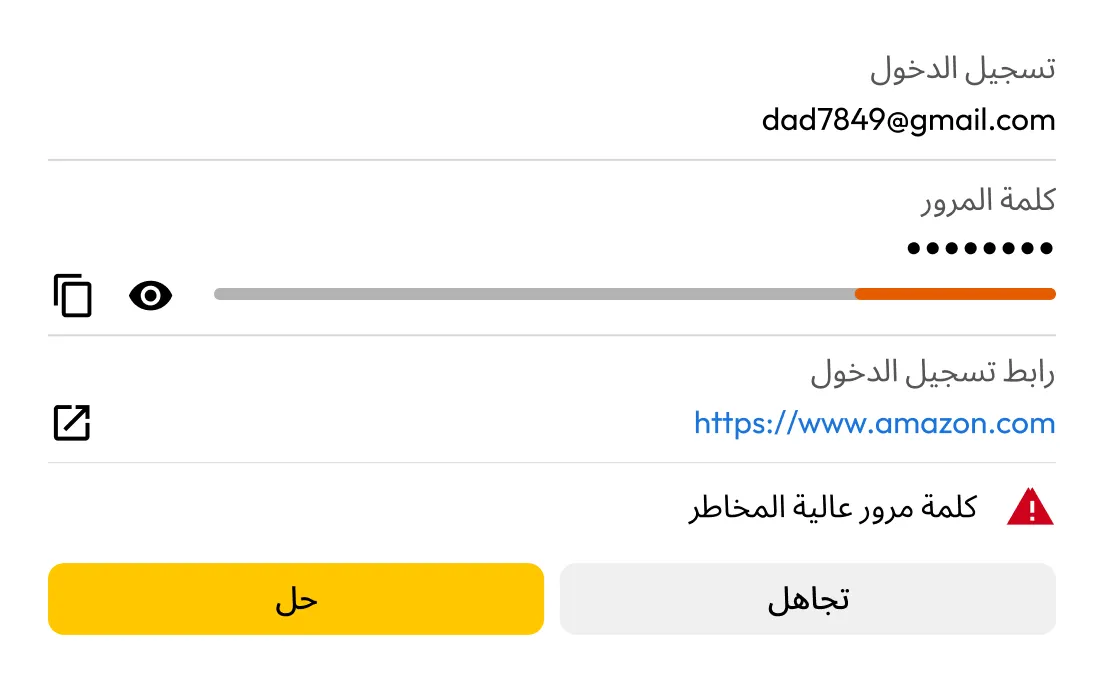
إذا اكتشفت BreachWatch كلمة مرور مخترقة، يمكنك تحديد السجل المتأثر ومراجعة ما يلزم تحديثه فيه.

تنبيه BreachWatch من Keeper بشأن كلمة مرور عالية الخطورة في سجل تسجيل دخول إلى Amazon، مع خياري تجاهل التنبيه ومعالجة الخطر.
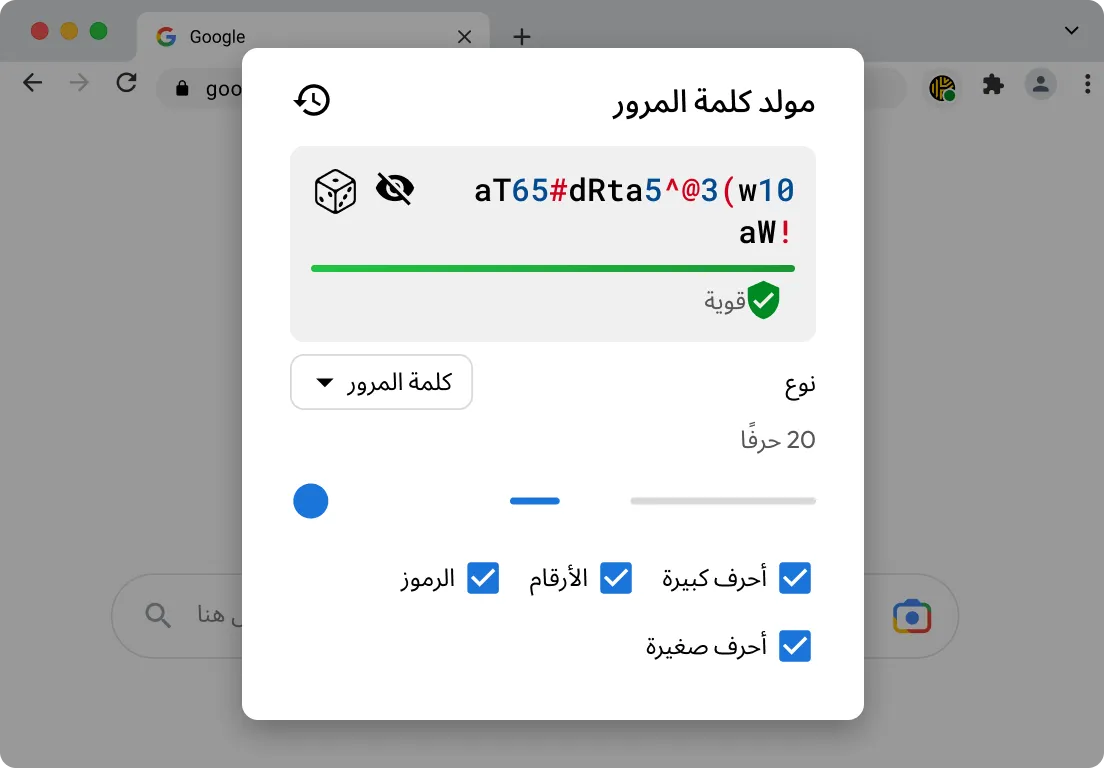
أداة إنشاء كلمات المرور من Keeper تعرض كلمة مرور قوية مكوّنة من 20 حرفًا، مع تفعيل الأحرف الصغيرة والكبيرة والأرقام والرموز.

Update passwords more easily

تساعدك KeeperFill® على تسجيل الدخول إلى الحساب المتأثر، وإنشاء كلمة مرور أقوى أثناء عملية التحديث، وحفظ بيانات الاعتماد الجديدة في خزنة Keeper لديك.

Replace weak passwords with stronger ones

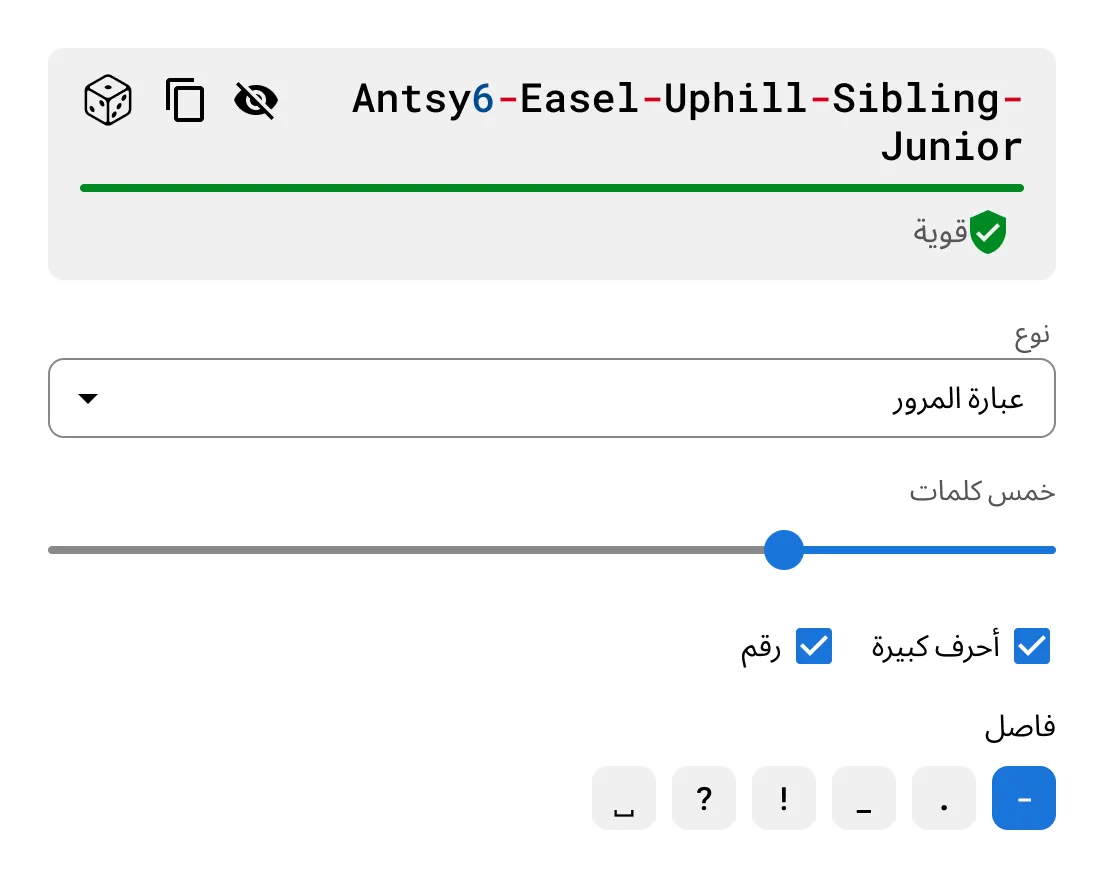
استخدم أداة إنشاء كلمات المرور وعبارات المرور المدمجة في Keeper لإنشاء بيانات اعتماد قوية وفريدة لكل حساب من حساباتك.

أداة إنشاء عبارات المرور من Keeper تعرض عبارة مرور قوية مكوّنة من خمس كلمات، مع خيارات لتحديد الفاصل بين الكلمات.

Why choose BreachWatch to monitor your passwords?

Continuous monitoring that keeps working in the background

لا تكتفي أداة BreachWatch بإجراء فحص لمرة واحدة فقط. بل تراقب باستمرار كلمات المرور المخزنة في خزنة Keeper لديك عبر مقارنتها ببيانات اختراقات معروفة، وتُجري هذا الفحص تلقائيًا على جميع أجهزتك، لتنبيهك فور العثور على أي تطابق.

Built to help you take action, not just send alerts

عند العثور على كلمة مرور ضمن بيانات أحد الاختراقات، تساعدك BreachWatch على تحديد السجل المتأثر. بعد ذلك، تساعدك KeeperFill على تحديث كلمة المرور وحفظ بيانات الاعتماد الجديدة بأمان في خزنة Keeper لديك.

الأسئلة الشائعة

Is dark web monitoring worth it?

For many people, yes. Credentials from past data breaches are actively bought and sold online, often long after the original breach occurs. If one of your saved passwords appears in a known breach, dark web monitoring helps you find out sooner so you can update it before your accounts are put at greater risk. BreachWatch continuously monitors for compromised credentials and alerts you when action is needed.

Does BreachWatch change my passwords for me?

No, BreachWatch alerts you to passwords that may be at risk, but you still need to change the password on the affected website or app.

How does Keeper help me update an exposed password?

KeeperFill can help guide you through the password change process by autofilling your current password, generating a stronger replacement and helping you save the updated credential to your Keeper Vault.

What happens after I update a compromised password?

After changing the password on the affected site, you should save the new password in your Keeper Vault to keep your record up to date.

Which passwords does BreachWatch monitor?

BreachWatch monitors passwords stored in your Keeper Vault records. If a record does not contain a password, it won't be included in the scan.

Can I use BreachWatch on mobile and desktop?

Yes, BreachWatch is available across Keeper's supported platforms, including web, desktop and mobile.

How is BreachWatch different from similar services?

Most dark web monitoring services work by sending your email address or a hashed version of your password to a third-party service for matching. This means your data leaves the service's security boundary and is processed externally.

BreachWatch works differently. Keeper uses a patented zero-knowledge matching method that performs breach analysis without exposing which websites you use or what your passwords are. Matching happens in a way that ensures neither Keeper nor any external party can see your credentials during the process. Your information stays protected throughout.

سحب موافقة ملفات تعريف الارتباطنحن نقدّر خصوصيتك

نستخدم ملفات تعريف الارتباط في موقعنا لمنحك أفضل تجربة تصفح، وتقديم إعلانات مخصصة لك عن منتجاتنا ومحتوانا، وتحليل حركة زيارة موقع الويب. لمعرفة المزيد، يُرجى الرجوع إلى سياسة الخصوصية الخاصة بنا.

قم بتسجل الاشتراك في نسخة تجريبية مجانية

شراء الآن