Role-Based Access Control

Map your directory to Keeper and give every user the access their job requires

Your identity provider already defines how your organization is structured. Keeper maps to that structure, so the access you enforce matches the org you actually run. IT teams can define, apply and audit permissions at scale from a single admin console.
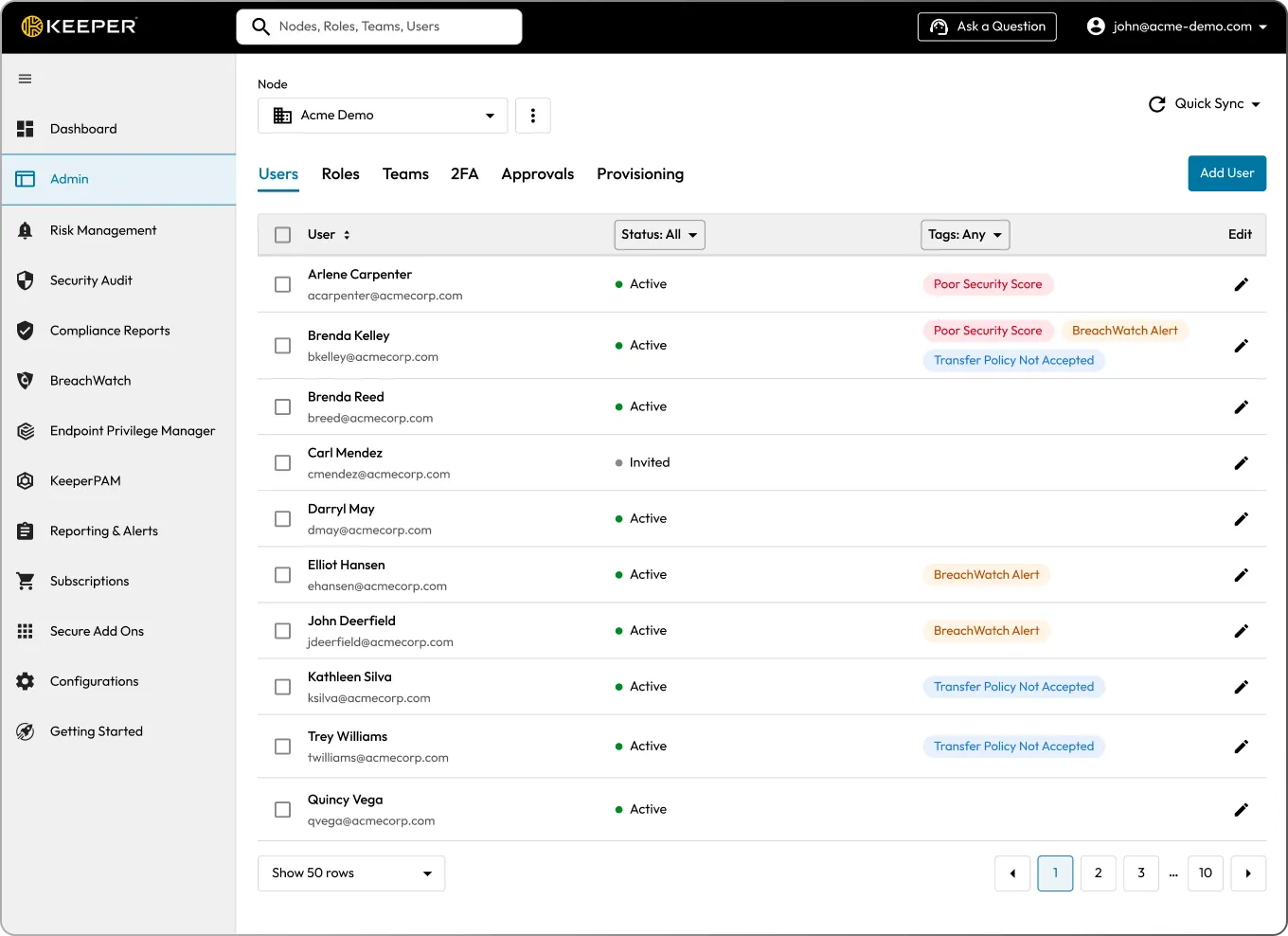
Keeper's centralized admin console displaying enterprise users, roles and teams, illustrating Role-Based Access Control (RBAC) for centrally managing user permissions and access.

Uncontrolled access is your biggest security liability

Access spreads quietly. People keep permissions they no longer need, IT loses track of who can reach what and every extra credential widens the attack surface.

Employees accumulate access over time and keep permissions from roles they’ve left.

IT lacks a clear view of who can access which credentials and systems.

When someone leaves, the credentials they knew leave with them.

Each team handles access differently, with no consistent standard.

SOC 2, HIPAA and NIST 800-53 all require documented, auditable access controls.

With Keeper, every user gets exactly the access their role requires

Start with the directory you already have

Your source directory, Active Directory, Entra ID, Okta or any SAML 2.0 identity provider, defines your organizational structure. Keeper maps to it. You assign your existing groups to Keeper Teams and Roles, and access follows the structure you already maintain.

Teams control what users can access

Team defines which vault resources its members can access: passwords, secrets and privileged resources like machines and databases. Assign a group to a Team, and every member inherits the same access.

With Workflow, you can add them to a Team's eligible list instead. They request access when they need it and give it up when they're done, reducing standing privilege.

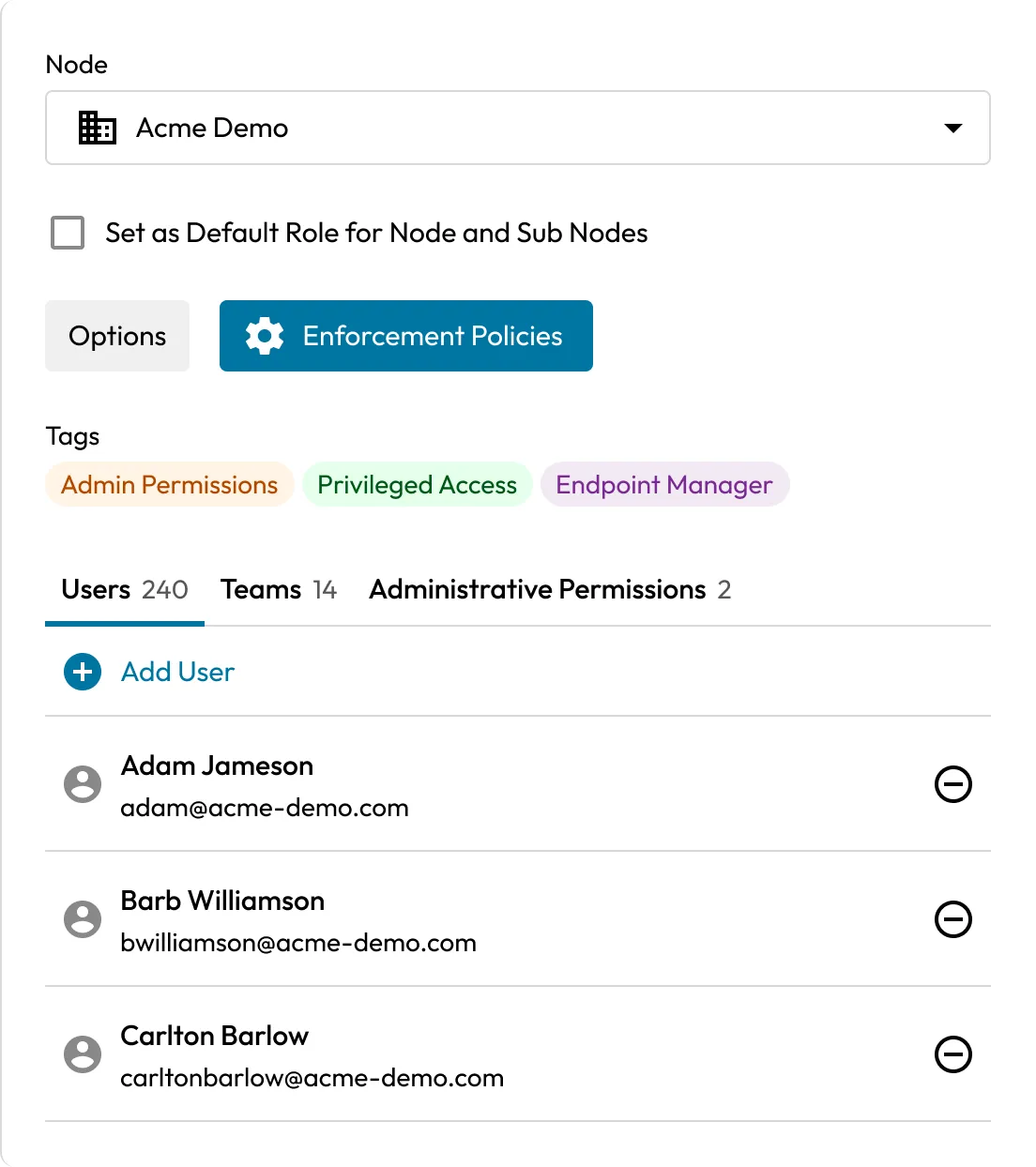
Keeper RBAC settings showing role assignments, enforcement policies, administrative permissions and users for an enterprise node.

Roles control what users can do

A Role is a set of enforcement policies applied to its members. Roles govern login and Two-Factor Authentication (2FA) requirements, platform and vault restrictions, sharing and export rules, and which capabilities a user can use. When a user belongs to more than one Role, Keeper applies the most restrictive policies, so least privilege is enforced by default.

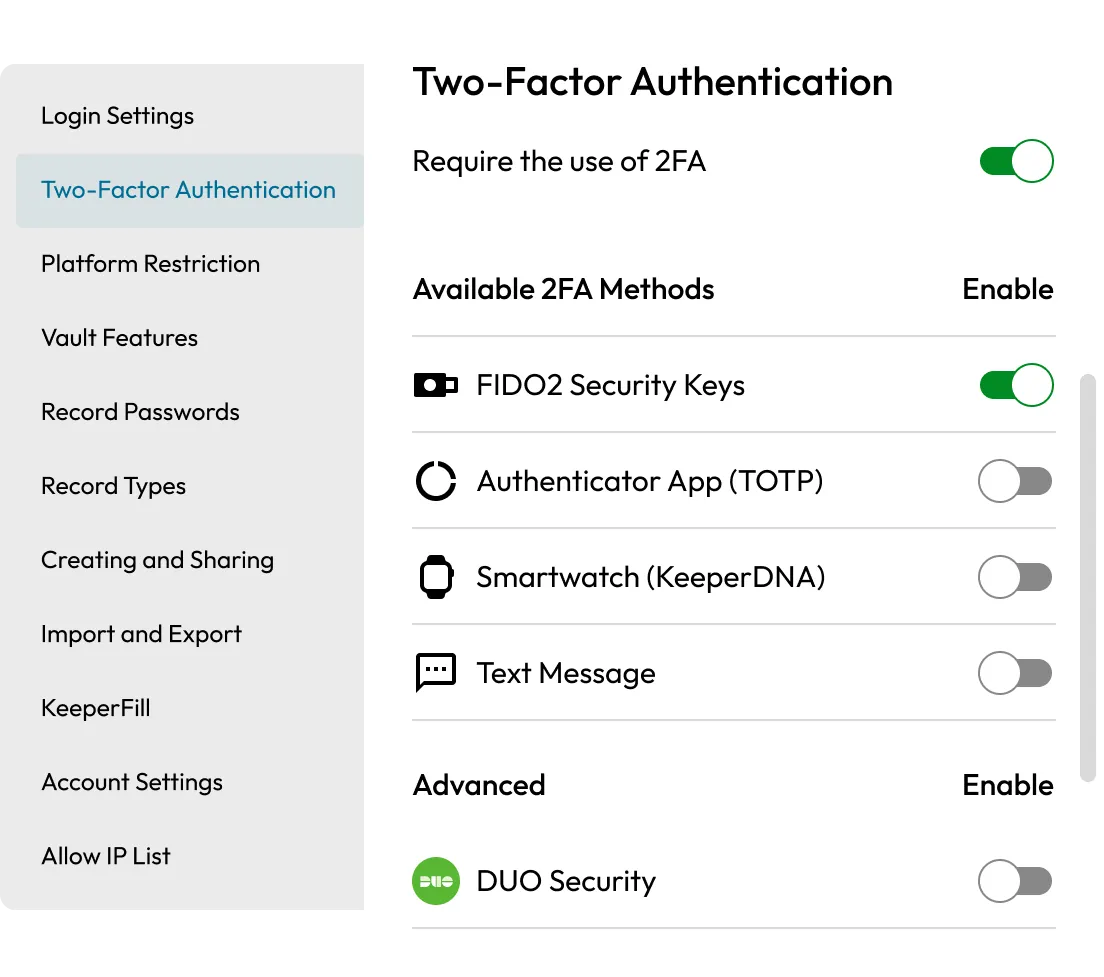
Keeper Two-Factor Authentication (2FA) settings showing required 2FA with FIDO2 security keys enabled and additional authentication methods available.

Apply access at scale, not one user at a time

Team and Role assignments map to your directory groups through SCIM provisioning, the Keeper AD Bridge or your identity provider. When someone joins, changes teams or leaves, their access updates automatically. No manual edits, and no stale permissions left behind from a previous job.

Delegate administration by node

Keeper's node structure lets you hand a delegated administrator control over one part of the organization, a region, a department or a business unit, without visibility into anything outside it. An IT admin for EMEA, for example, can manage users, Teams and Roles within that region and nothing else.

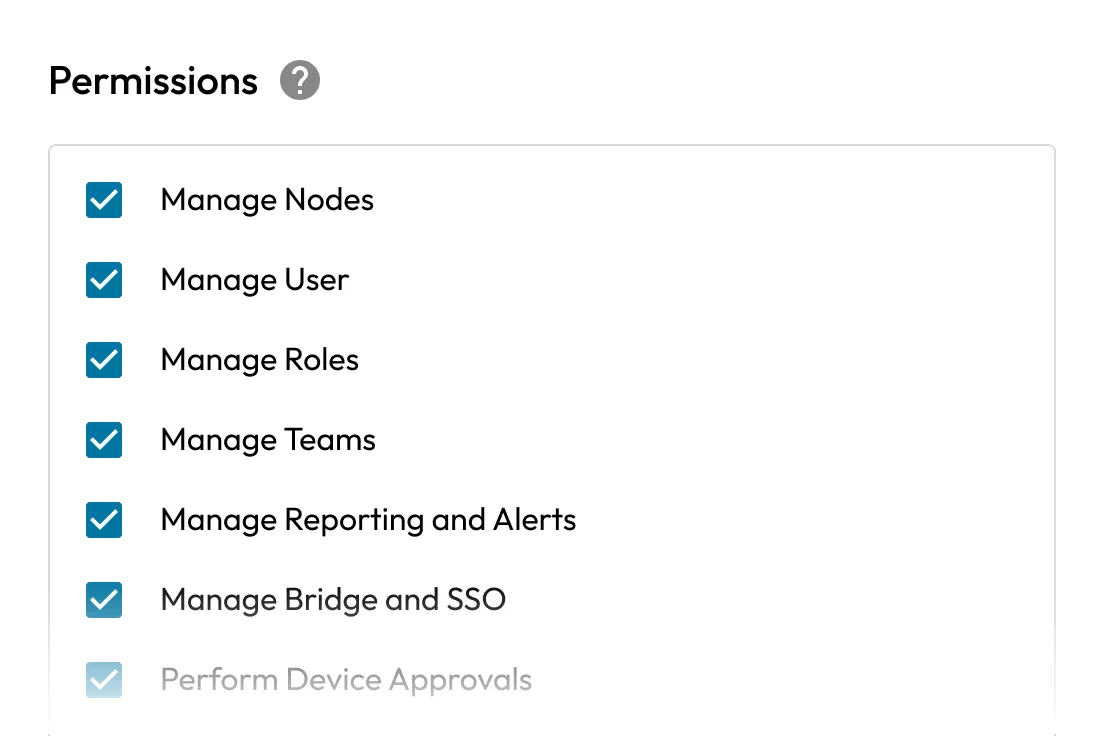
Keeper RBAC permissions showing administrative controls for managing nodes, users, roles, teams, reporting, SSO and device approvals.

Cut standing privilege with Just-In-Time (JIT) access

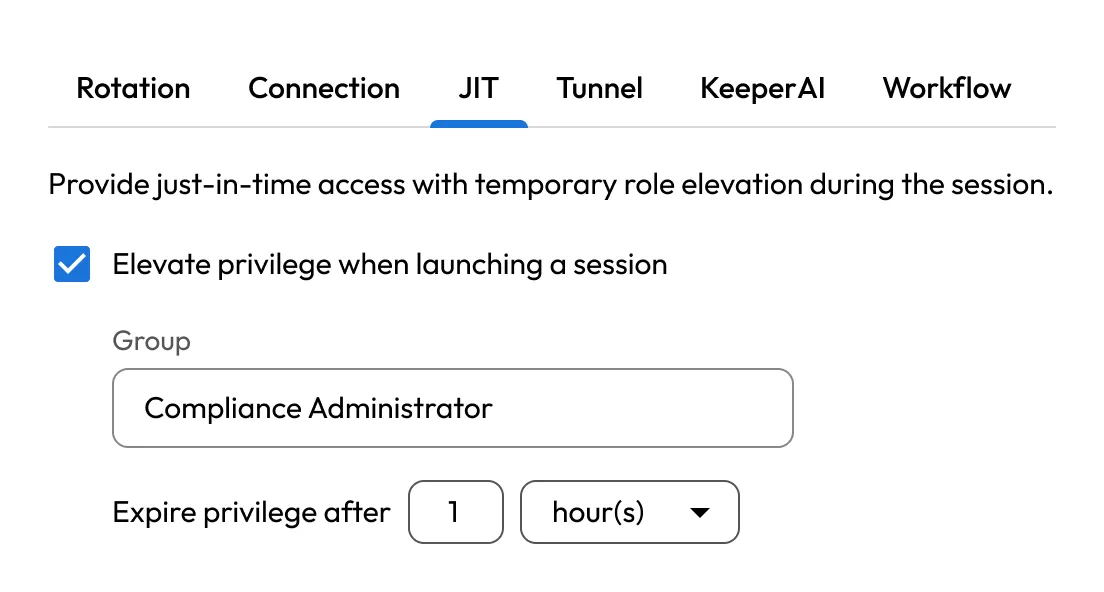
With KeeperPAM®‘s Keeper Privileged Cloud feature, you can grant just-in-time access to any managed resource or asset in the vault. Users receive privileged access only when they need it and lose it when the task is done.

Keeper JIT access settings showing temporary privilege elevation for a Compliance Administrator role with access set to expire after one hour.

Reduce offboarding risk

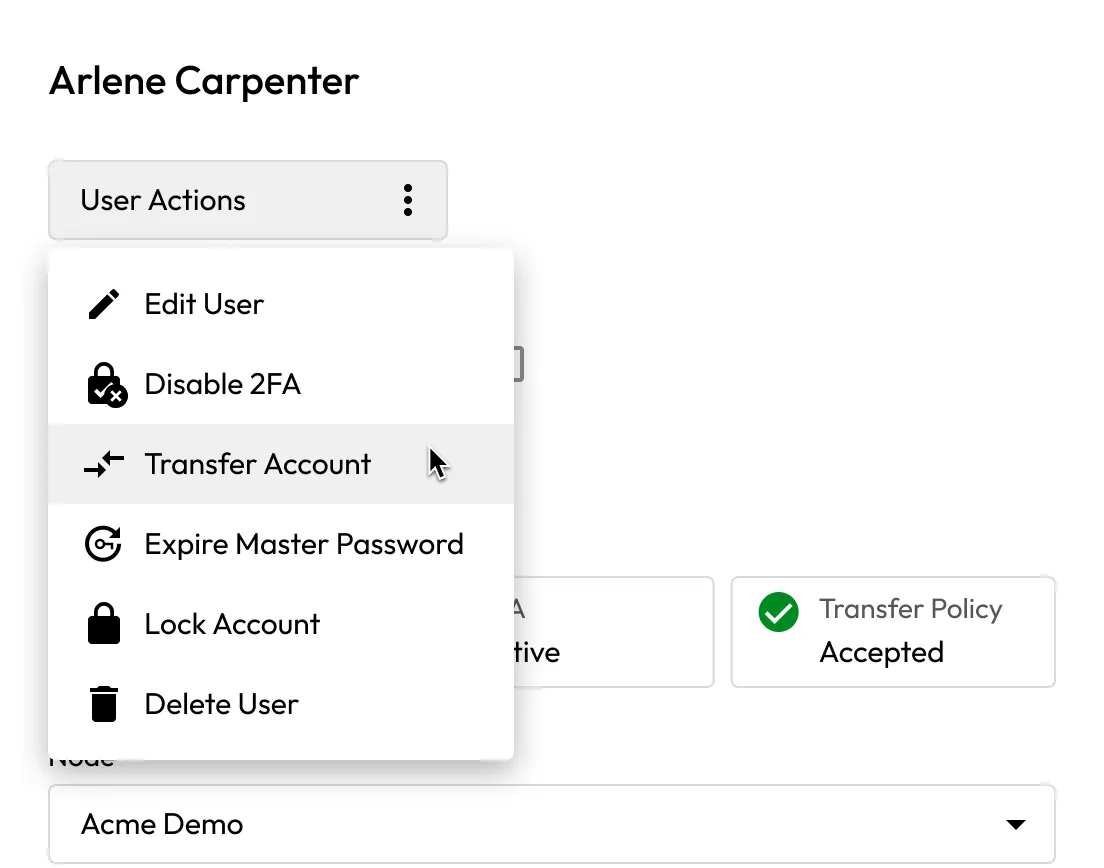
When an employee leaves, lock their vault and transfer ownership to another user. Role policies control who can run transfers and for which users. The process maintains zero-knowledge.

Keeper user management menu showing administrative actions to edit a user, disable 2FA, transfer the account, expire the master password, lock the account or delete the user.

Built-in visibility for audit and review

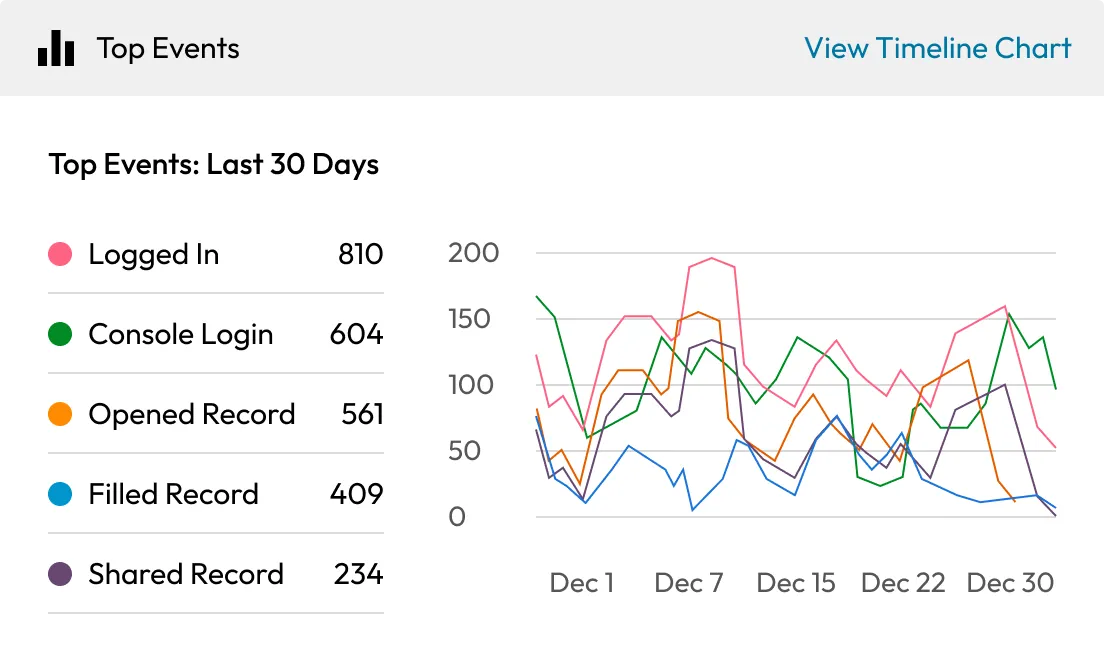
Security teams can run access reports from the Keeper Admin Console, review permissions by user or Team and produce the evidence auditors ask for. Every role assignment, policy change and vault action is logged and reportable.

Keeper reporting dashboard showing top user events from the last 30 days, with activity counts and a timeline chart for logins, record access, autofill and sharing.

Take control of who can access what before someone else does

Keeper's role-based access controls help IT and security teams enforce least-privilege access and improve visibility without the overhead of managing access manually.

Frequently asked questions

What's the difference between a Team and a Role in Keeper?

Teams grant access to vault resources such as passwords, secrets and privileged resources. Roles apply enforcement policies to users and enable capabilities like KeeperPAM privileged access and Keeper Secrets Manager. Teams decide what a user can reach; Roles determine which policies and entitlements apply. Roles can be assigned to Teams for added flexibility.

How are Teams and Roles created and managed?

Both can be created manually in the Admin Console, mapped automatically via SCIM provisioning, built with Keeper Commander® or assigned from Active Directory via the Keeper AD Bridge. Once created, each Role is configured with its own enforcement policies and each Team with its own resource access.

Does Keeper integrate with Active Directory and identity providers?

Yes, Keeper integrates with Active Directory, Azure AD/Entra ID, Okta and other SSO providers. Team and Role assignments can be driven by directory group membership, so permissions stay current without manual updates.

What enforcement policies can be set per Role?

Roles cover login settings, 2FA requirements, platform restrictions, vault features, password rules, sharing and export controls, KeeperFill® behavior, IP allowlisting, account transfer permissions, Keeper Secrets Manager access and KeeperPAM privileged access settings. Each area is configured independently per Role.

Can I grant temporary access instead of permanent access?

Yes, with KeeperPAM and Keeper Privileged Cloud, you can grant just-in-time access to privileged resources, so users hold access only for the task at hand and standing privilege stays near zero.

Can different administrators manage different parts of the organization?

Yes, a delegated administrator can be given some or all administrative permissions over an assigned node or sub-node, without visibility into the rest of the organization.

What happens to credentials when an employee leaves?

Admins can lock the departing user's vault and transfer ownership to another user. The process is zero-knowledge and role-governed; only users with the right permissions can start a transfer.

How does Keeper support compliance audits?

The Admin Console provides detailed reporting on user access, role assignments and vault activity, creating the audit trail required by SOC 2, HIPAA, NIST 800-53, ISO 27001 and similar frameworks.

Withdraw Cookie ConsentWe value your privacy

We use cookies on our site to give you the best browsing experience, serve personalized ads about our products and content, and analyze website traffic. To learn more, please refer to our Privacy Policy.

Sign up for a Free Trial

Buy Now