Feature: One-Time Share

Securely share data with end-to-end encryption using Keeper One-Time Share

Easily share and exchange passwords, secrets, files and other confidential information with one click - even if the recipient isn't a Keeper user. Content is kept in sync until the share expires.

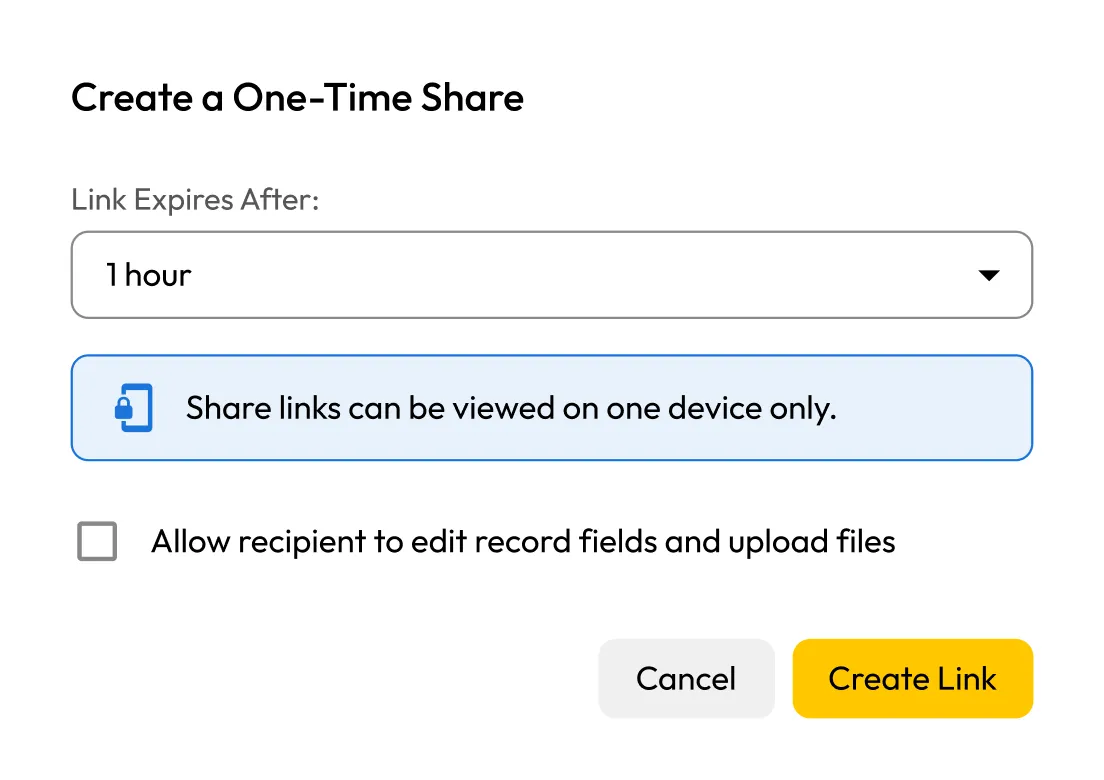
One-Time Share setup with expiry dropdown, one-device view notice, edit permission checkbox, and Cancel/Create Link buttons.

Why use One-Time Share?

Time-Limited Access

Time-Limited Access

Set an expiration time for every share to limit exposure and prevent ongoing access.

Device-bound protection

Device-bound protection

Each link works on a single device only, preventing it from being opened or reused elsewhere.

Optional two-way sharing

Optional two-way sharing

Enable two-way sharing to let recipients edit records and upload files. Changes are saved directly in your vault.

No account required

No account required

Recipients can access and edit shared records without signing up for or downloading Keeper.

How One-Time Share works

One-Time Share tab with message about creating secure links, and a blue button labeled 'Create a One-Time Share'

Choose what to share

Select a password, file, secure note or other record from your Keeper Vault.

Options for one-time share: link expiry dropdown set to 1 hour, and checkbox to allow recipient to edit fields and upload files.

Set expiration and send

Choose how long the share link will stay active, then share it via link or QR code.

File Request section showing attached file 'drivers license.pdf' (407 KB) with download icon.

Receive a secure reply

Allow the recipient to securely send information back. Two-way sharing is fully encrypted and optional.

Secure two-way sharing with Keeper's One-Time Share

One-Time Share on mobile

Keeper One-Time Share works seamlessly across iOS and Android, making it easy to share sensitive data on the go.

With just a few taps, you can:

  • Create a time-limited share link from any record
  • Set custom expiration times or revoke access at any moment
  • Share via QR code, text or any mobile messaging app
  • Monitor and manage active shares directly from your device

All shared data is end-to-end encrypted, ensuring zero-knowledge security on mobile just like desktop.

Mobile screen of Keeper's Secure Share Link showing access credentials (email, hidden password, website link) and attached file 'Documentation.pdf' with expiry timer.

Perfect for personal and business use

Easily send and receive encrypted files from anyone

Easily send and receive encrypted files from anyone

Share login details to family or friends securely

Share login details to family or friends securely

Provide one-time access to contractors or partners

Provide one-time access to contractors or partners

Avoid sending plaintext passwords over email or chat

Avoid sending plaintext passwords over email or chat

Frequently asked questions

Do recipients need a Keeper account to view the shared item?

No, One-Time Share works without requiring the recipient to sign up or log in.

Can I revoke a One-Time Share after I send it?

Yes, you can cancel or revoke the share link at any time from your Keeper Vault.

What happens after the link is used?

After the link is used, it becomes inactive immediately and cannot be used again on a different device.

Is the shared data encrypted?

Yes, Keeper uses zero-knowledge, end-to-end encryption. Only the intended recipient can decrypt and view the data.

Can I see if the link was accessed?

Yes, Keeper allows you to track share link activity, including when it was accessed and, when available, details about the device used.

Buy Now