Keeper vs 1Password:
Which is better?

Explore the ultimate comparison between Keeper and 1Password. Discover which password manager wins on security, features and usability. Get the insights you need to choose the right protection for your workforce, devices and data.

起价仅
 
 
/用户/月 *zzgl MwSt *Includes GST
个人用户

额外福利!包含为每位团队成员提供免费 Family 方案。

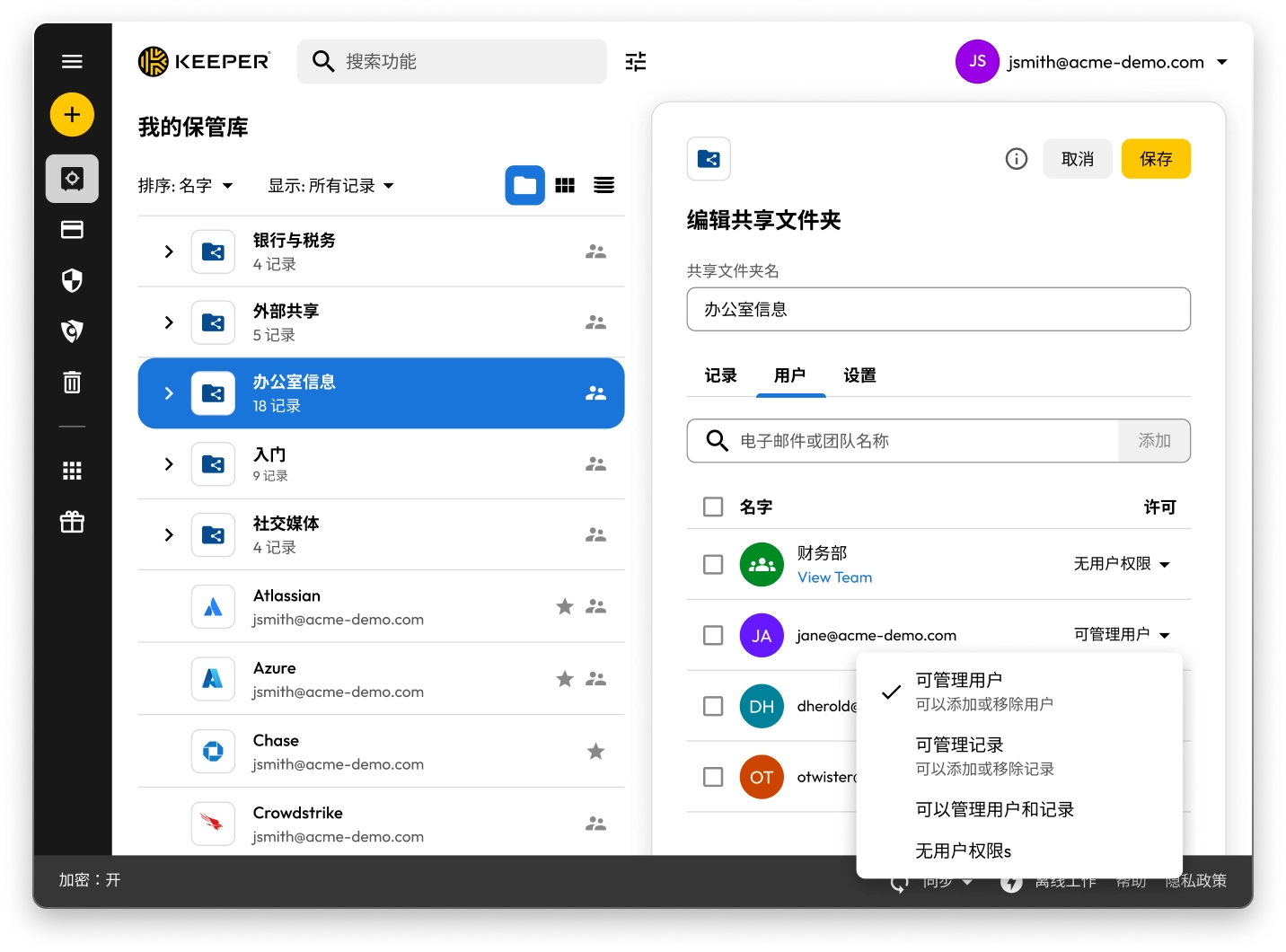
Keeper Vault interface showing shared folders and records. The “Edit Shared Folder” panel for “Office Information” is open, displaying user permissions with options to manage users, manage records, or assign no permissions.

安全模型

Keeper's security model is built on proven enterprise standards with advanced threat protection capabilities that go far beyond a traditional password management solution. Keeper is a modern, comprehensive and agentic AI-enabled Privileged Access Management (PAM) platform, with password management being just one component of the platform.

Keeper
1Password
Authentication and access control

Advanced multi-layered authentication with a master password and device verification — an attack-resistant design that simplifies the user experience while enhancing security.

Traditional dual-factor approach (account password + secret key) that may create complexity and potential access issues for users.

Single Sign-On (SSO) integration

Keeper is the innovator in SSO integration, with patent-protected SSO technology and enterprise production experience since 2016, supporting complex multi-provider configurations and seamless integration.

1Password's recently launched SSO capability offers only basic functionality, requiring additional software installations. It is limited to single identity provider configurations, with no support for advanced configurations or nodes.

SCIM 调配

Keeper supports direct SCIM provisioning with any identity provider without requiring any software installation. Automated SCIM provisioning ensures that every user in your organization is protected, and Just-In-Time (JIT) access eliminates standing privileges.

1Password requires the installation of a self-hosted “SCIM Bridge” in either an on-prem or cloud environment.

Memory protection and security

Keeper Forcefield technology provides comprehensive user-land and kernel-land protection against sophisticated memory-based attacks that target password managers.

Provides only basic memory protection, leaving users vulnerable to advanced malware techniques.

Encryption technology

Keeper's unique “Transmission Security,” which uses TLS 1.3/1.2 encryption, plus an additional 256-bit AES transmission key, provides full protection for all data communications, not just authentication. Keeper's approach also includes Hardware Security Module (HSM) integration in the AWS cloud for super-encryption.

1Password's SRP encryption focuses solely on authentication, leaving critical security gaps in data communication.

Record and folder-level encryption

Each record and folder stored in Keeper is encrypted using AES-256 technology with its own unique key, and all encryption and decryption is done locally on the user's device. Each record-level key is wrapped with an additional key if it is contained within a Shared Folder. This multi-layered encryption model provides the most granular level of protection for your data.

1Password enrypts data at the vault level only. It does not encrypt each individual record and folder with a different AES-256 key.

暗网监视

Operates a fully self-managed BreachWatch® service that runs entirely within the Keeper infrastructure, using a proprietary HSM-protected architecture that prevents correlation between breached and vault passwords.

1Password relies solely on an external third-party service, Have I Been Pwned, for monitoring, which requires transmission of customer data outside of its controlled infrastructure.

Compliance and certifications

Comprehensive, highly regulated government and enterprise certifications include being FedRAMP Authorized, along with broader security certifications (ISO 27001/17/18, FIPS 140-3 validation) and the longest-standing SOC 2 Type 2 certification.

1Password retains no FIPS module or government authorizations (FedRAMP or GovRAMP), limiting market access in regulated industries and government sectors.

*Data as October 27, 2025

Feature set

Keeper Security sets itself apart from 1Password by offering a comprehensive PAM platform that extends far beyond password management and surpasses 1Password's capabilities for all advanced enterprise requirements. KeeperPAM® combines enterprise password management, secrets management, connection management, zero-trust network access and remote browser isolation in one easy-to-use interface.

Keeper
1Password
PAM platform architecture

Keeper's full-featured PAM platform includes secrets management with automated credential rotation, privileged session recording across multiple protocols, automatic discovery of privileged accounts and JIT access with ephemeral accounts, integrated into one cloud-native, zero-knowledge platform.

1Password is a standalone password management solution that lacks comprehensive privileged access management capabilities. It offers a limited “Extended Access Management" platform for device management, with other features in beta.

远程浏览器隔离

Keeper's Remote Browser Isolation (RBI) technology creates isolated browser sessions for accessing internal or cloud applications, protecting against data exfiltration and eliminating the need for VPNs or separate zero-trust network access solutions.

1Password does not offer Remote Browser Isolation.

JIT access and zero standing privileges

Keeper provides time-limited access to resources with automatic privilege revocation upon session termination. With Keeper's Endpoint Privilege Manager, IT teams can enforce JIT access, remove standing privileges and grant time-limited admin rights directly on user endpoints.

1Password does not provide JIT or zero-standing privilege capabilities or any capability to enforce least privilege on user devices.

Developer and DevOps capabilities

Keeper Secrets Manager is fully cloud-based and natively integrated into the Keeper platform, providing seamless CLI integration, REST APIs, Terraform support, CI/CD pipeline security and native database tools without requiring any on-premises infrastructure.

1Password offers only basic developer features, requiring additional infrastructure components and manual setup. 1Password Secrets Automation, based on its acquisition of SecretHub, requires users to install a “Connect Server” in their environment.

Access controls and permissions

Keeper provides over 80 distinct vault and role-level permissions over 14 categories. Keeper's highly granular permission system, with extensive policy controls paired with clear audit trails, is thoughtfully designed for true enterprise governance and compliance.

1Password has just 13 vault-based permissions with limited granularity for enterprise access control.

Guest access (advanced user management)

Keeper provides enterprise-grade external access through its node-based (tenant structure) organizational architecture, allowing isolation between different organizational units and support for multiple identity providers within the same tenant.

1Password has no concept of node structure, organizational units or support for multiple identity providers. Instead, it offers a "guest account" to control external user access, which is limited to a single vault without time controls or automated security measures.

Advanced sharing

Keeper's sharing features include time-limited access to records and folders with automatic credential rotation, bidirectional one-time sharing (to users and non-users) with real-time sync and advanced vendor access controls.

1Password requires users to create separate vaults for sharing password sets, creating unsynchronized copies of records rather than maintaining a real-time sync with the original data.

Managed Service Provider (MSP) platform

Keeper offers a mature (launched in 2019) and comprehensive MSP platform combining password management with full PAM capabilities and advanced automation, all within a unified multi-tenant platform.

1Password recently launched an MSP offering focused solely on password management, without PAM features.

帐户恢复

Keeper provides enterprise customers with multiple account recovery and transfer pathways that maintain zero-knowledge security, including Enterprise SSO Recovery, Account Transfer Policy, a 24-word recovery phrase for users who authenticate with a master password, share admin privileges and Commander CLI automation.

1Password offers no capability to directly transfer entire vaults between user accounts; instead, it relies on manual processes that depend on departing employee cooperation.

*Data as October 27, 2025

Usability and customer ratings

Keeper is fanatical about creating solutions that are as user-friendly as they are secure, and its modern, intuitive interface extends across each of its platforms. Keeper provides desktop applications for Windows, macOS and Linux devices, in addition to a web-based vault and browser extension for both password management and privileged access management. Native mobile apps for iOS and Android provide feature parity and hold the highest ratings in the category across all app stores.

Keeper
1Password
Organizational scalability

Keeper has a purpose-built scalability architecture that addresses the unique needs of all organization types, from small offices to government agencies with specialized compliance requirements.

1Password appears to take a one-size-fits-all approach, without specific adaptations for different market segments or compliance requirements.

易于使用

Keeper's browser extension provides biometric login using FIDO2 passkeys without the need for a companion desktop application.

Requires installation of the 1Password desktop application for biometric login.

User ratings and reviews

Keeper receives consistently high ratings across all platforms, with significantly larger review volumes indicating broader user adoption and satisfaction.

1Password has lower review volumes and notably lower ratings on the Chrome extension (3.0/5) and Android (3.9/5).

*Data as October 27, 2025

Keeper 与 1Password 对比:用户评分和评论

Keeper
1Password
iOS App Store

iOS App Store

4.9 out of 5 and 213,000 Reviews

4.9 out of 5 and 213,000 Reviews

4.6 out of 5 and 18,200 Reviews

4.6 out of 5 and 18,200 Reviews

Microsoft 商店应用

Microsoft 商店应用

4.9 out of 5 and 1,340 Reviews

4.9 out of 5 and 1,340 Reviews

4.1 out of 5 and 132 Reviews

4.1 out of 5 and 132 Reviews

Chrome Extension

Chrome Extension

4.8 out of 5 and 8,400 Reviews

4.8 out of 5 and 8,400 Reviews

3.0 out of 5 and 2,500 Reviews

3.0 out of 5 and 2,500 Reviews

Android

Android

4.5 out of 5 and 8,400 Reviews

4.5 out of 5 and 8,400 Reviews

3.9 out of 5 and 15,000 Reviews

3.9 out of 5 and 15,000 Reviews

*Data as October 27, 2025

已经在使用 1Password 了?迁移至 Keeper 很简单。

将密码从 1Password 迁移至 Keeper 既简单又安全。只需点击几下,即可将存储在 1Password 中的信息(包括密码、文件夹、子文件夹、自定义字段、TOTP 代码、备注和帐户)迁移至 Keeper。

常见问题解答

如何将密码从 1Password 导入到 Keeper?

您可以通过以下简单步骤将密码从 1Password 导入至 Keeper Security:

  • 登录至您的 1Password 帐户
  • 选择您所需的保管库或订阅
  • 导出数据
  • 通过 Web 或桌面应用登录至 Keeper
  • 点击您的帐户图标 > 设置 > 导入
  • 从列表中选择 1Password,并将导出的文件拖到“拖放文件至此处”窗口

查看这份分步骤的设备专属指南,详细了解从 1Password 进行导入的更多信息。

如何取消 1Password 订阅?

如果您不想继续订阅 1Password,请按照以下三个步骤进行操作:

  • 登录至您的 1Password 帐户。
  • 在右上角选择您的姓名,然后点击“我的个人资料”。
  • 在页面底部,选择“永久删除帐户”。

在关闭您的帐户之前,请务必记得导出您的凭据,然后将其导入至您选择的 1Password 替代方案。

Keeper is a comprehensive PAM platform. Does that mean it's only meant for large enterprises?

No. While Keeper offers comprehensive PAM capabilities that serve enterprise needs, it's designed to scale from individual users to large organizations.

Keeper Business provides smaller organizations with a streamlined, easy-to-use credential management solution without compromising security.

Keeper also offers personal plans for individual password management and secure file storage, as well as family plans for shared password management across household members.

The platform's flexible architecture allows users to start with basic password management and scale up to enterprise-grade PAM features as their needs grow. This means individuals can benefit from the same security foundation that powers Keeper's business solutions, while organizations can access sophisticated privileged access controls when needed.

1Password Family 与 Keeper Family 套餐:有何区别?

Keeper Family 允许您安全存储和共享无限数量的家庭密码,提供五个私人保管库、10 GB 文件存储空间,不限设备数量,支持紧急访问和 24/7 全天候客户支持。Keeper Family 每月费用仅为 7.08 美元。

1Password 也允许家庭安全地存储密码、导出数据和共享密码,但需要创建多个保管库方可进行共享。Keeper 支持单条记录共享和文件夹共享。1Password 仅提供 1 GB 文档存储空间,而 Keeper 则提供 10 GB 存储空间。

close
立即购买