KeeperDB vs DBeaver: Secure database access comparison

DBeaver is a popular, feature-rich database client. KeeperDB offers a faster, more secure, and modern alternative that runs standalone as a full-featured database client or deployed through KeeperPAM. Through KeeperPAM, every connection becomes passwordless and session-recorded, backed by AI threat detection and an AI co-pilot, and governed by zero-trust controls.
Request a Demo
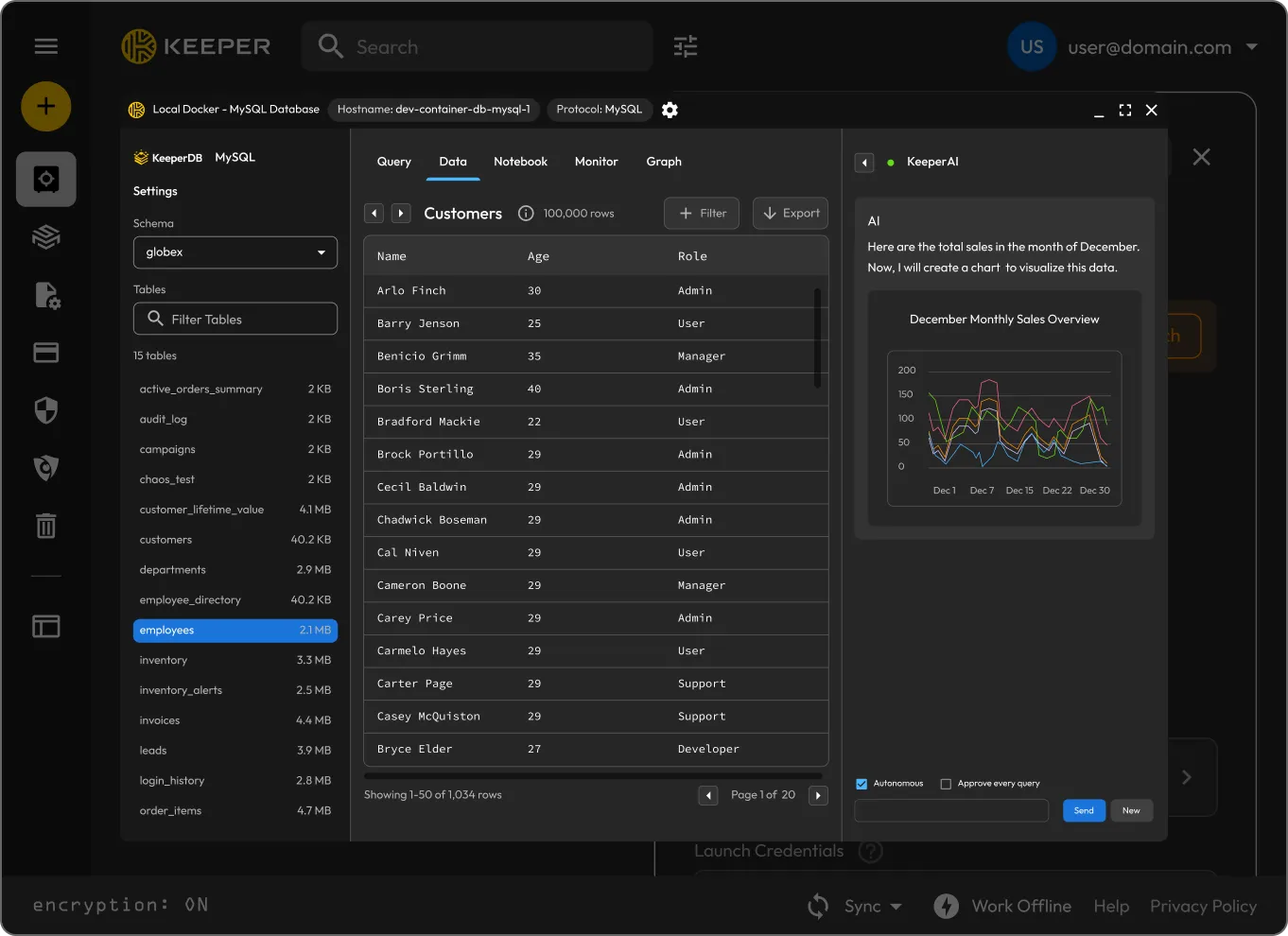
KeeperDB desktop app showing a query editor and results

What makes Keeper the best DBeaver alternative?

Keeper = Super Secure
DBeaver
Product purpose

KeeperDB is a multi-protocol database client built on Keeper's zero-knowledge management platform. It supports PostgreSQL, MySQL/MariaDB, SQL Server, Oracle, Amazon Redshift and SQLite from a single interface, with a query editor, data grid, ER diagrams, a scratchpad notebook and a real-time performance monitor.

It ships in two ways: as a standalone desktop app for Mac, Windows and Linux, and as an integrated experience within KeeperPAM, where sessions launch from a vault record and run through Remote Browser Isolation. The standalone app is a full database client in its own right and stands up to legacy tools. The embedded mode adds privileged session recording, KeeperAI threat detection, event logging and Just-In-Time (JIT) access. Both forms share the same interface, feature set and core database capabilities.

DBeaver is a universal database management tool for developers, DBAs and analysts. It includes a SQL editor, data editor, schema editor, ER diagrams, data export and migration, execution plans and AI-assisted query completion, with support for more than 100 databases through JDBC and ODBC drivers.

It's built for working with data, such as exploring, querying, visualizing and administering databases across many platforms.

Credential handling

KeeperDB handles credentials differently depending on how it runs. In the standalone desktop app, the user authenticates with Face ID or Windows Hello, and connections pull credentials directly from Keeper Secrets Manager, so passwords aren't typed or copied into the client. When KeeperDB runs through the vault or the KeeperDB Proxy, connections are fully passwordless: the user launches a session from a vault record, the credential is handled within Keeper's zero-knowledge, zero-trust environment, and the session runs inside Keeper Remote Browser Isolation, so nothing touches the local machine.

The vault and Proxy paths remove the most common database attack vector: credentials sitting in local configuration files, environment variables or shared connection strings.

By default, DBeaver stores connection credentials in a local credentials-config.json file. DBeaver's own documentation notes that this file is encrypted with a key publicly available in the DBeaver source code, meaning a third party can decrypt it with external software.

Paid editions add a Master Password option for stronger local encryption tied to the user's device. Credentials still reside locally and, by design, can't be shared securely across a team when the Master Password is enabled.

Session recording and audit

When KeeperDB runs in the vault, it records every database session in full, with central management in the vault. Every query, every action, every session is captured as immutable audit evidence. These recordings can be used for monitoring, investigation and compliance in regulated sectors. KeeperAI also includes encrypted activity summaries, making auditing much easier.

Because recording is built into the vault access path, it is automatically applied to every session once KeeperDB is deployed through KeeperPAM, with no per-session setting for an administrator to toggle. The standalone desktop app is a working client and does not record sessions on its own; teams that need full recording route KeeperDB through the vault or connect an existing client through the KeeperDB Proxy.

DBeaver Community Edition does not record sessions. Team Edition and CloudBeaver Enterprise add audit logging, which provides a timestamped record of user activity across authentication, connections, SQL operations and configuration changes.

Audit logging is disabled by default and must be enabled by an administrator. It captures events rather than full visual session recordings.

Access governance

When deployed through the vault, KeeperDB access is governed by the same centralized policy engine as the rest of KeeperPAM. Database access is scoped to user and role identity, granted JIT and tied to the organization's broader privileged access controls. The same vault that manages passwords, secrets and privileged sessions also governs who can reach which database.

This means database access isn't a separate silo with its own permissions model. It inherits the identity governance, Role-Based Access Controls (RBAC) and approval workflows already in place across the platform.

DBeaver Community Edition is single-user, meaning connections and credentials are stored locally per user and can't be centrally governed. DBeaver Team Edition adds a client-server model with role-based access control, centralized user management and SSO/LDAP integration.

Team Edition's roles (Administrator, Developer, Manager) govern access to DBeaver's own features and connections. These roles operate within DBeaver rather than as part of a broader identity security platform that spans credentials, secrets and privileged sessions.

Deployment and access model

The standalone desktop app runs natively on Mac, Windows and Linux for teams that want desktop performance and a tool that beats legacy clients on its own. It authenticates with Face ID or Windows Hello, integrates directly with Keeper Secrets Manager for vault-credential retrieval, ships a modern UI and includes a built-in AI agent that can run on the customer's preferred LLM. It can connect directly with credentials in an OS-native secure store, through Keeper Tunnels or through the KeeperDB Proxy, which fetches credentials Gateway-side so the user never sees or types them.

The embedded mode launches from the Keeper Vault in a browser through Remote Browser Isolation. No VPN or local setup is required, and the database connection never reaches the user's machine directly. This configuration is for regulated, zero-trust environments and adds session recording, governance and JIT access while using the same client.

DBeaver is primarily a desktop application that runs on Windows, macOS and Linux and requires a local install. Connections are configured and stored on the local machine.

CloudBeaver and Team Edition offer a browser-based version with a client-server architecture for teams that want web access. Direct database connectivity from the user's environment remains the core model, making DBeaver flexible for data work and placing credential and session security on the user rather than a central platform.

Built-in AI assistance

KeeperAI is built into KeeperDB with full schema context. It answers natural language questions, writes and runs queries autonomously, generates charts from live result sets, explores existing SQL and triages performance issues from the monitor. Read-only queries run automatically; any write commands surface a confirmation modal, so the user is always the approver. Server-side guardrails keep it scoped to database work and block off-topic code generation, even under prompt injection.

Administrators can pin KeeperAI to their own Azure OpenAI, AWS Bedrock or Vertex AI endpoint, so prompts and schema never leave their network. When KeeperDB runs in the vault, every AI-executed statement is recorded in the session the same way a human-typed query is.

DBeaver includes AI-assisted SQL completion and code generation through OpenAI and GitHub Copilot, and the PRO editions add an AI Chat that returns structured results and can run DBeaver tools from the chat.

The AI assistant connects to third-party model providers. AI activity in DBeaver isn't tied to a recorded, centrally audited privileged session the way KeeperAI's actions are when KeeperDB runs in the vault.

Database coverage and data tooling

KeeperDB covers PostgreSQL, MySQL/MariaDB, SQL Server, Oracle, Redshift and SQLite with native drivers, without requiring an ODBC or JDBC Bridge. The interface includes a query editor with multi-statement execution, an editable data grid with CSV/JSON/SQL export, ER diagrams and a notebook scratchpad.

Its performance monitor is built in: active process list, blocking chains, lock analysis and one-click session termination across all supported engines except SQLite.

DBeaver supports more than 100 database types through JDBC and ODBC drivers. Its toolkit includes visual query building, schema and data comparison, cross-database data migration, execution plan analysis and spatial data viewing.

For complex data engineering, such as large-scale database migrations, multi-database schema design, and advanced analytics across multiple platforms, DBeaver's breadth and depth are real strengths. KeeperDB's own documentation notes that some teams may keep using tools like DBeaver for advanced workflows while routing them through the KeeperDB Proxy for credential protection and session recording.

Keeper vs DBeaver: User rating and reviews

Keeper = Super Secure
DBeaver
iOS App Store

iOS App Store

4.9 out of 5 and 226K Reviews

4.9 out of 5 and 226K Reviews

No dedicated app

Mac App Store

Mac App Store

4.8 out of 5 and 225K Reviews

4.8 out of 5 and 225K Reviews

No dedicated app

Microsoft Store

Microsoft Store

4.9 out of 5 and 1.46K Reviews

4.9 out of 5 and 1.46K Reviews

No dedicated app

Chrome Extension

Chrome Extension

4.8 out of 5 and 8.5K Reviews

4.8 out of 5 and 8.5K Reviews

No dedicated app

Android

Android

4.7 out of 5 and 110K Reviews

4.7 out of 5 and 110K Reviews

No dedicated app

*Data as of June 3, 2026

Ready to bring database access into the vault?

See how KeeperDB delivers passwordless, fully audited database access governed by the same zero-trust controls that protect the rest of your privileged access environment.

Frequently asked questions

Is KeeperDB a replacement for DBeaver?

KeeperDB can replace DBeaver for day-to-day database access, querying and troubleshooting. The free standalone desktop app is a complete working client on its own, and the vault adds auditing and access control where security and compliance require it. DBeaver remains a strong choice for advanced data engineering workflows like complex schema design, ER diagramming and large-scale data migration. The two aren't mutually exclusive: Teams can route DBeaver connections through the KeeperDB Proxy to keep DBeaver's interface while gaining Keeper's credential protection and session recording.

How does DBeaver store database credentials?

By default, DBeaver stores credentials locally in a credentials-config.json file. DBeaver's own documentation notes that this file is encrypted with a key that is publicly available in the DBeaver source code, meaning it can be decrypted by third parties using external software. Paid editions add a Master Password option for stronger local encryption, but credentials still live on the user's device. KeeperDB retrieves credentials from Keeper Secrets Manager rather than storing them in a decryptable local file. When run through the vault or KeeperDB Proxy, the user never sees or types a credential at all.

Does DBeaver record database sessions?

DBeaver Community Edition does not record sessions. DBeaver Team Edition and CloudBeaver Enterprise offer audit logging that captures user activity, but it's off by default and is event logging rather than full visual session recording. When KeeperDB runs in the vault, it records every database session in full and stores those recordings as immutable audit evidence. Recording is automatically applied to every connection.

What databases does KeeperDB support?

KeeperDB supports MySQL, PostgreSQL, Oracle and Microsoft SQL Server, with a consistent interface and policy model across all connections.

Why use KeeperDB instead of a traditional database client?

KeeperDB is a modern, multi-protocol client that stands on its own against legacy tools, with Face ID / Windows Hello authentication, direct Keeper Secrets Manager integration and a built-in AI co-pilot. Run it in the vault, and it goes further than any traditional client: passwordless access, centralized policy enforcement and full session recording that turns database access into a fully auditable process. For organizations in regulated industries, or for teams that need to demonstrate who accessed what data and when, governance is the deciding factor.

What is the best DBeaver alternative with AI?

The right alternative depends on what you're looking for. If your priority is AI-assisted database administration, KeeperDB combines a full-featured database client with an embedded AI co-pilot that can answer questions, generate and explain SQL, create charts from live data and help troubleshoot performance issues. Unlike traditional database clients, KeeperDB can also run within KeeperPAM, where database access becomes passwordless, recorded and governed by centralized access controls.

What is KeeperAI in KeeperDB?

KeeperAI is an embedded DBA co-pilot with full schema context. It answers natural-language questions, writes and runs queries, generates charts from live data, explains existing SQL and triages performance issues from the monitor. Read-only queries run automatically, while any write requires explicit user confirmation and server-side guardrails keep it scoped to database work. When KeeperDB runs in the vault, every AI action is captured in the recorded session, and administrators can point KeeperAI at their own Azure OpenAI, AWS Bedrock or Vertex AI endpoint so prompts and schema never leave their network. Learn more in our article: What Is KeeperAI?.

Withdraw Cookie ConsentWe value your privacy

We use cookies on our site to give you the best browsing experience, serve personalized ads about our products and content, and analyze website traffic. To learn more, please refer to our Privacy Policy.

Sign up for a Free Trial

Buy Now