Keeper vs 1Password:
Which is better?

Explore the ultimate comparison between Keeper and 1Password. Discover which password manager wins on security, features and usability. Get the insights you need to choose the right protection for your workforce, devices and data.

Bereits ab
 
 
pro Benutzer/Monat *zzgl MwSt *Includes GST
Für Privatpersonen

Bonus! Enthält ein Kostenloses Family-Abonnement für jedes Teammitglied.
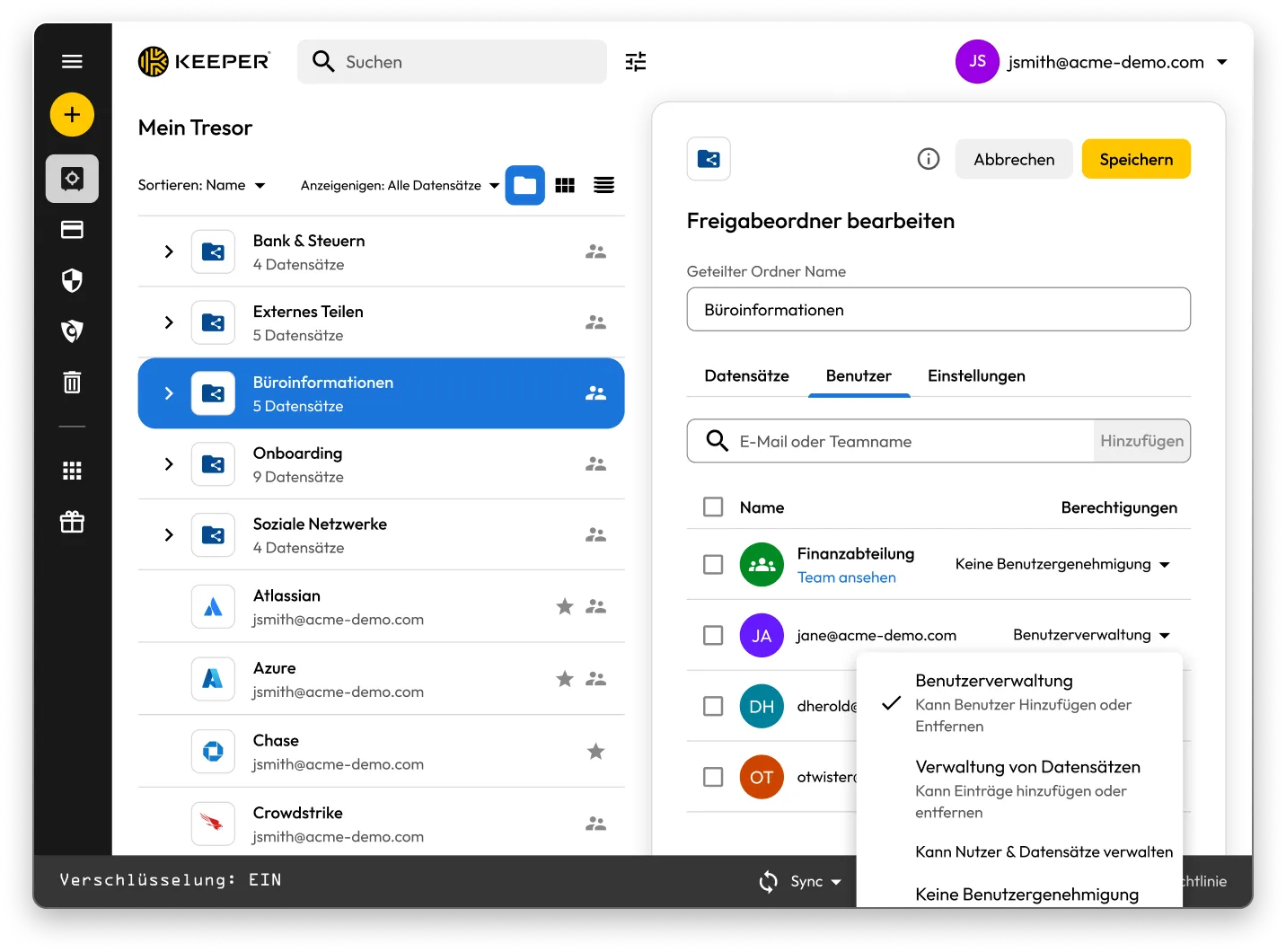
Keeper Vault interface showing shared folders and records. The “Edit Shared Folder” panel for “Office Information” is open, displaying user permissions with options to manage users, manage records, or assign no permissions.

Sicherheitsmodell

Keeper's security model is built on proven enterprise standards with advanced threat protection capabilities that go far beyond a traditional password management solution. Keeper is a modern, comprehensive and agentic AI-enabled Privileged Access Management (PAM) platform, with password management being just one component of the platform.

Keeper
1Password
Authentication and access control

Advanced multi-layered authentication with a master password and device verification — an attack-resistant design that simplifies the user experience while enhancing security.

Traditional dual-factor approach (account password + secret key) that may create complexity and potential access issues for users.

Single Sign-On (SSO) integration

Keeper is the innovator in SSO integration, with patent-protected SSO technology and enterprise production experience since 2016, supporting complex multi-provider configurations and seamless integration.

1Password's recently launched SSO capability offers only basic functionality, requiring additional software installations. It is limited to single identity provider configurations, with no support for advanced configurations or nodes.

SCIM-Bereitstellung

Keeper supports direct SCIM provisioning with any identity provider without requiring any software installation. Automated SCIM provisioning ensures that every user in your organization is protected, and Just-In-Time (JIT) access eliminates standing privileges.

1Password requires the installation of a self-hosted “SCIM Bridge” in either an on-prem or cloud environment.

Memory protection and security

Keeper Forcefield technology provides comprehensive user-land and kernel-land protection against sophisticated memory-based attacks that target password managers.

Provides only basic memory protection, leaving users vulnerable to advanced malware techniques.

Encryption technology

Keeper's unique “Transmission Security,” which uses TLS 1.3/1.2 encryption, plus an additional 256-bit AES transmission key, provides full protection for all data communications, not just authentication. Keeper's approach also includes Hardware Security Module (HSM) integration in the AWS cloud for super-encryption.

1Password's SRP encryption focuses solely on authentication, leaving critical security gaps in data communication.

Record and folder-level encryption

Each record and folder stored in Keeper is encrypted using AES-256 technology with its own unique key, and all encryption and decryption is done locally on the user's device. Each record-level key is wrapped with an additional key if it is contained within a Shared Folder. This multi-layered encryption model provides the most granular level of protection for your data.

1Password enrypts data at the vault level only. It does not encrypt each individual record and folder with a different AES-256 key.

Darknet-Überwachung

Operates a fully self-managed BreachWatch® service that runs entirely within the Keeper infrastructure, using a proprietary HSM-protected architecture that prevents correlation between breached and vault passwords.

1Password relies solely on an external third-party service, Have I Been Pwned, for monitoring, which requires transmission of customer data outside of its controlled infrastructure.

Compliance and certifications

Comprehensive, highly regulated government and enterprise certifications include being FedRAMP Authorized, along with broader security certifications (ISO 27001/17/18, FIPS 140-3 validation) and the longest-standing SOC 2 Type 2 certification.

1Password retains no FIPS module or government authorizations (FedRAMP or GovRAMP), limiting market access in regulated industries and government sectors.

*Data as October 27, 2025

Feature set

Keeper Security sets itself apart from 1Password by offering a comprehensive PAM platform that extends far beyond password management and surpasses 1Password's capabilities for all advanced enterprise requirements. KeeperPAM® combines enterprise password management, secrets management, connection management, zero-trust network access and remote browser isolation in one easy-to-use interface.

Keeper
1Password
PAM platform architecture

Keeper's full-featured PAM platform includes secrets management with automated credential rotation, privileged session recording across multiple protocols, automatic discovery of privileged accounts and JIT access with ephemeral accounts, integrated into one cloud-native, zero-knowledge platform.

1Password is a standalone password management solution that lacks comprehensive privileged access management capabilities. It offers a limited “Extended Access Management" platform for device management, with other features in beta.

Remote-Browser-Isolation

Keeper's Remote Browser Isolation (RBI) technology creates isolated browser sessions for accessing internal or cloud applications, protecting against data exfiltration and eliminating the need for VPNs or separate zero-trust network access solutions.

1Password does not offer Remote Browser Isolation.

JIT access and zero standing privileges

Keeper provides time-limited access to resources with automatic privilege revocation upon session termination. With Keeper's Endpoint Privilege Manager, IT teams can enforce JIT access, remove standing privileges and grant time-limited admin rights directly on user endpoints.

1Password does not provide JIT or zero-standing privilege capabilities or any capability to enforce least privilege on user devices.

Developer and DevOps capabilities

Keeper Secrets Manager is fully cloud-based and natively integrated into the Keeper platform, providing seamless CLI integration, REST APIs, Terraform support, CI/CD pipeline security and native database tools without requiring any on-premises infrastructure.

1Password offers only basic developer features, requiring additional infrastructure components and manual setup. 1Password Secrets Automation, based on its acquisition of SecretHub, requires users to install a “Connect Server” in their environment.

Access controls and permissions

Keeper provides over 80 distinct vault and role-level permissions over 14 categories. Keeper's highly granular permission system, with extensive policy controls paired with clear audit trails, is thoughtfully designed for true enterprise governance and compliance.

1Password has just 13 vault-based permissions with limited granularity for enterprise access control.

Guest access (advanced user management)

Keeper provides enterprise-grade external access through its node-based (tenant structure) organizational architecture, allowing isolation between different organizational units and support for multiple identity providers within the same tenant.

1Password has no concept of node structure, organizational units or support for multiple identity providers. Instead, it offers a "guest account" to control external user access, which is limited to a single vault without time controls or automated security measures.

Advanced sharing

Keeper's sharing features include time-limited access to records and folders with automatic credential rotation, bidirectional one-time sharing (to users and non-users) with real-time sync and advanced vendor access controls.

1Password requires users to create separate vaults for sharing password sets, creating unsynchronized copies of records rather than maintaining a real-time sync with the original data.

Managed Service Provider (MSP) platform

Keeper offers a mature (launched in 2019) and comprehensive MSP platform combining password management with full PAM capabilities and advanced automation, all within a unified multi-tenant platform.

1Password recently launched an MSP offering focused solely on password management, without PAM features.

Kontowiederherstellung

Keeper provides enterprise customers with multiple account recovery and transfer pathways that maintain zero-knowledge security, including Enterprise SSO Recovery, Account Transfer Policy, a 24-word recovery phrase for users who authenticate with a master password, share admin privileges and Commander CLI automation.

1Password offers no capability to directly transfer entire vaults between user accounts; instead, it relies on manual processes that depend on departing employee cooperation.

*Data as October 27, 2025

Usability and customer ratings

Keeper is fanatical about creating solutions that are as user-friendly as they are secure, and its modern, intuitive interface extends across each of its platforms. Keeper provides desktop applications for Windows, macOS and Linux devices, in addition to a web-based vault and browser extension for both password management and privileged access management. Native mobile apps for iOS and Android provide feature parity and hold the highest ratings in the category across all app stores.

Keeper
1Password
Organizational scalability

Keeper has a purpose-built scalability architecture that addresses the unique needs of all organization types, from small offices to government agencies with specialized compliance requirements.

1Password appears to take a one-size-fits-all approach, without specific adaptations for different market segments or compliance requirements.

Einfache nutzung

Keeper's browser extension provides biometric login using FIDO2 passkeys without the need for a companion desktop application.

Requires installation of the 1Password desktop application for biometric login.

User ratings and reviews

Keeper receives consistently high ratings across all platforms, with significantly larger review volumes indicating broader user adoption and satisfaction.

1Password has lower review volumes and notably lower ratings on the Chrome extension (3.0/5) and Android (3.9/5).

*Data as October 27, 2025

Keeper und 1Password im vergleich: Nutzerbewertungen und rezension

Keeper
1Password
iOS App Store

iOS App Store

4.9 out of 5 and 213,000 Reviews

4.9 out of 5 and 213,000 Reviews

4.6 out of 5 and 18,200 Reviews

4.6 out of 5 and 18,200 Reviews

App aus dem Microsoft Store

App aus dem Microsoft Store

4.9 out of 5 and 1,340 Reviews

4.9 out of 5 and 1,340 Reviews

4.1 out of 5 and 132 Reviews

4.1 out of 5 and 132 Reviews

Chrome Extension

Chrome Extension

4.8 out of 5 and 8,400 Reviews

4.8 out of 5 and 8,400 Reviews

3.0 out of 5 and 2,500 Reviews

3.0 out of 5 and 2,500 Reviews

Android

Android

4.5 out of 5 and 8,400 Reviews

4.5 out of 5 and 8,400 Reviews

3.9 out of 5 and 15,000 Reviews

3.9 out of 5 and 15,000 Reviews

*Data as October 27, 2025

Nutzen sie 1Password? Wechseln sie ganz leicht zu Keeper!

Das Verschieben Ihrer Passwörter von 1Password zu Keeper ist einfach und sicher. Ihre in 1Password gespeicherten Informationen, einschließlich Passwörter, Ordner, Unterordner, benutzerdefinierte Felder, TOTP-Codes, Notizen und Konten, werden mit nur wenigen Klicks zu Keeper migriert.

Häufig gestellte fragen

Wie kann ich Passwörter von 1Password in Keeper importieren?

Sie können Passwörter von 1Password in Keeper Security mit diesen einfachen Schritten importieren:

  • Melden Sie sich bei Ihrem 1Password-Konto an
  • Wählen Sie den Tresor oder das Abonnement aus, das Sie möchten
  • Exportieren Sie die Daten
  • Melden Sie sich in der Web- oder Desktop-App bei Keeper an
  • Klicken Sie auf Ihr Kontosymbol > Einstellungen > Importieren
  • Wählen Sie 1Password aus der Liste und ziehen Sie die exportierte Datei in das Fenster "Datei ablegen".

Erfahren Sie mehr über den Import von 1Password mit dieser gerätespezifischen Schritt-für-Schritt-Anleitung.

Wie kündige ich 1Password?

Befolgen Sie diese drei Schritte, wenn Sie 1Password nicht mehr verwenden und löschen wollen:

  • Melden Sie sich bei Ihrem 1Password-Konto an.
  • Wählen Sie in der oberen rechten Ecke Ihren Namen aus und klicken Sie auf Mein Profil.
  • Wählen Sie unten auf der Seite Konto endgültig löschen aus.

Denken Sie daran, Ihre Anmeldeinformationen zu exportieren und in die von Ihnen gewählte 1Password-Alternative zu importieren, bevor Sie Ihr Konto schließen.

Keeper is a comprehensive PAM platform. Does that mean it's only meant for large enterprises?

No. While Keeper offers comprehensive PAM capabilities that serve enterprise needs, it's designed to scale from individual users to large organizations.

Keeper Business provides smaller organizations with a streamlined, easy-to-use credential management solution without compromising security.

Keeper also offers personal plans for individual password management and secure file storage, as well as family plans for shared password management across household members.

The platform's flexible architecture allows users to start with basic password management and scale up to enterprise-grade PAM features as their needs grow. This means individuals can benefit from the same security foundation that powers Keeper's business solutions, while organizations can access sophisticated privileged access controls when needed.

1Password Family vs. Keeper Family Paket: Was ist der Unterschied?

Keeper Family ermöglicht es Ihnen, unbegrenzt Passwörter für Haushalte zu sichern und zu teilen, mit fünf privaten Tresoren, 10 GB Dateispeicher, unbegrenzten Geräten, Notfall-Zugang und 24/7-Support. Keeper Family kostet nur 7,08 $ pro Monat.

1Password ermöglicht es Familien auch, Passwörter sicher zu speichern, Daten zu exportieren und Passwörter zu teilen, erfordert jedoch die Erstellung mehrerer Tresore für die gemeinsame Nutzung. Keeper ermöglicht das Teilen von einzelnen Datensätzen und Ordnern. 1Password verfügt über nur 1 GB Dokumentenspeicher, während Keeper über 10 GB Speicherplatz verfügt.

close
Jetzt kaufen