Keeper vs KeePass: Comparing password managers

Keeper provides stronger security, centralized administration and a broader set of capabilities across password management, privileged access, endpoints, secrets and connections, making it a more comprehensive platform than KeePass's standalone desktop app.

Iniziando da soli
 
 
per utente/mese *zzgl MwSt *Includes GST

Bonus! Include un Piano Family Gratuito per ogni membro del team.
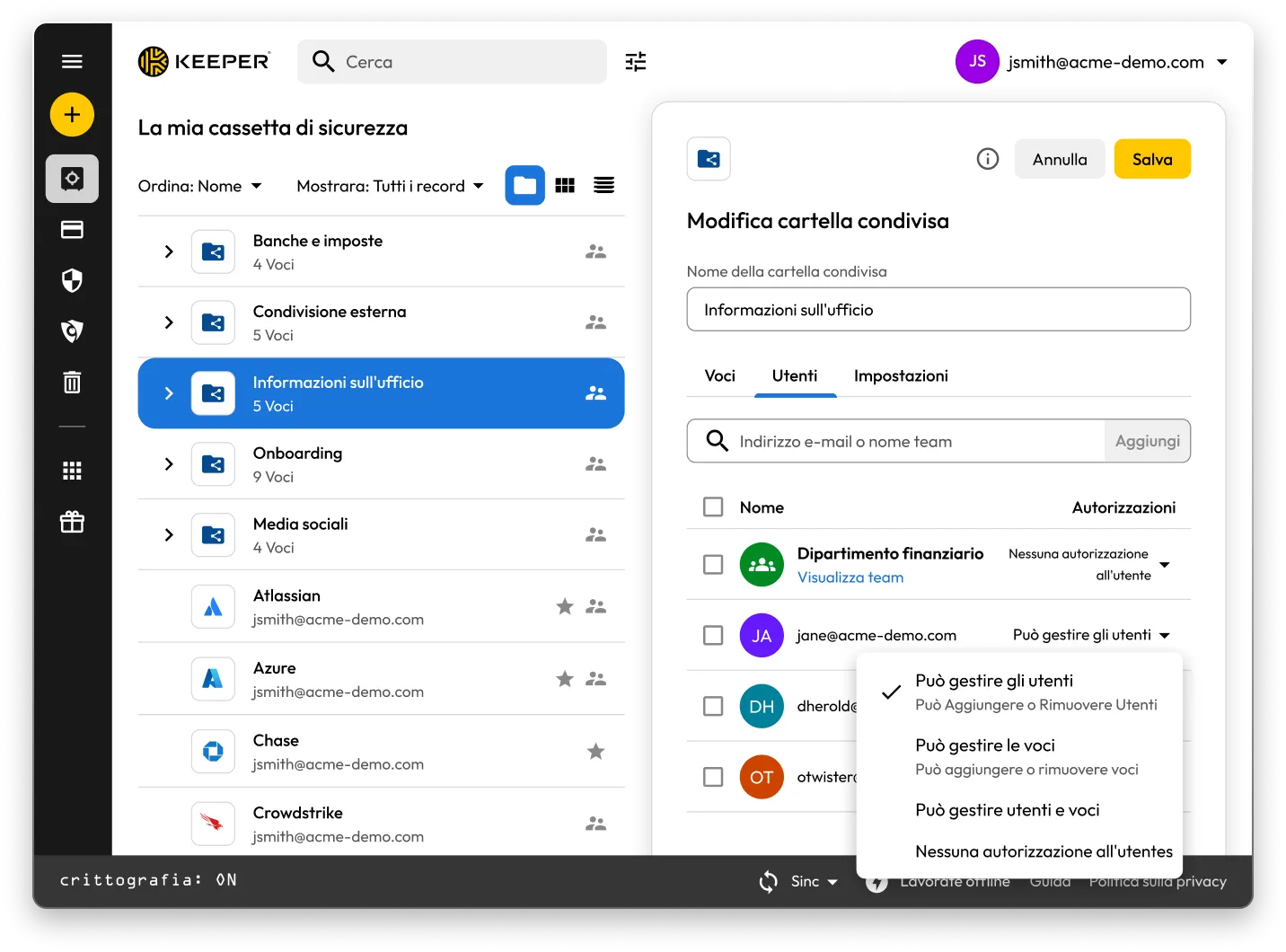
Keeper vault interface displaying the 'Edit Shared Folder' panel for a folder named Office Information. The screen shows user access management with a list of team members and permission settings, including options such as manage users, manage records and no access, illustrating how shared folder permissions are configured.

Keeper vs KeePass: Which password manager is right for you?

Keeper
KeePass
Architettura zero-knowledge

Keeper® is built with a zero-knowledge security architecture, meaning all encryption and decryption is done locally on the user's device. Each record is encrypted at the record level using AES-256, with unique record keys generated randomly on the client-side.

KeePass is a local password database application: Your vault is a database file that you store and protect (and optionally sync using a method you choose). The database is encrypted as a whole, and your overall security depends heavily on how you store, sync, back up and govern that file.

Security infrastructure and compliance posture

Keeper maintains long-standing SOC 2 Type II and ISO 27001 compliance, along with TRUSTe certification, demonstrating that strict security controls are in place to protect customer data and ensure the secure operation of its products and services.

Keeper Security Government Cloud (KSGC) is FedRAMP and GovRAMP High Authorized, supporting public sector environments that require rigorous controls and auditability.

KeePass is a standalone, open-source application rather than a vendor-operated enterprise service, so it typically does not provide organization-level audit reports such as SOC 2 Type II reports or ISO/IEC 27001 certification as a hosted service would. Instead, KeePass points to its security design and third-party technical reviews.

Archiviazione e sicurezza in un unico posto

Keeper stores more than just passwords in one place, using a proprietary zero-knowledge security architecture to protect employees' information while keeping it accessible across devices. In addition to passwords and credentials, Keeper supports storing secure files and attachments, as well as structured record types such as logins, payment cards, bank accounts and more.

For IT and security teams, Keeper also supports storing and managing infrastructure secrets such as API keys, database credentials, access keys and certificates, and enables passwordless, zero-trust database access workflows through KeeperDB.

KeePass stores your vault as an encrypted database file that you manage. To access passwords from another device, you typically place the KeePass database in a synced location such as Dropbox, OneDrive, Google Drive or a network share, and you're responsible for securing that storage, managing access controls and handling sync/versioning conflicts.

Console di amministrazione

Keeper offers a comprehensive administrative console so organizations have visibility into and control over how employees store, share and access sensitive information across the Keeper platform, not just passwords. Admins can enforce security policies, manage users and teams and review reporting for governance and compliance.

Delegated admin rights can be extended to department leads to oversee access and privileges within their scope.

KeePass doesn't offer an administrative console or a vendor-operated centralized management service for enforcing policies, delegated administration or organization-wide reporting. Administrative controls typically depend on third-party tools and internal processes used to secure and govern the KeePass database file.

AI-powered threat detection

Keeper includes KeeperAI, which delivers agentic, real-time threat detection for privileged access sessions in KeeperPAM®. KeeperAI monitors and analyzes activity at the gateway level (as commands are entered) and generates an encrypted session summary for review, helping security teams detect and respond to suspicious behavior during high-risk sessions.

KeePass does not include a built-in, vendor-delivered AI layer for privileged session monitoring or automated response.

Any comparable AI-driven capabilities would require external tools outside of KeePass and would not be provided as part of the KeePass application itself.

Gestione dei privilegi degli endpoint

Keeper offers Keeper Endpoint Privilege Manager to help organizations enforce least-privilege controls on user endpoints by reducing standing admin rights and controlling privilege elevation based on policy.

This helps limit the impact of malware and prevents users from running unauthorized applications with elevated privileges, all while keeping administration centralized.

KeePass does not provide endpoint privilege management or privilege elevation controls.

Condivisione delle voci

Keeper offers robust sharing so you can securely share records and shared folders with users and teams using granular permission controls. Keeper also provides enterprise governance features to help admins manage and oversee sharing across the organization.

For external collaboration, users can leverage Keeper's One-Time Share to provide time-limited, encrypted access to a record without requiring recipients to have a Keeper account. For privileged access use cases, Keeper supports PAM resource sharing, allowing teams to grant access to a zero-trust privileged session without exposing the underlying credentials.

KeePass does not natively provide modern, granular sharing controls. Teams typically “share” by placing a KeePass database file on shared storage and giving multiple users access using the same master password and/or key file, which shifts governance to file permissions and internal processes rather than built-in sharing controls.

Supporto multipiattaforma

Keeper works across all major mobile devices and Operating Systems (OS), with native apps, browser extensions and a web vault experience designed to keep your vault available across devices.

KeePass does not have any native mobile apps. Therefore, its mobile installations come from third parties rather than directly from KeePass.

KeePass does not offer an official mobile app from the KeePass project. To use KeePass on mobile, users typically rely on third-party apps that support KeePass database formats, and the feature set and user experience can vary by client.

Syncing and cross-device access

Keeper syncs your encrypted vault in real time across your devices (mobile, desktop and browser), so changes you make in one place are instantly available everywhere.

Keeper also supports offline access (once enabled) so users can still access their vault when they're not connected.

KeePass does not provide a built-in cloud syncing service. To use KeePass across multiple devices, you typically store the KeePass database file in a cloud-synced folder or rely on specialized plugins/integrations, and then manage syncing behavior and potential conflicts through that storage layer.

User-friendly interface and functionality

Keeper has a sleek interface and a consistent user experience across supported platforms, helping teams adopt secure password, secrets and access workflows with less friction.

Because KeePass mobile usage typically relies on third-party clients, the experience and available features can vary depending on the specific app chosen.

Assistenza clienti Keeper Security

Keeper knows your questions matter and has support staff ready to help, giving you the option to speak to a person over the phone.

Keeper also offers product training and onboarding with any business plan subscription.

KeePass provides only self-service documentation and community forums for support.

*Data as of March 9, 2026

Keeper vs KeePass: User ratings and reviews

Keeper
KeePass
App Store iOS

App Store iOS

4,9 su 5 e 213.000 recensioni

4,9 su 5 e 213.000 recensioni

4.1 out of 5 and 50 Reviews

4.1 out of 5 and 50 Reviews

App su Microsoft Store

App su Microsoft Store

4,9 su 5 e 1.340 recensioni

4,9 su 5 e 1.340 recensioni

4.8 out of 5 and 95 Reviews

4.8 out of 5 and 95 Reviews

Estensione di Chrome

Estensione di Chrome

4,8 su 5 e 8.400 recensioni

4,8 su 5 e 8.400 recensioni

3.8 out of 5 and 33 Reviews

3.8 out of 5 and 33 Reviews

Android

Android

4,5 su 5 e 8.400 recensioni

4,5 su 5 e 8.400 recensioni

4.4 out of 5 and 36,100 Reviews

4.4 out of 5 and 36,100 Reviews

*Data as of March 9, 2026

Disclaimer: KeePass does not offer a single official mobile app from the KeePass project. Mobile reviews and ratings may reflect third-party KeePass-compatible apps, which are developed and maintained independently and may differ in features, design and support.

Already using KeePass? Migrate to Keeper easily.

Moving your passwords from KeePass to Keeper is simple and secure. Your information stored in KeePass, including passwords, folders, subfolders, notes and accounts, is migrated to Keeper with just a few clicks while maintaining full encryption.

Domande frequenti

Has Keeper ever been breached?

No, Keeper has never been hacked or breached. To learn more about how Keeper protects your data with zero-knowledge encryption and strict security controls, see Keeper's security model

.

What are the disadvantages of KeePass?

Common disadvantages, especially for teams and enterprises, come from the fact that KeePass is a file-based password database rather than a vendor-operated platform:

  • No centralized cloud admin console/policy enforcement: KeePass explicitly says a centralized internet server is out of scope, so admin control, policy enforcement and organization-wide reporting aren't native capabilities.
  • Sharing and governance are operationally hard: “Sharing” typically means multiple people accessing the same database file, which shifts access control to file permissions and internal processes.
  • Limited auditability/accountability model: There's no “user concept” like an enterprise platform has; anyone with the database key can access what's inside, making detailed per-user auditing difficult without external controls.
  • Mobile experience depends on third-party clients: The official KeePass site points to ports/third-party apps for mobile, so UX/features/support can vary by client.
  • Operational/security hygiene is on you: Where the database is stored, how it's synced, backups, endpoint hardening and configuration safety become the organization's responsibility. KeePass documentation also describes configuration and portability considerations that reinforce the need for careful administration.

Is KeePass still safe?

KeePass can be safe when used correctly. But its safety depends heavily on your setup and threat model:

  • Use a strong master password and modern key-derivation settings.
  • Keep KeePass updated and be cautious with plugins and portable configurations.
  • If you sync the database via cloud storage, the file is encrypted, but you still need strong access controls and good operational practices.

With Keeper, you don't have to manage a shared database file or rely on third-party clients; Keeper provides a centrally managed, zero-knowledge encrypted vault with official apps across platforms.

close
Acquista ora