Endpoint Privilege Manager

Enforce least privilege on every endpoint to prevent ransomware, data breaches and insider attacks.

Keeper eliminates standing access rights and enables Just-in-Time (JIT) access across all Windows, Linux and macOS endpoints, including the agentic AI running on them.

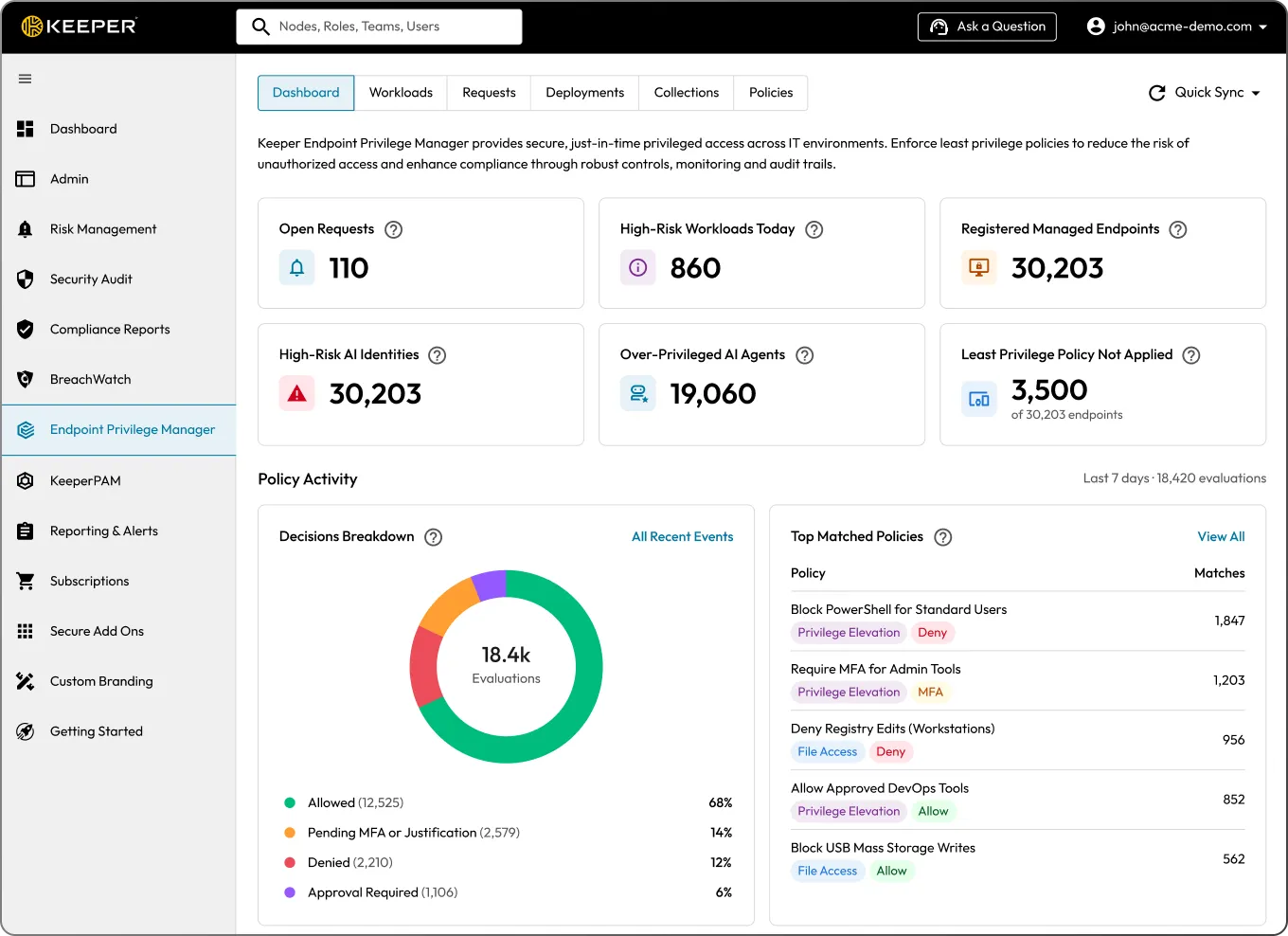
Keeper Endpoint Privilege Manager dashboard showing workload risk, AI identity risk and policy activity.

Simple to deploy and manage

Administrators simply deploy a lightweight agent that removes standing admin rights while enabling temporary, policy-based privilege elevation only when necessary. The system enforces customizable security policies through just-in-time access, with optional approval workflows and MFA enforcement.

Privilege elevations run through a Keeper-managed ephemeral account so end users never receive standing admin rights. Elevated access is granted only for the approved action and ends when that action completes. Keeper EPM supports Windows, macOS, and Linux, and the Keeper Admin Console provides a centralized dashboard with audit logging of elevation activity for compliance.

Agent deployment

A Keeper agent is installed on every managed endpoint. This agent intercepts and evaluates privilege elevation requests based on defined organizational policies.

Policy enforcement

Administrators define elevation policies using the Keeper Admin Console. Policies control what actions users can perform, what applications can run with elevated privileges, whether approvals or MFA are required and which AI agents are permitted to operate.

Ephemeral privileged access

Users are not granted permanent local admin rights. Instead, Keeper Endpoint Privilege Manager temporarily elevates privileges for specific actions using ephemeral, Keeper-controlled accounts.

Visibility and control

The Keeper Admin Console provides real-time visibility into all elevation activity, requests and policy applications including AI agent risk scores and agentic AI inventory, across all environments. Admins can review, approve or deny requests and view audit logs for compliance.

Control AI agents the same way you control users

Keeper Endpoint Privilege Manager governs AI agents with the same policy model used for human users. It identifies known agents by signature and scores unknown processes, so you decide which agents run, what they can do and when a human approves actions before execution.

Agentic AI policy

Controls whether an agent is permitted to run at all, blocking or holding unsanctioned agents before they take any action.

Agentic Access policy

Governs what a running agent can do on the user's behalf, including access to sensitive files, executables and commands.

Agentic Privilege Elevation policy

Governs elevation requests from a running agent, applying the same allow, deny, approval and MFA controls used for users.

Human-in-the-loop approval

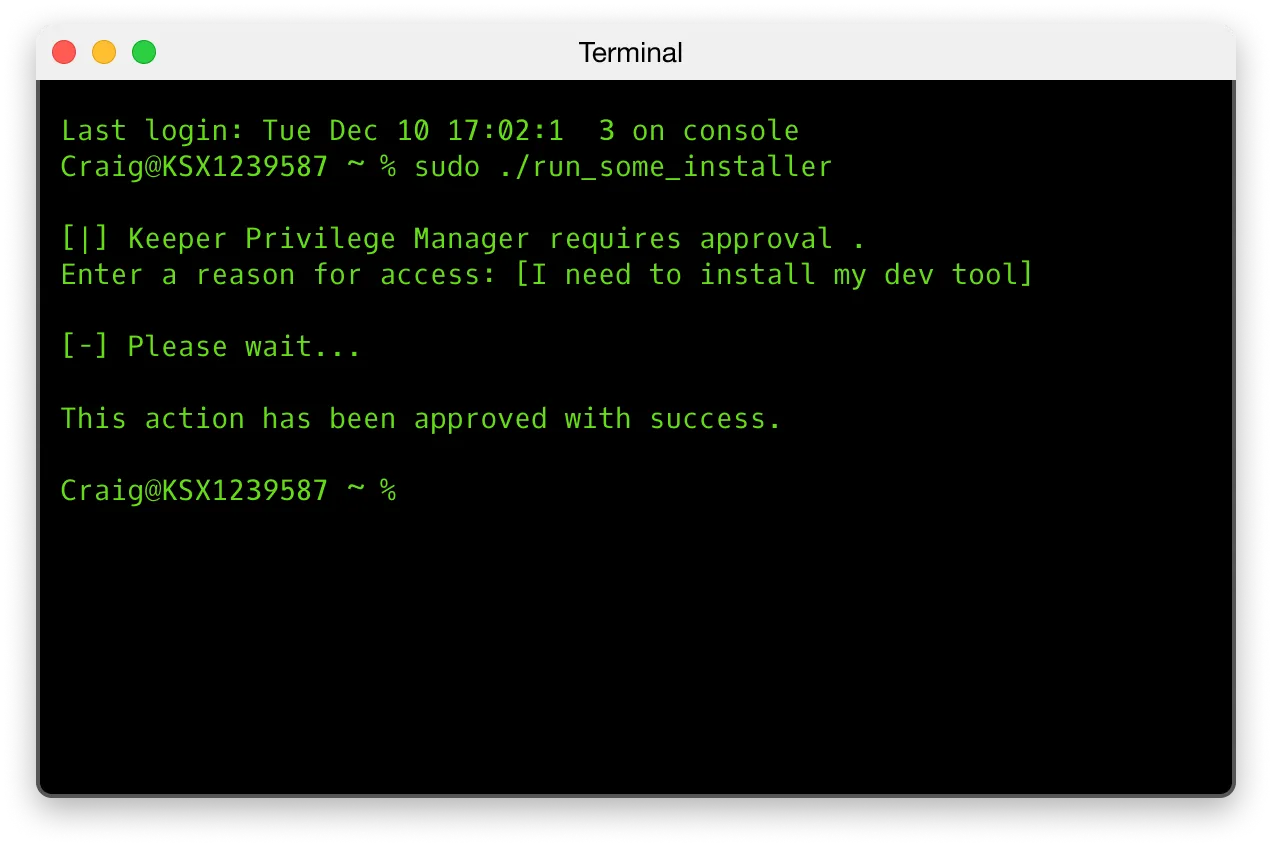
Prompts the end user on the endpoint or an administrator to approve or deny an agent's action in real time.

Full audit trail

Records every agent action (allowed, denied or held) against the policy baseline.

Elevation process

Users follow a simple elevation flow for applications or processes that require elevated permissions through the Keeper agent.

Policy

If an application or process requires elevation, the Keeper agent checks the relevant policy.

Approval

If approval is required, the request is routed to an admin via the Admin Console or Command Line Interface (CLI).

MFA option

If no approval is needed, the elevation proceeds automatically. MFA enforcement is optional as an additional step.

Cross-platform support

Consistent management is enforced across operating systems, with platform-specific implementations tailored for Windows, macOS and Linux.

  • Windows: Users are removed from the local Administrators group
  • macOS: Users are removed from sudo, with elevation enforced through a system extension
  • Linux: Users are removed from sudo, and the agent governs elevation through policy
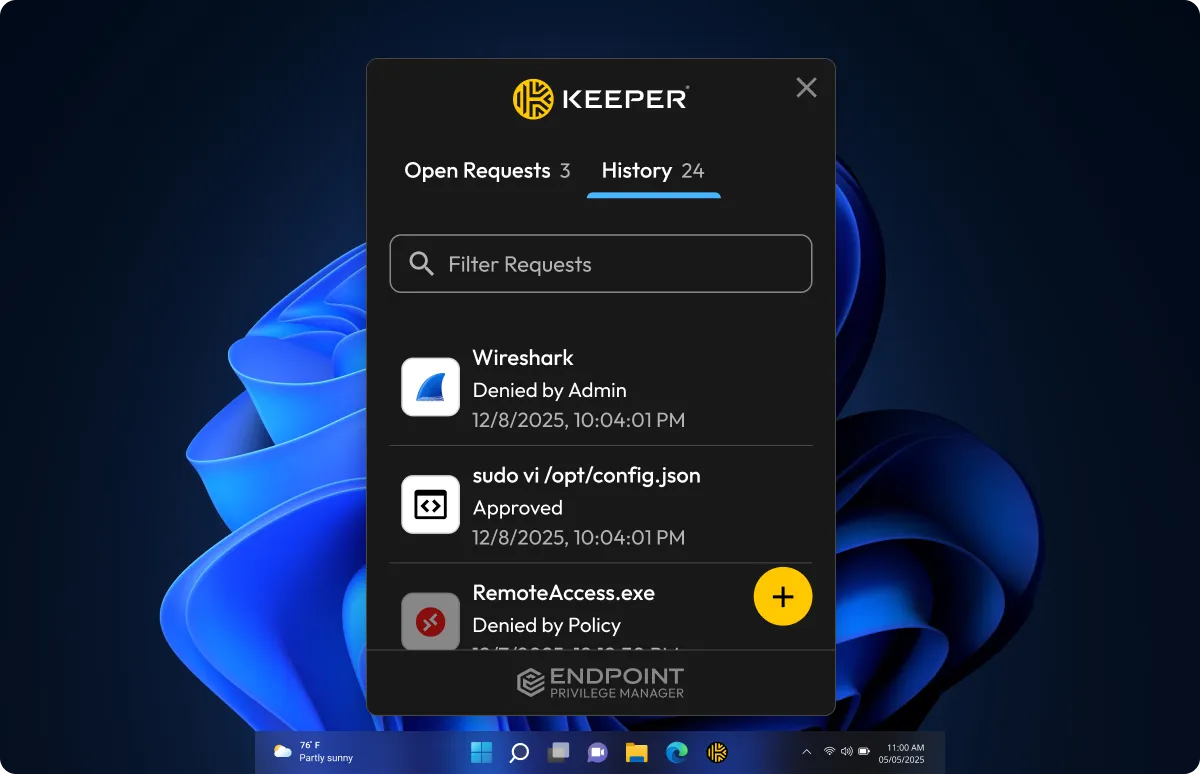
Keeper Endpoint Privilege Manager desktop app showing request history with approved and denied requests.
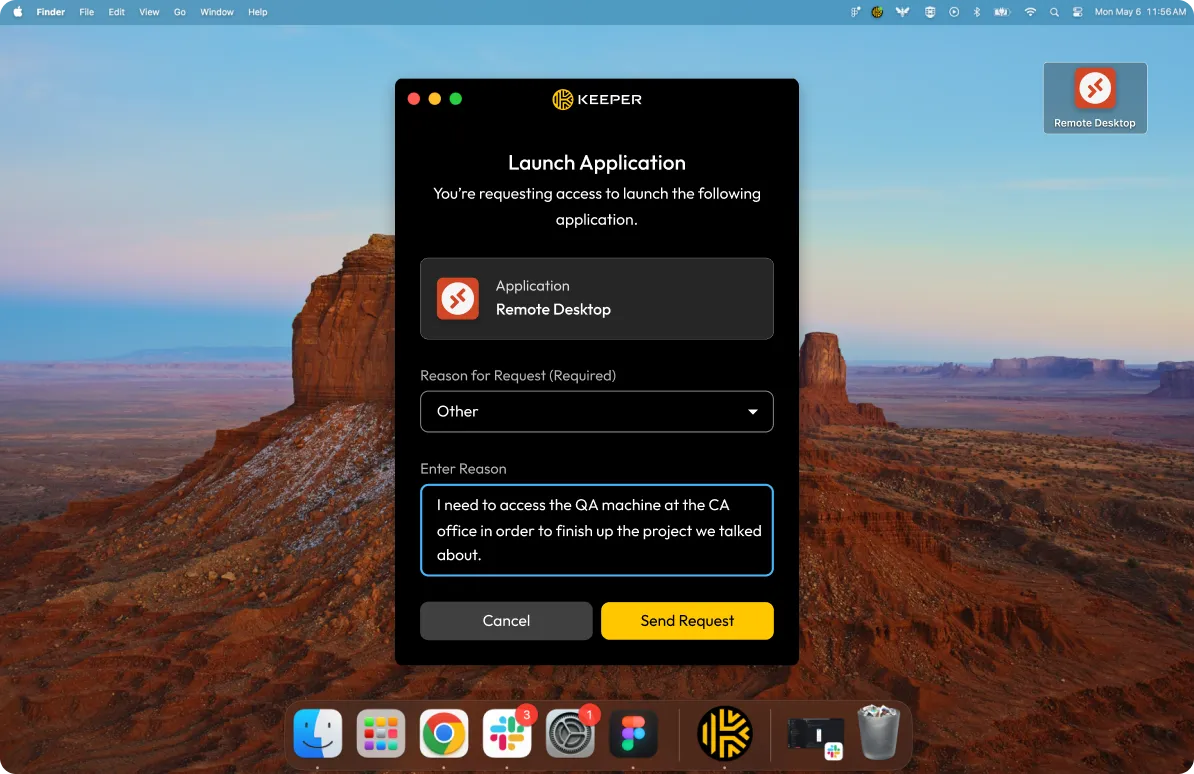
Keeper Endpoint Privilege Manager launch request for Remote Desktop on macOS with a required reason field.
Keeper Endpoint Privilege Manager terminal showing a sudo approval request and successful approval.

Zero-trust and zero-knowledge security

Information about end-user devices, applications and access requests is fully encrypted on the user's device and can only be decrypted by authorized administrators within the Keeper Admin Console. Keeper never has access to or visibility into customer data, end-user activity or application details – ensuring complete privacy and control always remain with our customers.

Essential features to secure all endpoints

Ephemeral accounts

Temporary, system-generated privileged accounts are created and managed to perform specific elevated tasks, then automatically removed to ensure zero standing privilege and minimize security risk.

Least privilege management

Restricts users and systems to only the minimum access rights necessary to perform their authorized tasks.

Agentic AI governance

Detects, monitors and controls AI agent activity on the endpoint. Governs whether agents can run, gates what they can do with elevated privileges and requires human approval before sensitive operations proceed.

Just-in-Time access

Provides users with temporary elevated privileges only when needed for specific authorized tasks, automatically revoking these rights once the task is completed or after a predetermined time period.

Flexible policy management

Allows administrators to create customized, context-aware rules for privilege elevation that adapt to different user roles, applications and security requirements across the organization.

Process-level privilege management

Detects, monitors and controls AI agent activity on the endpoint. Governs whether agents can run, gates what they can do with elevated privileges and requires human approval before sensitive operations proceed.
Security and scalability across every endpoint

Security

Eliminates standing admin rights and enables just-in-time elevation only for approved applications and agents, reducing the attack surface.

Compliance

Provides comprehensive audit trails of privilege usage and ensures adherence to regulatory requirements through documented administrative access control.

Operational efficiency

Reduces help desk workload by automating approvals for routine administrative tasks.

User experience

Allows users to complete necessary tasks without IT delays through automated privilege elevation for approved applications.

Scalability

Enables organizations to efficiently enforce least-privilege policies and manage privileged access across thousands of Windows, macOS and Linux endpoints from a centralized platform.

Auditability and visibility

Gives insight into elevation activity, approvals and endpoint policy enforcement with detailed logging and integration into SIEM tools for faster incident response.

Secure every endpoint with Endpoint Privilege Manager

Frequently asked questions

What is Keeper Endpoint Privilege Manager?

Keeper Endpoint Privilege Manager is a Privilege Elevation and Delegation Management (PEDM) solution that enforces least-privilege access policies across Windows, macOS and Linux endpoints. It provides just-in-time elevation for users and processes, eliminates standing local admin rights and governs AI agent activity on managed endpoints.

How does just-in-time access work in Keeper?

When approval is required, the user's access request is routed to a Keeper administrator and managed through the Admin Console or the Commander CLI. If no approval is needed based on the applied policy, the Keeper agent automatically allows the privilege elevation. If MFA is enforced, the user is prompted to complete MFA before proceeding. This flexible approach supports both interactive and policy-driven JIT access across devices.

What are the key features of Endpoint Privilege Manager?

Through agent-based deployment on Windows, macOS and Linux, Endpoint Privilege Manager eliminates standing local admin rights and introduces process-level controls through JIT access. Users operate without persistent admin privileges, with privileged commands executed through Keeper-managed ephemeral accounts, ensuring a true Zero Standing Privilege (ZSP) environment.

The centralized dashboard provides a clear view of all recent events, including those in monitoring mode and serves as the entry point for key workflows: Requests, Deployments, Collections, Policies and AI Agent Inventory.

How does Keeper EPM govern AI agents?

Keeper EPM uses three policy types to govern AI agents. Agentic AI controls whether a recognized agent can run, blocking it or requiring approval before it acts. Agentic Access governs what a running agent may do, while Agentic Privilege Elevation governs an agent's requests for administrative privileges. These policies support controls such as allow, deny, approval, justification and MFA. Confidence-score thresholds can be applied to Possible Agents to help tailor enforcement to how likely a process is to be an AI agent.

How does Endpoint Privilege Manager integrate with the KeeperPAM platform?

Keeper Endpoint Privilege Manager extends KeeperPAM's zero-trust approach by controlling the elevation of privileges directly on endpoints, complementing the secure connection capabilities of the broader PAM solution. While the rest of the KeeperPAM platform secures how users connect to systems, Endpoint Privilege Manager governs what administrative rights they can exercise once connected.

What is the end-user experience for admins and users with Endpoint Privilege Manager?

Users running the Keeper agent see a desktop interface that displays applied privilege policies and tracks elevation requests. When an action requires elevated access, a prompt appears based on the organization's policies. When an AI agent attempts a sensitive operation that requires human-in-the-loop approval, the user sees the same type of prompt and can approve or deny the action in real time.

How can Keeper Endpoint Privilege Manager work with MS Windows LAPS?

Endpoint Privilege Manager can work seamlessly alongside LAPS in organizations that have already invested in LAPS deployment. In this complementary arrangement, LAPS can continue managing the rotation of local administrator passwords on domain-joined computers, while KeeperPAM handles credential management for domain accounts, service accounts and other privileged credentials that fall outside LAPS's scope. This integration preserves your existing LAPS investment while extending privileged access protection across more systems and account types.

Endpoint Privilege Manager enhances this security ecosystem by implementing least-privilege enforcement on endpoints. While LAPS focuses on securing the credentials of standing admin accounts, Endpoint Privilege Manager reduces the need to use those accounts in the first place by enabling temporary privilege elevation for specific tasks. Together, these solutions provide comprehensive coverage: LAPS secures local admin passwords, KeeperPAM manages and controls access to those credentials and other privileged accounts, and Endpoint Privilege Manager ensures users receive elevated privileges only when necessary and authorized.

Where can I find additional technical documentation for Keeper Endpoint Privilege Manager?

Technical documentation for Keeper Endpoint Privilege Manager can be found in the Keeper Endpoint Privilege Manager Docs.

Withdraw Cookie ConsentWe value your privacy

We use cookies on our site to give you the best browsing experience, serve personalized ads about our products and content, and analyze website traffic. To learn more, please refer to our Privacy Policy.

Sign up for a Free Trial

Buy Now