
 Cybersecurity



Malicious cyber activity targeted remote monitoring and control technology at over 30 community water systems across Minnesota in late July 2026, and water cyber attacks were
6 min read
Published on July 09, 2025
IT teams face increasing pressure to onboard new employees and offboard departing ones quickly and without compromising security. Granting users access to necessary tools is crucial for business productivity, but without strong access controls, organizations risk suffering from data breaches, compliance issues and privilege misuse. In fact, Keeper Security’s The Future of Defense Report found that 40% of respondents have experienced a cyber attack caused by an employee.
To close security gaps like these, Keeper® provides IT administrators with a unified, zero-knowledge platform to manage access, enforce policies and maintain visibility across user activity. During onboarding and offboarding, IT administrators can use Keeper to streamline provisioning and maintain detailed audit trails while reducing manual sprawl or guesswork.
Continue reading to learn why access management is important during every stage of the employee lifecycle and how Keeper simplifies onboarding and offboarding for IT administrators.
Why access management matters during onboarding and offboarding
Access management is crucial to maintaining operational efficiency and a strong security posture during onboarding and offboarding. Without strong access controls, new employees may face delays as they start their roles, and former employees might retain access to sensitive systems they should no longer have.
Employees need access fast, but not at the cost of security
When new employees join an organization, they require immediate access to the tools, data, and systems necessary for their roles. Delays in provisioning can slow down the onboarding process, causing both frustration for new hires and adverse effects on productivity. However, rushing to assign new hires access can lead to broad permissions or insecure credential sharing, creating potential security vulnerabilities from the start. The main challenge that IT administrators face is providing quick access without jeopardizing security. They must provide least-privilege access while also maintaining full visibility into who has access to certain systems and data.
Offboarding mistakes can lead to serious security incidents
When it comes to access management, offboarding is just as important as onboarding. Without a secure process, former employees may keep access to sensitive information, critical systems and login credentials. Based on Verizon’s 2025 Data Breach Investigations Report, 32% of data breaches linked to human error involved credential abuse, highlighting the importance of proper de-provisioning.
Common offboarding risks include orphaned accounts, unchanged shared passwords and unauthorized access to cloud tools that fall beyond an IT team’s supervision. These vulnerabilities can lead to significant security issues like data breaches, insider threats and compliance violations.
How Keeper simplifies onboarding and offboarding for IT
Managing access manually across several systems can be time-consuming and increase the risk of human error. Keeper simplifies the onboarding and offboarding process by allowing IT administrators to provision users consistently, assign role-based access to shared credentials and revoke access when it’s no longer needed.
Provision users consistently through directory sync and SCIM
Keeper SSO Connect integrates seamlessly with Identity Providers (IdPs) like Okta and Google Workspace to automate user provisioning. Through these integrations, new employees can be automatically provisioned with appropriate access based on their roles, reducing delays and human error during the onboarding process. Keeper also supports System for Cross-domain Identity Management (SCIM) provisioning, letting IT teams sync users and roles directly from their IdP into Keeper.
These automated processes minimize manual setup and maintain updated permissions as employees join an organization or shift responsibilities over time. For organizations without IdP integrations – especially small businesses – Keeper supports CSV imports and manual provisioning, offering flexible deployment for organizations of all sizes.
Assign role-based access to shared folders and records
Keeper allows IT administrators to assign Role-Based Access Control (RBAC) to shared records and folders, ensuring employees have access only to the information required for their jobs. IT administrators can create predefined roles within Keeper that grant appropriate access and vault permissions to specific departments or functions. For example, when a new software engineer joins a company, Keeper can automatically grant them access to a shared folder containing credentials for their team’s development tools and internal systems.
Monitor new user activity and vault interactions
Keeper’s Advanced Reporting and Alerts Module (ARAM) gives IT administrators the ability to monitor user activity and vault interactions with comprehensive reporting. This enables IT teams to track how newly onboarded employees use their vaults – whether they view, edit or share credentials and records. Detailed activity logs provide visibility, validating that new users are accessing only the resources they need and not exceeding their permissions. By monitoring user behavior, IT teams can use Keeper to detect potential privilege misuse early and maintain strict control over sensitive data.
Revoke access and transfer vaults upon offboarding
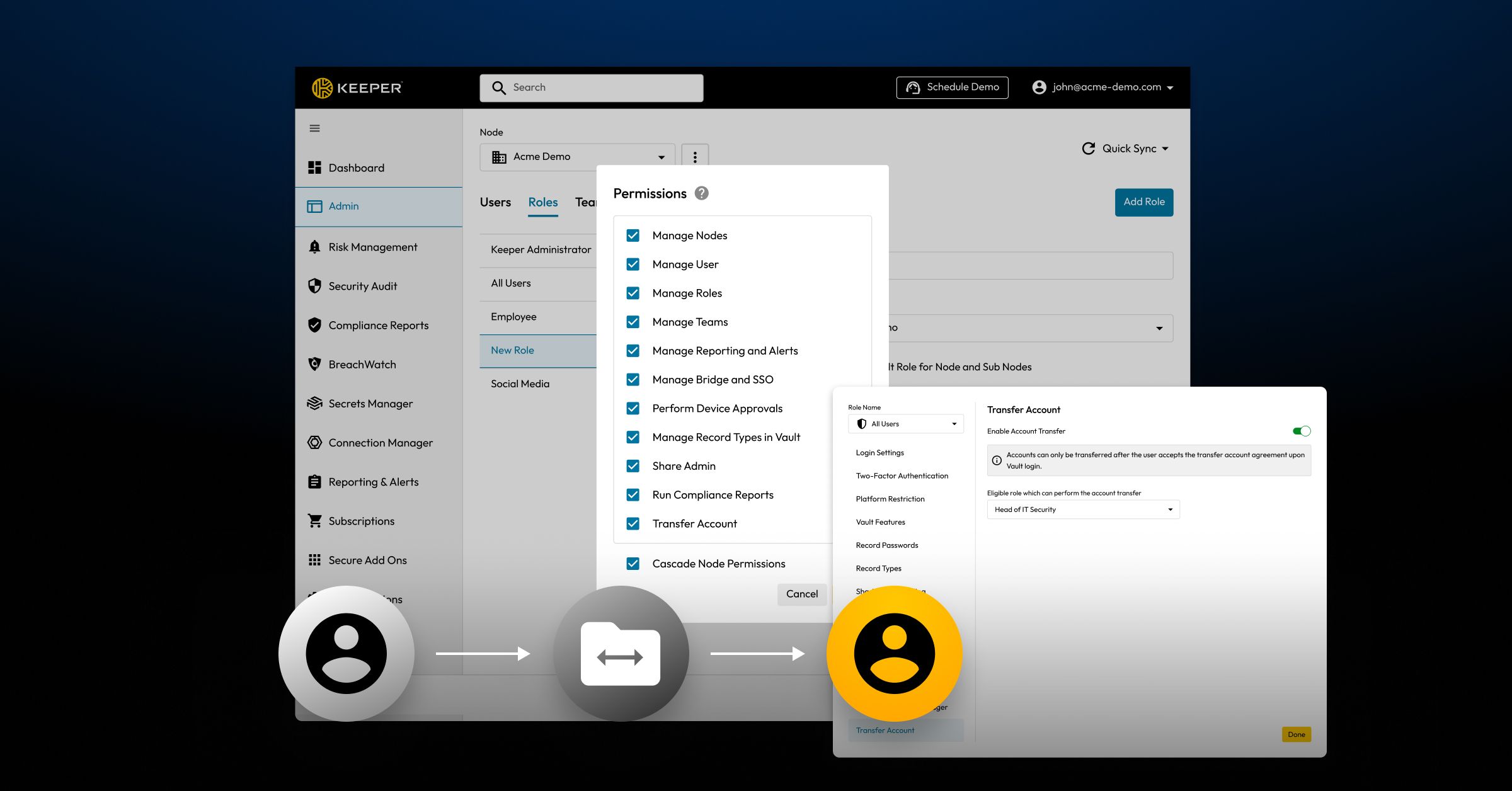
The Keeper Admin Console enables IT administrators to revoke access and securely transfer ownership of shared data during the offboarding process, ensuring no sensitive information is exposed. When an employee leaves an organization, IT teams can quickly disable the Keeper account and reassign access to shared credentials, records or folders to another authorized user.
It’s important to note that vault transfers aren’t set up automatically; IT teams must manually take this step as part of the offboarding process to ensure no records become orphaned and that no former employee retains access to sensitive data. It’s best to configure this optional feature during the initial deployment phase of the Keeper rollout. To enable an account transfer, visit Transfer Account in the settings under administrative permissions, turn on Enable Transfer Account and then select the role that will have the ability to initiate a transfer.
Identify and update credentials after offboarding
Once a user is offboarded, Keeper makes it easy for IT administrators to identify which credentials the former employee had access to. With full visibility, administrators can review shared folders and records connected to the former employee’s role or vault activity. This allows IT teams to rotate credentials and update keys for those specific records without having to reset everything across the organization – or worse, waste time guessing what needs to be changed.
Protect access at every step with Keeper
Keeper gives IT teams the tools they need to manage onboarding and offboarding securely and efficiently. By improving visibility, simplifying access control and reducing the risk of credential misuse, Keeper streamlines every stage of the employee lifecycle. With Keeper’s centralized platform for managing access, enforcing policies and auditing for compliance, IT administrators can eliminate manual processes and focus on protecting access to sensitive data.
Frequently asked questions
Can Keeper automate employee onboarding?
Keeper can automate several key aspects of the onboarding process, particularly for organizations that integrate it with identity providers such as Okta or Google Workspace. Through directory sync and SCIM provisioning, new employees can be automatically added to Keeper and assigned roles, granting them access to specific shared records and folders. Although full onboarding isn’t completely automated, Keeper significantly reduces the steps IT teams must take to ensure new employees receive appropriate access quickly and securely.
What happens to an employee’s vault after offboarding?
When an employee is offboarded, their Keeper account can be disabled to revoke access immediately. However, their vault data remains intact and accessible to IT administrators. Administrators can transfer ownership of any shared records or folders to another user, ensuring no credentials are lost and that access to sensitive information is reassigned appropriately. Entire vaults can also be transferred to other users.
Can I see which credentials a former employee had access to?
Yes, Keeper provides full visibility into which credentials and records an employee accessed during their time at an organization. IT administrators can review the former employee’s vault, including shared folders, individual records and detailed logs that show when records were viewed, edited or shared. Keeper makes it easy for IT administrators to identify which credentials need to be changed or transferred after an employee leaves the organization, preventing unauthorized standing access.
How does Keeper help with compliance during employee transitions?
Keeper supports compliance by enforcing strict access controls and maintaining detailed audit logs. IT administrators can show which employees had access to what and when they accessed it – essential for meeting compliance requirements such as SOC 2, ISO 27001, the Health Insurance Portability and Accountability Act (HIPAA) and the General Data Protection Regulation (GDPR). By centralizing credential management and providing full visibility into employee activity, Keeper helps organizations reduce security risks and maintain compliance throughout the employee lifecycle.

