
 PAM
PAM 



You might treat a centralized vault as the authoritative source for every secret, but secrets can quietly fall out of sync as they get copied into
5 min read
Published on October 08, 2024
Updated on October 2, 2026.
The main difference between Privileged Identity Management (PIM) and Privileged Access Management (PAM) is what each one focuses on. PIM manages the identities of users who need elevated permissions. It decides who gets privileged access, what they can reach and for how long. PAM secures and monitors what happens when that privileged access is used, stopping unauthorized users from reaching sensitive data and systems. Simply put, PIM governs who has privileged access, and PAM controls how that access is used.
Continue reading to learn what PIM and PAM are, how each one works and the key differences between them.
What are PIM and PAM?
PIM and PAM are closely related cybersecurity disciplines that work together to protect your organization’s most powerful accounts. The terms are often used interchangeably, but each one covers a different part of the privileged access lifecycle.
What is Privileged Identity Management? It manages who is trying to access your organization’s data or network and what privileges their identity allows. With a PIM solution, you can control which resources authorized users can access in specific systems. PIM works by first identifying which users need special permissions and assigning them roles based on their job responsibilities. Instead of giving users standing access to privileged data, PIM makes privileged data available to certain roles on a time-limited basis. A user requests access when they need it, the request may require approval or Multi-Factor Authentication (MFA) and the access expires automatically when the time limit ends. PIM also supports regular access reviews so outdated permissions don’t linger.
What is Privileged Access Management? It works in tandem with PIM, focusing on securing and monitoring access to your organization’s most sensitive information and systems. Accounts that regularly access sensitive systems, such as those used by your IT department or HR staff, must be protected against unauthorized users because any security weakness can lead to a data breach. PAM works by storing privileged credentials in a secure vault and enforcing the principle of least privilege. Many PAM tools also rotate credentials automatically and generate detailed audit trails for compliance. A modern PAM solution gives your organization full control over accounts with access to critical information and makes sure privileged activity is closely monitored. Learn more about how privileged access management works.
The key differences between PIM and PAM
Even though PIM and PAM typically work together to help your organization protect and manage privileged data, there are several differences between them.
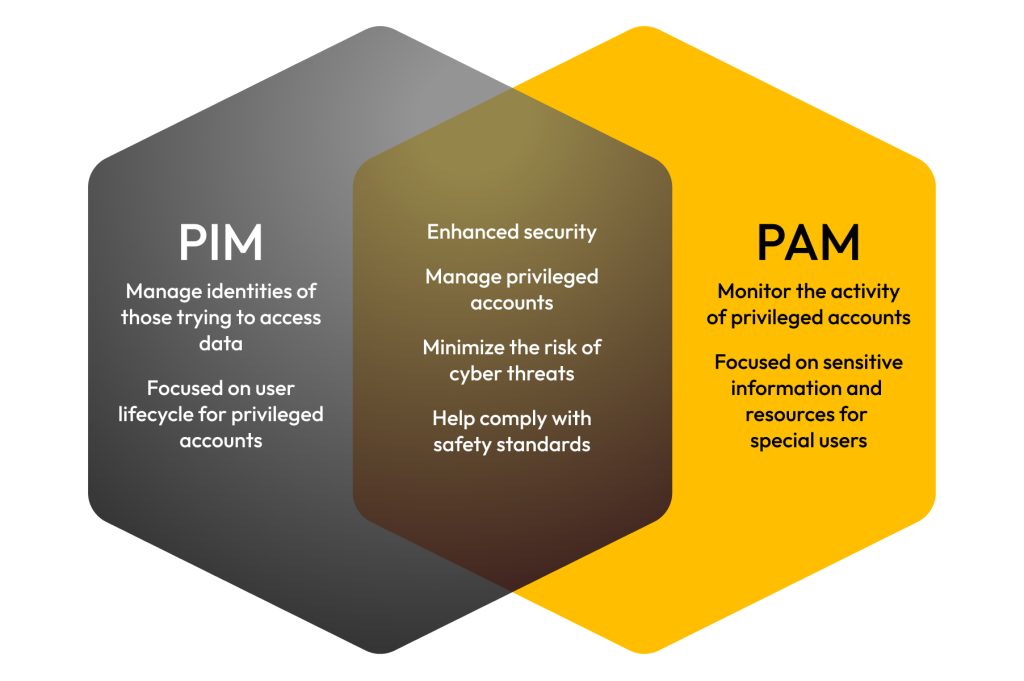
PIM and PAM focus on different aspects of IAM
Both PIM and PAM are subsets of Identity and Access Management (IAM), which is a framework of policies that ensures authorized users have proper access to the resources they need for their jobs. When comparing IAM vs PAM vs PIM, the difference comes down to scope:
- IAM manages access for all users across the organization
- PIM narrows that focus to privileged identities
- PAM secures and monitors the privileged access those identities use
In technical terms, PIM secures privileged identities and focuses on Role-Based Access Control (RBAC), which gives authorized users access only to what they need to get their work done. PAM makes sure that users with access to your most sensitive information are closely monitored.
PIM and PAM have different objectives
PIM ensures that only authorized users have specific privileges based on their identity and keeps track of who can access certain resources. Think of PIM as a receptionist in a large office building, checking your ID badge to make sure you not only belong in the building but also have access to where you’re supposed to be. PAM, on the other hand, is your ID badge that gives you special access to important areas that other employees may not have. The main purpose of PAM is to secure sensitive information and protect privileged users who have access to your organization’s most important data.
PIM and PAM offer different use cases
PIM and PAM can be used in a variety of ways within an organization. PIM focuses more on who can access specific resources, while PAM focuses on keeping that access secure, especially for users who manage sensitive information. You can rely on PIM during the onboarding process because it ensures each employee gets appropriate permissions to access the resources they need. PIM can also be used to update an employee’s access if they need additional files or programs, or PIM can be used to remove access for an employee who leaves your organization.
Your organization can use PAM to safely access important systems with special credentials, monitor what privileged users do when accessing sensitive data and even grant emergency privileged access to administrators who need to fix any issues. Most PAM solutions, like KeeperPAM®, can also help manage your organization’s passwords by offering a password manager, allowing your employees to securely store and share their login credentials.
Protect your organization with PIM and PAM
Although PIM and PAM have several major differences, many PAM solutions include PIM features to enhance the overall security of your organization. Despite their differences, PIM and PAM complement each other by ensuring all employees have appropriate access to resources and securely monitoring accounts with privileged access to sensitive data. That’s why many organizations look for a unified solution that delivers both PIM and PAM. KeeperPAM brings PIM and PAM capabilities together in a cloud-based, zero-trust and zero-knowledge platform. For PIM, KeeperPAM helps you control who has privileged access through role-based policies and Just-in-Time (JIT) access that expires when it’s no longer needed. For PAM, KeeperPAM secures how that access is used with password and secrets management, privileged session management with session recording, automated credential rotation and detailed audit trails.
Start your free trial of KeeperPAM to see how your organization can achieve secure control and management for every privileged user and protect your sensitive information.
Frequently asked questions
What is the difference between IAM and PAM?
IAM manages identities and access for every user in an organization. It makes sure each user has the right access to the resources they need. PAM is a subset of IAM that focuses only on privileged accounts with elevated access to sensitive data and systems. PAM adds stronger protections such as credential vaulting and session monitoring. In basic terms, PIM manages which identities hold privileged roles, and PAM monitors how those privileged accounts are used. Learn more in our full article about IAM vs PAM.
What is a PIM used for?
A PIM solution is used to manage and control the privileged roles assigned to users in an organization. Common uses for PIM include assigning elevated permissions based on job function, granting time-limited access to privileged roles, requiring approval before a role is activated, running periodic access reviews and removing privileges when an employee leaves the organization. These controls help eliminate standing privileges, shrinking the attack surface and limiting the damage a compromised account can cause.
What is PIM in cybersecurity?
In cybersecurity, PIM stands for Privileged Identity Management. It is the practice of managing, controlling and monitoring the identities that hold elevated permissions within an organization’s systems. Although PIM is used in other industries as an acronym, it always refers to governing privileged identities in cybersecurity.

