
 PAM
PAM 



KeeperDB is a secure, multi-protocol database client built on Keeper’s zero-knowledge platform. Available as both a free standalone desktop application and a privileged session component of
7 min read
Published on June 15, 2026
Database access is one of the largest blind spots in enterprise security. Credentials are often shared, insecurely stored or transmitted without monitoring. KeeperDB is a modern, multi-protocol database client that addresses these gaps by supporting PostgreSQL, MySQL, Microsoft SQL Server and other major protocols from a unified interface. As a standalone desktop app with biometric authentication and vault-based credential retrieval, KeeperDB is a secure replacement for legacy tools like DBeaver and MySQL Workbench. When used within KeeperPAM, it becomes a fully governed, zero-trust privileged access session.
Continue reading to learn how KeeperDB secures database access and why it matters in modern enterprise security.
Why securing database access is important
Databases are among the most critical assets for storing sensitive organizational data. Several factors make database access security especially important:
- High-value targets: Databases contain large amounts of sensitive data, making them valuable to cybercriminals seeking financial or strategic gain
- Limited visibility: Many organizations lack real-time session monitoring and recording of database activity, leading to unauthorized access or suspicious behavior going undetected
- Compliance risk: Without proper auditing, organizations may fail to meet requirements for regulatory frameworks like SOC 2, HIPAA and ISO 27001
- Credential-based attacks: Compromised, reused or poorly managed credentials remain one of the most common attack vectors cybercriminals use to breach systems
To address these challenges, organizations must have full visibility and control over database access. This includes enforcing zero-trust security, managing credentials at the client level and maintaining detailed audit trails. KeeperDB delivers this by using biometric authentication through Face ID and Windows Hello, creating a passwordless login experience. For database credentials, KeeperDB integrates directly with Keeper Secrets Manager, retrieving them from the Keeper Vault at connection time instead of leaving them scattered across endpoints.
Here are seven ways KeeperDB secures database access.
1. Eliminate stored credentials with passwordless access
Stored database credentials are a major security risk for organizations. In many environments, passwords are saved in configuration files, embedded in scripts or shared across teams. These practices create multiple points of exposure, making it easier for cybercriminals to steal credentials through phishing attacks or malware. Once exposed, credentials can be reused to move laterally across systems or escalate privileges.
KeeperDB removes this risk by keeping database credentials out of plaintext configuration files. As a standalone desktop app with Keeper Secrets Manager integrated, credentials are retrieved from the vault at connection time rather than saved in local config files, and biometric authentication completely replaces the master password. When KeeperDB is deployed through KeeperPAM, credentials never reach the endpoint; they are decrypted only within the customer-controlled Keeper Gateway at the time of access. From there, credentials are passed to KeeperDB in memory over an encrypted channel and immediately erased once the session ends.
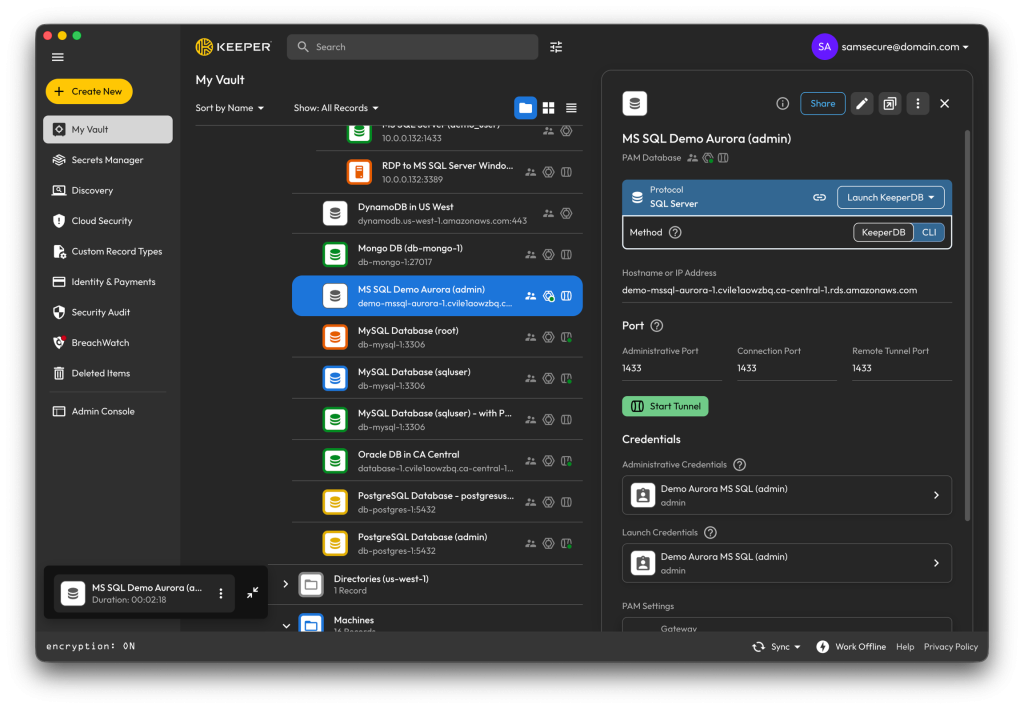
Sessions are fully isolated using Keeper’s Remote Browser Isolation (RBI), where KeeperDB is streamed to the user’s browser in a fully contained session. Since no credentials are ever written to the endpoint, they remain ephemeral and controlled, enforcing strict separation between the database and the endpoint. By eliminating stored secrets, organizations reduce the risk of credential theft and limit lateral movement across their infrastructure.
2. Enforce zero-trust security in all database sessions
When deployed in KeeperPAM, KeeperDB enforces zero-trust access by establishing authenticated, end-to-end encrypted connections through the Keeper Gateway. Databases are never exposed through inbound firewalls, and no VPN is required. Instead, access is brokered through secure, outbound-only connections that significantly reduce the attack surface.
KeeperDB also supports Just-in-Time (JIT) access, allowing organizations to grant time-limited database access only when necessary. Access requests can be initiated and approved through integrations like Slack, Jira, ServiceNow or Microsoft Teams. Permissions are automatically revoked after use, eliminating standing privileges. By combining zero-trust security with JIT access, KeeperDB reduces the likelihood of unauthorized access while maintaining operational efficiency.
3. Launch secure sessions directly from the Keeper Vault
For teams using KeeperPAM, KeeperDB enables users to launch secure database sessions directly from the Keeper Vault, removing the need for VPNs or manual configuration. Sessions run within Keeper’s RBI environment, ensuring all activity occurs in a fully contained session streamed to the user’s browser. Since credentials never reach the endpoint and are never stored locally, this isolation layer reinforces zero-trust security while enhancing the user experience.
KeeperDB’s workflow allows users to select a database record in their vault, launch KeeperDB and connect instantly through the embedded interface. There’s no need to copy and paste credentials, configure connection files or manage separate tools. Unlike traditional workflows that rely on locally stored secrets and manual setup, KeeperDB centralizes access and removes friction from the process. This approach simplifies secure access for engineers and security teams while maintaining full control over every session.
4. Monitor, record and audit database activity in real time
KeeperDB includes a real-time performance monitor that works in both its standalone desktop application and embedded PAM deployment. It surfaces key operational insights, including active process lists, blocking chains, lock analysis and one-click session termination. If a database slows down, teams can quickly identify long-running or blocking queries and terminate sessions to restore performance.
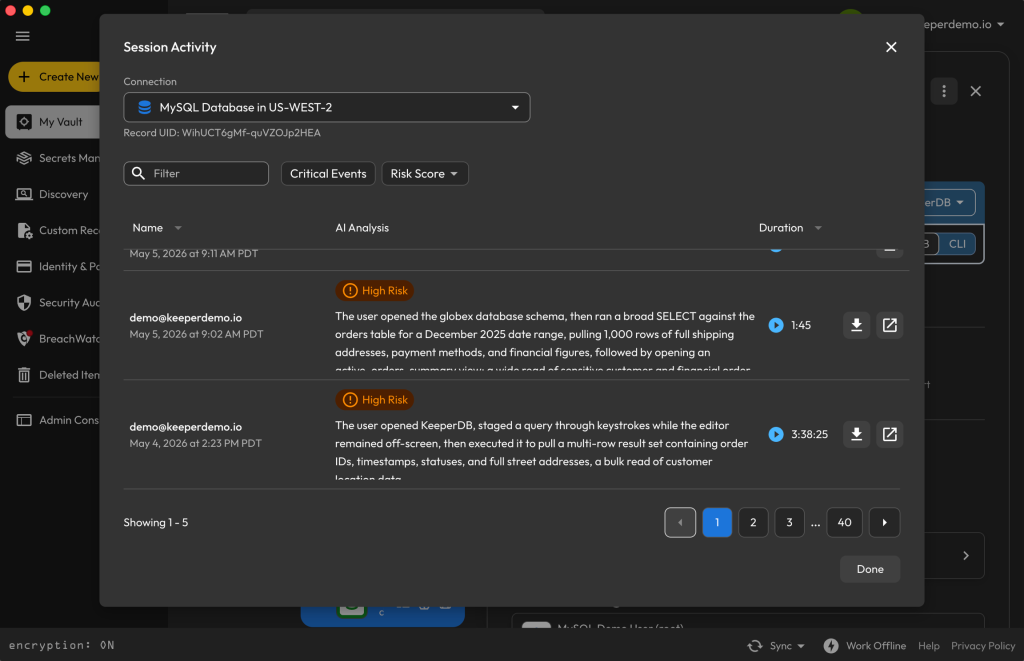
When deployed in KeeperPAM, KeeperDB records every privileged session and logs all SQL activity, adding the governance layer that many legacy clients lack. Query-level logging ensures that every command is tracked with timestamps, session context and execution status. These actions are consolidated into detailed audit trails that provide a full record of database access. This level of visibility strengthens both security and compliance, maintaining clear records for frameworks like SOC 2, HIPAA and ISO 27001. By combining real-time monitoring with comprehensive auditing, KeeperDB ensures every database interaction is visible and accountable.
5. Use KeeperAI® to automate database operations securely
KeeperDB integrates KeeperAI to streamline database workflows while maintaining granular access controls. Users can interact with databases using natural language, reducing the time required to write and troubleshoot SQL queries. KeeperAI operates in several controlled modes:
- Natural language queries: Generate and explain SQL using full schema context
- Read-only automation: Execute queries and analyze results without user intervention
- Approval-based writes: Require explicit authorization for DML or DDL changes to prevent potentially destructive actions before execution
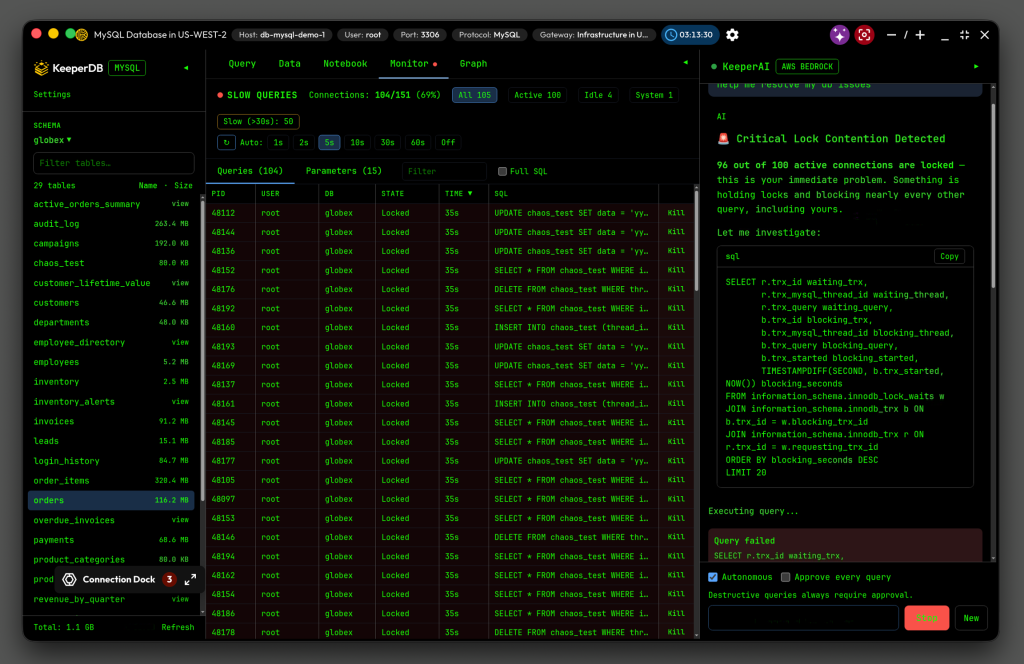
When KeeperDB is used within KeeperPAM, KeeperAI continuously analyzes session activity for anomalies and exfiltration attempts and offers automated session termination. This helps teams accelerate troubleshooting and reporting while maintaining full control over database changes and preserving data integrity.
6. Secure connections with tunnels and KeeperDB Proxy
Legacy database access often relies on VPNs or bastion hosts, but KeeperDB replaces these with zero-trust tunnels that provide secure, outbound-only connectivity through the Keeper Gateway. Instead of opening inbound firewall rules or exposing databases directly, tunnels make remote databases appear local to the user while traffic remains encrypted and routed through Keeper’s zero-trust architecture.
KeeperDB Proxy extends this model for desktop workflows. When a proxy is enabled on a PAM database record, it acts as a mediator, handling authentication on behalf of the user. KeeperDB Proxy retrieves credentials securely from the vault via the Keeper Gateway and injects them directly into the database protocol handshake, ensuring the user never sees or manages credentials. Together, tunnels and KeeperDB Proxy eliminate infrastructure overhead and minimize the risk of unauthorized access to remote or internal databases.
7. Centralize credential management and rotation
Manual credential management introduces major risks in database environments, especially when passwords are shared across teams, reused or rotated inconsistently. KeeperDB addresses this challenge by centralizing credential management within Keeper’s zero-trust, zero-knowledge architecture. All database credentials are securely stored in the Keeper Vault and are never exposed to users.
Through KeeperPAM, organizations can enforce automated rotation policies that regularly update credentials without disrupting workflows. Once a password is rotated, authorized users automatically receive access to the updated credential through the Keeper Vault. This approach significantly reduces credential sprawl by removing passwords from endpoints, scripts and shared documents. KeeperDB also simplifies offboarding by revoking vault access and ensuring that credentials remain protected throughout their entire lifecycle.
Modernize database access with KeeperDB
Legacy database tools like DBeaver and MySQL Workbench were built for functionality, not for security at scale. They rely on locally stored credentials, lack session recording and create audit blind spots that compliance frameworks don’t accept; KeeperDB was built differently. As a standalone desktop app, KeeperDB offers biometric authentication, vault-based credential retrieval and a modern, AI-powered interface that makes it a strong replacement for outdated tools. When your organization is ready, KeeperDB can extend into KeeperPAM to deliver zero-trust privileged access, session recording and Just-in-Time (JIT) provisioning, ensuring your database security can grow with you.
Download KeeperDB to modernize how your team works with databases, and start your free trial of KeeperPAM today to see how it scales into secure database access.

