
 Cybersecurity



Malicious cyber activity targeted remote monitoring and control technology at over 30 community water systems across Minnesota in late July 2026, and water cyber attacks were
8 min read
Published on September 09, 2024
If you’ve realized your bank account got hacked, you are most likely panicked and want to secure your finances as soon as possible. You may even be wondering how something like this could have happened to you. Your bank account could have been hacked due to various cyber attacks, including brute force, phishing, SIM swapping, credit card skimming or Man-in-the-Middle (MITM). Regardless of how your bank account got hacked, it is important to act quickly to protect your identity, privacy and finances from further damage.
Continue reading to learn more about these cyber attacks and what to do if your bank account has been hacked.
How your bank account could have gotten hacked
Your bank account could have been hacked in a variety of ways, so let’s dive into the potential causes.
Brute force attacks
A brute force attack uses software to guess your login credentials through trial and error. This software relies on dictionary words, popular phrases, commonly used passwords and other specific patterns of numbers and letters until it finds a match. Brute force attacks are especially dangerous if you reuse your passwords on multiple accounts. If you have reused a single password on several accounts, including your bank account, this could have led to your bank account getting hacked. All a cybercriminal has to do is correctly guess your password for one account, try the same login credentials on your bank account and successfully log in to it using the same password.
Phishing attacks
A phishing attack occurs when a cybercriminal persuades you to share personal information like your passwords or credit card numbers by impersonating a person or company you trust. Sometimes, cybercriminals will conduct phishing attacks while pretending to be an organization with which you have an account. Phishing attacks are typically done through email, but you can also be a victim of phishing attacks through smishing over text messages or vishing over the phone.
Think back to whether or not you received a suspicious email with a link or attachment. If you weren’t careful, you may have clicked on a link that seemed legitimate and entered your private information. You could have been the victim of a spoofing attack, which relies on you believing that a fake website is actually a legitimate one. For example, you might have received an email from your bank claiming it needed to verify your login information. The message may have warned you that if you did not click on the link and enter your login information, you would be locked out of your bank account. After clicking the link out of panic, you landed on what you thought was your bank’s official website. However, a cybercriminal could have spoofed the website, designing it to appear almost identical to the legitimate bank’s website. If you entered your login credentials for your bank account on the spoofed website, that information was sent directly to the cybercriminal, who could then access your finances.
SIM swapping
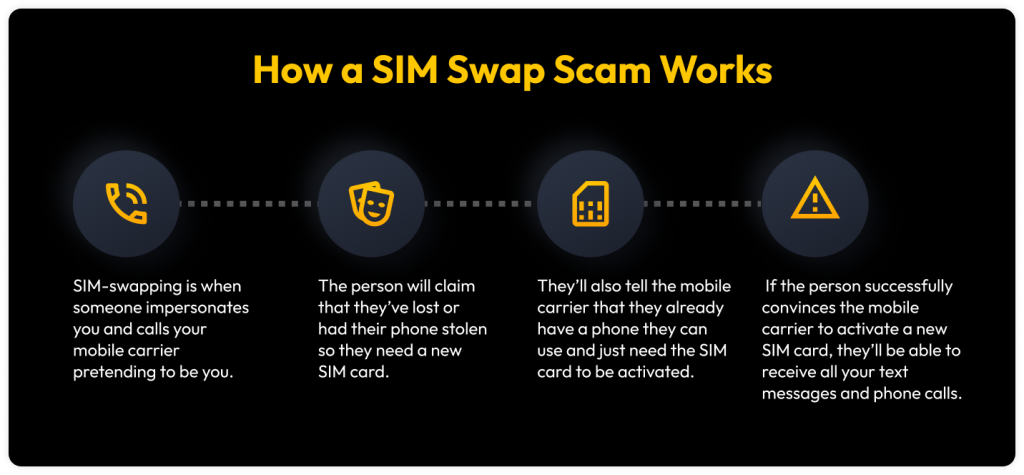
Your bank account may have been hacked due to SIM swapping, which occurs when a cybercriminal pretends to be you to convince your mobile carrier to activate a new SIM card. If a cybercriminal successfully does this, they can insert the SIM card into their device and access your text messages or phone calls. SIM swapping helps cybercriminals not only steal your identity but also invade your privacy, including accessing your bank account information. Your bank account could have been hacked after a new SIM card was activated on a cybercriminal’s device. The cybercriminal may have contacted your bank, impersonating you, to gain access to your funds.
Credit card skimming
A credit card skimmer is a device attached to a card reader by a cybercriminal in order to steal your card information to commit fraud and identity theft. Although credit card skimming gives cybercriminals access to your funds through your card number, this does not necessarily mean they can access your bank account. To hack into your bank account by credit card skimming, you would have needed to use your debit card instead of a credit card, and a cybercriminal could have set up a hidden camera at a gas pump or non-bank ATM to see your card PIN.
Man-in-the-Middle (MITM) attacks
As the name suggests, a Man-in-the-Middle (MITM) attack occurs when a cybercriminal intercepts data being sent between two individuals or businesses. Cybercriminals intercept the information and steal it, either to use for themselves or to sell on the dark web. These kinds of attacks could target your bank account because financial data is highly sensitive and could provide cybercriminals with a profit. Your bank account may have been hacked during a MITM attack if you accessed your bank account on public WiFi or communicated with your bank about your financial information over the phone.
Steps to take if your bank account gets hacked
If your bank account did, unfortunately, get hacked, there are several steps you should immediately take to protect your finances and private information.
1. Contact your bank immediately
Call your bank as soon as you realize your bank account has been hacked to prevent further financial damage. Most banks have web pages or departments dedicated to helping you report any fraudulent activity. If your bank does not have a specialized fraud department, call someone from your bank’s local branch, and they will help you close or freeze your account before a cybercriminal empties it, if they haven’t already.
2. Change your password and security questions
After contacting your bank and notifying them that your account has been hacked, make sure to change your password and choose new security questions. Doing this will make your bank account more secure, especially if you update your password with a strong and unique one. You should use a password generator, which creates random and strong passwords with the click of a button.
3. Enable Multi-Factor Authentication (MFA) on your bank accounts
Set up Multi-Factor Authentication (MFA) on your bank accounts and every other account that has it available. MFA is an additional security measure that requires another form of authentication before you can access your account. Some examples of MFA include a PIN, a code from an authenticator app or your fingerprint. Enabling MFA prevents cybercriminals from accessing your bank account because they will need not only your username and password but also your additional form of authentication.
4. File a report with the Federal Trade Commission (FTC)
You should report your bank account getting hacked to the Federal Trade Commission (FTC) by submitting a form, which they will evaluate and share with law enforcement. The FTC will use your report to investigate your case and help prevent fraud and scams from impacting others.
5. Freeze your credit
As an extra security precaution, you should place a freeze on your credit. A credit freeze stops creditors from accessing your credit report and approving new loans under your name. If a cybercriminal hacks into your bank account and you freeze your credit report, the cybercriminal will be unable to open a new line of credit under your name or commit any more fraud. To place a freeze on your credit report, you need to contact each of the three major credit bureaus (Experian, TransUnion and Equifax).
6. Dispute fraudulent transactions
After contacting your bank and ensuring your information cannot be used to commit further fraud, you need to dispute any fraudulent transactions that the cybercriminal made. Go through recent transactions and identify any you don’t recognize. Write these unfamiliar transactions down, then contact your bank to notify them about the fraudulent transactions. The sooner you contact your bank about these transactions, the higher the chance they can help recover any lost funds.
Protect your bank account with Keeper
Secure your bank account and all other sensitive account information with Keeper Password Manager. Not only can Keeper protect you from phishing attacks and other cyber threats with convenient features like KeeperFill®, but it can also ensure your passwords are strong, unique and stored in a safe place.
Start your free 30-day trial of Keeper Password Manager today to protect your bank account and private information.

