
 PAM
PAM 



Database access is one of the largest blind spots in enterprise security. Credentials are often shared, insecurely stored or transmitted without monitoring. KeeperDB is a modern,
5 min read
Published on July 07, 2026
KeeperDB is a secure, multi-protocol database client built on Keeper’s zero-knowledge platform. Available as both a free standalone desktop application and a privileged session component of KeeperPAM®, KeeperDB combines a database query engine, vault-managed credentials, real-time performance monitoring and an AI-powered database assistant in a unified interface.
Continue reading to learn more about how KeeperDB works, its key features and the benefits of using it to help secure database access.
How KeeperDB works
KeeperDB comes in two forms: a standalone desktop app and an embedded experience launched from within KeeperPAM database records. Both versions provide the same end-user experience and core functionality. Whether you download the app or launch it from a PAM record within the Keeper Vault, the query editor, data grid, schema explorer, notebook and performance monitor work identically. The difference between the desktop version and the KeeperPAM version involves credential brokering, session recording and monitoring. When KeeperDB runs within KeeperPAM, it becomes a fully governed connection with one-click passwordless access, visual session monitoring, query logging and AI threat detection.
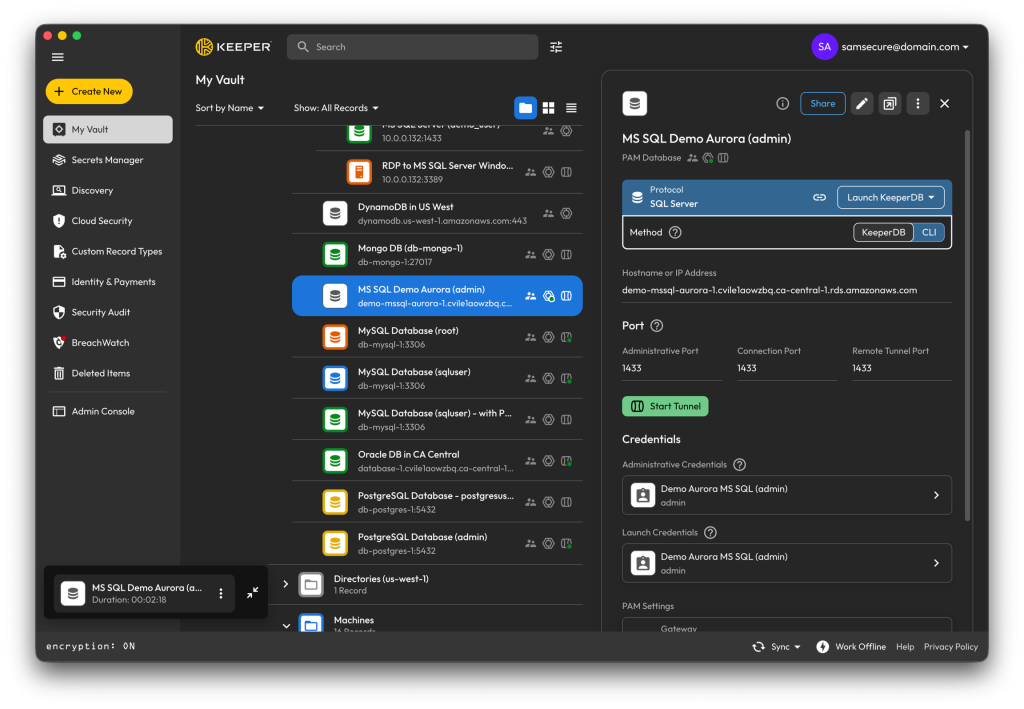
What sets KeeperDB apart from legacy database clients is its zero-knowledge architecture. When deployed through KeeperPAM, ephemeral database credentials are generated and decrypted inside the customer’s self-hosted Keeper Gateway container and delivered to KeeperDB over an encrypted channel, never on Keeper’s servers. When KeeperDB is used locally and integrated with Keeper Secrets Manager, credentials are pulled from the centralized vault on-demand and held in memory only for the duration of the session. For data engineers and DBAs, this solves key privileged-access challenges because passwords rotated in Keeper are updated automatically, and offboarding a contractor or engineer requires only a single revocation. Additionally, KeeperDB is protected by Keeper Forcefield during runtime, providing memory protection against any local malware or infostealers.
How to connect to KeeperDB
KeeperDB supports five ways to connect, but the right one depends on whether you’re working alone or under privileged access controls. For a deeper dive into the same security model behind each option, see how KeeperDB secures database access.
- Direct connection: Use Touch ID or Windows Hello biometrics to authenticate into the native app. Then provide a database’s connection details once, and KeeperDB will store them in your operating system’s secure storage. This is the fastest path for local work and individual sandboxes, with built-in credential storage.
- Secrets Manager integration: Retrieve credentials from the Keeper vault by providing KeeperDB with a Keeper Secrets Manager device token, with limited access to specific folders. Launching a connection fetches credentials on-demand and never caches them, so users never see or handle passwords.
- KeeperPAM Sessions: Create a PAM Database connection in the Keeper Vault, activate the KeeperDB session protocol and provide just-in-time access to the resource with either ephemeral or static credentials and dynamic privileged role elevation. Sessions are launched from the Keeper Vault record and visually monitored with recording, KeeperAI session analysis and threat detection.
- Keeper Tunnels: For a hybrid use case of the desktop application with a VPN-less access model, Keeper Tunnels expose the target through the Keeper Gateway so it appears local to your machine. KeeperDB connects to that tunneled endpoint as it would for a direct connection, but every byte flows through Keeper’s zero-trust, encrypted channel.
- KeeperDB Proxy on a PAM record: Enabling the KeeperDB Proxy on a PAM Database record creates a local proxy port that native database clients can connect to without a password. Ephemeral or static credentials flow automatically from the vault through the Gateway to the proxy, with detailed session logging and configurable idle and duration limits. Users get passwordless access from their preferred tool; administrators get the audit trail.
Main features of KeeperDB
KeeperDB consolidates everything database teams need into one client: a multi-protocol database workspace, an embedded AI agent, real-time monitoring and vault-managed credentials.
One client for every database
KeeperDB brings the full database workflow into a single interface that works the same way across major enterprise databases, including PostgreSQL, MySQL, SQL Server, Oracle, Amazon Redshift, MongoDB, DynamoDB, SQLite and more. This ensures a data engineer managing a mixed fleet doesn’t need to context-switch between separate tools for each database. Native drivers come bundled with the app, simplifying the user experience.
Full session recording
When KeeperDB is deployed through KeeperPAM, every database interaction is monitored and recorded — including an AI agent’s activity within a session. With Keeper’s session recording and playback, every AI-executed SQL statement is logged exactly like a human-typed one, and every AI-initiated write surfaces through the same confirmation modal a human user must approve, so the user always remains the authorizer of any change. Each chart and autonomous iteration is attributed to the session recording, and with a summary generated alongside a detailed log of every action, compliance reviewers gain a full account of exactly what happened during each session.
Built-in AI agent
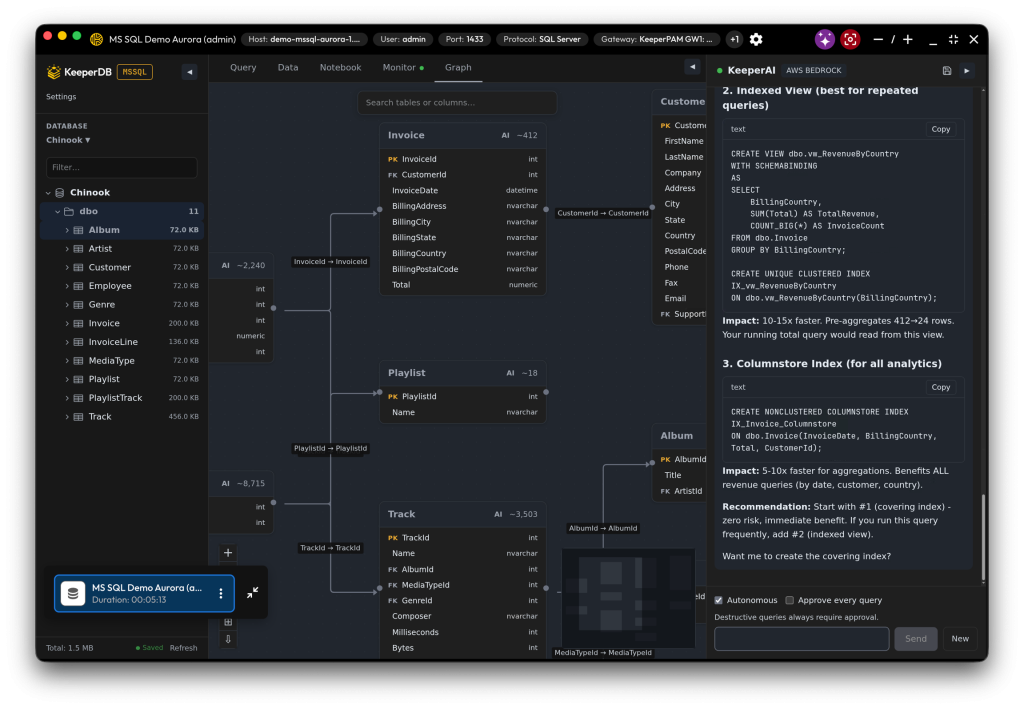
KeeperAI® is an embedded co-pilot with full knowledge of your connected schema, and it operates in three modes: Chat mode to answer questions in plain language and SQL, Autonomous mode to write and run queries to achieve a desired outcome and Explain mode to walk through an existing query. Read-only queries run on their own, but any write surfaces a confirmation showing the statement verbatim before it executes, so you are always the approver. KeeperAI also builds charts directly from live result sets and triages slow databases from the real-time performance monitor. KeeperAI is provider-pluggable, meaning administrators can use their preferred LLM provider or self-hosted endpoint, so prompts and schema data remain within their environment.
Full SQL workspace
The Query tab is a complete SQL environment that allows syntax highlighting, autocomplete and multi-statement execution with per-statement status. This allows you to paste a migration script, run it and see which statements succeeded. Browse and edit rows in a paginated data grid with previewed, confirm-before-run updates, and store your work in a Notebook that automatically saves SQL and Markdown cells together. The Notebook allows teams to build reusable query libraries and document findings alongside the SQL that produced them.
Real-time performance monitoring
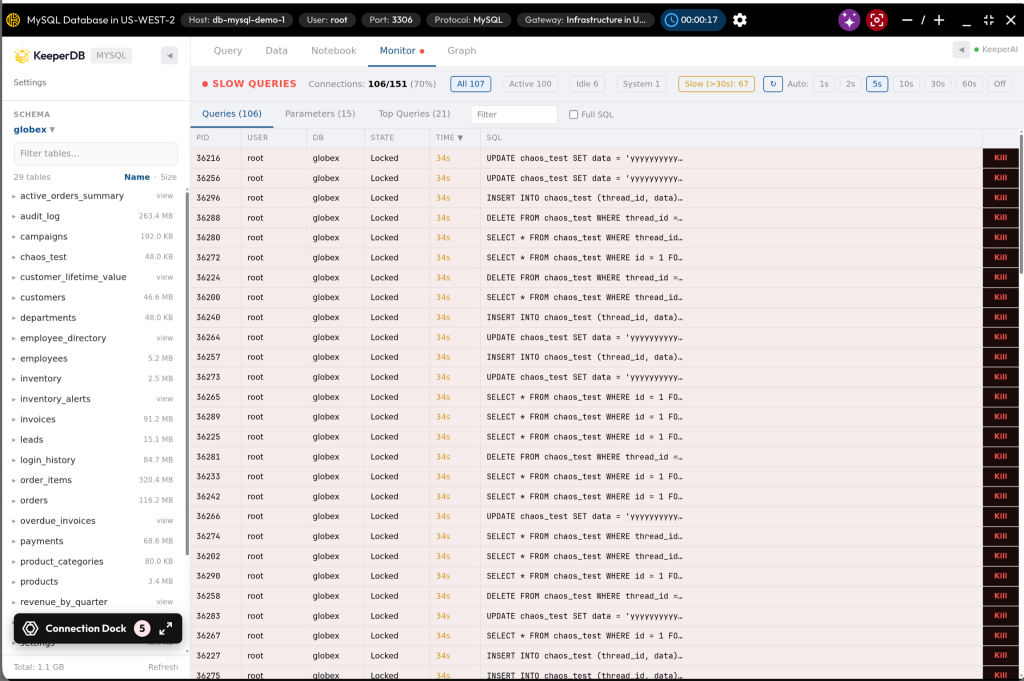
When a database slows down, the Monitor tab shows who is connected, what they’re running and which sessions are blocking others. Complete with a process list, blocking chains and lock analysis, KeeperDB lets you terminate an offending session with one click. KeeperAI can recommend which session to terminate and help identify performance bottlenecks, significantly reducing the time spent diagnosing slow databases.
Vault-managed credentials and biometric authentication
On the desktop app, you can unlock KeeperDB with Face ID or Windows Hello instead of using a stored password. When you connect through Keeper Secrets Manager, credentials are pulled from the encrypted vault at connection time instead of sitting in a local configuration file. Adding on to this convenience, KeeperDB simplifies password rotation by allowing everyone to reconnect with the new value automatically since no one can hold a stale copy. It also reshapes offboarding: Revoke a user’s vault share and their access is eliminated, with no need for manual resets or delays in tracking where a credential may have been cached.
Benefits of using KeeperDB
KeeperDB’s features provide practical benefits for both the database teams using the tool and the security teams responsible for governing access. Here are KeeperDB’s main benefits:
- Modern interface with full functional parity: Biometric login, an embedded AI agent and a built-in performance monitor give users advanced security and operational power without the dated UI of legacy tools.
- Unified, multi-protocol access: PostgreSQL, MySQL, SQL Server, Oracle, Amazon Redshift, DynamoDB, MongoDB and SQLite sit behind a single interface with bundled native drivers, so no tool-switching or per-database installations are required.
- Reduced credential sprawl: Database credentials are retrieved at connection time rather than stored in local configuration files or shared documents.
- Free to download, with room to scale: Use KeeperDB for free as your everyday database client, then add KeeperPAM’s governed capabilities to the same client.
- Centralized audit trail for compliance: When used within KeeperPAM, database activity can be logged centrally to provide an auditable history of who ran what, on which database and when.
Start securing database access with KeeperDB
Legacy database clients were useful when credentials lived on endpoints, sessions went unmonitored and the only audience for a query was the person who ran it. However, modern engineering and data science teams need a solution like KeeperDB that works quickly and securely across all major engines while closing the security gaps left by legacy tools. With KeeperDB, credentials don’t remain on the endpoint, data is protected with zero-knowledge encryption and audit trails are readily available.
Download KeeperDB for free to use as your everyday database client or start a free trial of KeeperPAM to add governed, recorded and fully audited database access.
Frequently asked questions
How is KeeperDB different from DBeaver?
Legacy database clients like DBeaver often rely on locally stored credentials and separate tools for credential management and privileged access governance. KeeperDB integrates these capabilities and includes even more directly in its platform through the Keeper Vault, KeeperAI and KeeperPAM. For a full comparison between KeeperDB vs DBeaver, read our blog.
What can KeeperAI do in KeeperDB?
KeeperAI acts as a built-in DBA co-pilot. It can answer questions about a connected database schema, generate SQL queries, create visualizations from result sets and help troubleshoot database performance issues. For write operations, KeeperAI always requires explicit user approval before executing any destructive SQL statement.
What databases does KeeperDB support?
KeeperDB supports PostgreSQL, MySQL, SQL Server, Oracle, Amazon Redshift, DynamoDB, MongoDB and SQLite from a single interface, with native drivers embedded. Additional database protocols are being added based on customer demand.
How does KeeperDB protect credentials?
KeeperDB is built on Keeper’s zero-trust, zero-knowledge architecture, ensuring credentials are decrypted inside the customer’s Keeper Gateway and delivered to KeeperDB over an encrypted channel. Since passwords are pulled from the vault at connection time and zeroized when the session ends, they are never stored on Keeper’s servers or on the endpoint.

