
 Comparison



Updated on January 12, 2026. Choosing the right Privileged Access Management (PAM) solution is essential for modern enterprises that continue to defend against advanced identity-based cyber
7 min read
Published on June 22, 2026
KeeperDB is a modern, multi-protocol database management tool that works both as a standalone desktop client and an integrated feature within KeeperPAM® for fully governed, zero-trust access. DBeaver is a universal database client designed for those who need a flexible environment for daily data work. The main difference between KeeperDB and DBeaver is their core purpose: KeeperDB is a security-first working tool that embeds database access within a zero-trust, zero-knowledge platform, while DBeaver is built for productivity with broad database support.
Continue reading to learn more about these database management tools, their unique features and what sets them apart from each other.
What is KeeperDB?
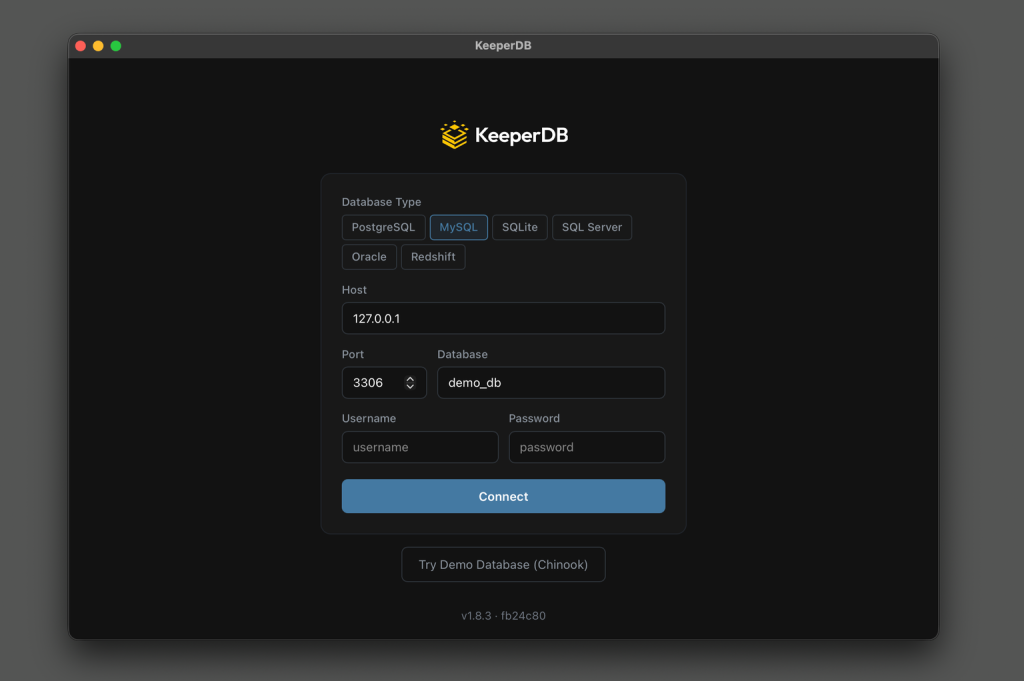
KeeperDB is a full-featured, multi-protocol database client built for engineers, Database Administrators (DBAs) and data teams. It was built to close a major security gap: Databases have traditionally been accessed through unmanaged tools, shared credentials and unmonitored connections outside security controls. A version of KeeperDB is available as a free standalone desktop application for Windows, macOS and Linux that replaces legacy tools like DBeaver and MySQL Workbench with a modern interface, biometric authentication and a built-in AI agent.
Here are several ways KeeperDB stands out from legacy database management tools:
- Biometric authentication with Face ID and Windows Hello, creating a passwordless experience and eliminating credentials stored in plaintext on disk
- Keeper Secrets Manager integration, which retrieves database credentials directly from the Keeper Vault at connection time instead of leaving them in configuration files
- Built-in AI agent uses your LLM provider of choice to write queries in natural language, generate and refine SQL and chart results
- Multi-protocol support across widely used enterprise database platforms, including PostgreSQL, MySQL, SQL Server, Oracle, Amazon Redshift and SQLite – all from one interface
- Real-time performance monitoring with process lists, blocking chains, lock analysis and one-click session termination across supported engines
KeeperDB’s capabilities expand when it’s deployed as part of KeeperPAM, becoming a fully governed privileged access session within the Keeper Vault. In Keeper workflows, credentials are never exposed to the user or stored locally on the endpoint; they’re decrypted inside the Keeper Gateway and delivered over an encrypted channel to support passwordless access. Every query and session is recorded into a detailed audit trail, access is governed with Just-in-Time (JIT) provisioning and KeeperAI® continuously analyzes activity for suspicious queries and data exfiltration attempts. Whether used as a standalone client or through KeeperPAM, KeeperDB gives teams a single tool for working across protocols and environments, eliminating the need to switch between applications when managing multiple databases.
What is DBeaver?
DBeaver is a widely adopted database management client used by developers and DBAs who need a flexible environment for working with data. It supports SQL, NoSQL and cloud-based data sources from a single interface, making it a popular choice for teams managing diverse database environments. DBeaver includes a variety of productivity features, such as a full-featured SQL editor, schema visualization, ER diagrams, query performance analysis and extensive plugins. Its broad compatibility with over 100 database systems makes it useful for teams working across legacy platforms, mixed infrastructure or niche data sources.
DBeaver offers a free, open-source Community edition that covers the basics of general-purpose database administration, as well as paid editions that add more advanced capabilities like cloud integrations, Single Sign-On (SSO) and additional developer tooling. While DBeaver prioritizes flexibility and efficiency, none of its editions offer biometric authentication or vault-based credential retrieval.
KeeperDB vs DBeaver features comparison
KeeperDB and DBeaver both provide database administration capabilities, but they were built around different core principles and priorities. Here are the ways they compare:
| Features | KeeperDB | DBeaver |
|---|---|---|
| Deployment | Standalone desktop app and vault-embedded privileged session | Standalone desktop app |
| Databases supported | PostgreSQL, MySQL, SQL Server, Oracle, Amazon Redshift and SQLite | 100+ databases |
| Authentication | Biometric authentication; no master password necessary | No biometric authentication; SSO available in paid tiers |
| Credential handling | Retrieved from Keeper Secrets Manager at connection time | Stored locally by default; encrypted storage available in paid tiers |
| AI assistance | Built-in AI agent using your preferred LLM provider | SQL completion and AI chat available in paid tiers via OpenAI or GitHub Copilot |
| Session recording | Full session monitoring and recording with centralized vault management when deployed in KeeperPAM | Not offered |
| PAM integration | Yes, JIT access, threat detection and SIEM streaming with KeeperPAM | Not offered |
| Compliance support | Centralized auditing, session recording and policy enforcement, when deployed in KeeperPAM, help organizations meet compliance requirements such as FedRAMP, SOC 2 and HIPAA | Compliance and governance features are available in paid tiers |
| Open source | No | Community edition is open source |
| Pricing | Available as a free standalone desktop app; also included in KeeperPAM license integrated within the vault | Community edition is free; paid Pro and Ultimate tiers available |
Day-to-day user experience
KeeperDB is designed to be the tool DBAs actually want to use, complete with a modern interface, query editor, SQL notebook, schema explorer, ER diagrams, embedded AI agent and a real-time performance monitor. DBeaver delivers well-rounded features and a mature plugin ecosystem, which contributes to its widespread adoption. However, KeeperDB pairs its visual appeal with biometric authentication and vault-based credential retrieval, while DBeaver – like most legacy clients – still relies on credentials stored locally on the endpoint by default.
Security and access
KeeperDB authenticates with Face ID or Windows Hello and retrieves database credentials from Keeper Secrets Manager at connection time, so credentials aren’t left sitting in plaintext configuration files on the endpoint. When KeeperDB is utilized in KeeperPAM or when an existing client is routed through the KeeperDB Proxy, credentials never reach the endpoint at all; every session is recorded, and passwordless access is governed by zero-trust security policies.
DBeaver supports SSO, Kerberos and MFA in paid tiers, with credential management available through a secrets manager specifically in the Ultimate tier. While these are helpful features, they are simply additions to a productivity-first tool in which credentials are still stored locally by default. When KeeperDB is deployed in KeeperPAM, credentials never reach the endpoint, every session is recorded and access is governed by zero-trust security policies. Although DBeaver offers access controls in paid tiers, its absence of credential injection and session recording means it doesn’t match KeeperDB’s level of security and governance.
Compatibility and database support
KeeperDB supports major enterprise database platforms – PostgreSQL, MySQL, Microsoft SQL Server, Oracle, Amazon Redshift and SQLite – with a consistent interface across all of them. This means DBAs managing multiple databases do not need to switch between tools. DBeaver, on the other hand, supports over 100 database systems, including NoSQL, making it a strong choice for general use or for teams working with legacy, niche or diverse data sources that fall outside major enterprise platforms.
Pricing
KeeperDB is available as a free standalone desktop application, with advanced capabilities available through a paid subscription. For organizations with a KeeperPAM license, KeeperDB is also included in the platform and can be launched directly from the Keeper Vault as a governed, embedded database session. This provides teams with the flexibility to start with KeeperDB as a modern, standalone database client and expand into advanced security with PAM as their needs evolve. Similar to KeeperDB, DBeaver follows a free-to-paid model. Its Community edition is free and open source, and paid tiers such as Pro and Ultimate add enterprise-focused features like cloud integrations and additional database drivers.
Which multi-protocol database tool is better for you: KeeperDB or DBeaver?
When choosing between KeeperDB and DBeaver, consider your team’s priorities, compliance requirements and overall security posture.
KeeperDB may be a better fit if:
- You want a modern, visually pleasing replacement for legacy tools like DBeaver or MySQL Workbench.
- You want biometric authentication and credentials retrieved from Keeper Secrets Manager rather than stored in local configuration files.
- You want a built-in AI agent that uses your preferred LLM provider.
- You have compliance requirements to meet, including FedRAMP, SOC 2 or HIPAA, and require full session monitoring, recording and auditing.
- You are already using Keeper and want to access databases from the same platform, or you want the option of growing into governed privileged access in the future.
DBeaver may be a better fit if:
- You need broad database compatibility across diverse or niche database types, including NoSQL.
- You rely on a specific plugin or integration in DBeaver’s ecosystem.
- You prefer an open-source client with a large community.
If your environment includes NoSQL or niche database types that KeeperDB doesn’t currently support, DBeaver is a reasonable option for those specific connections. However, with KeeperDB Proxy, you don’t have to choose – your team keeps the DBeaver interface they’re familiar with while Keeper handles security and governance in the background.
How KeeperDB Proxy lets you use both
If your team uses DBeaver and isn’t ready to switch tools, KeeperDB Proxy allows developers to continue using their preferred database clients – including DBeaver – while routing all connections securely through Keeper. Centralized policy enforcement, full visibility and Keeper’s zero-knowledge architecture are all maintained in the background without disrupting existing workflows. KeeperDB Proxy offers a dual benefit: the flexibility of DBeaver with the security and governance of Keeper.
To learn more about how KeeperDB Proxy works, read our documentation.
Prioritize database access security with KeeperDB
As a standalone client, KeeperDB is a modern replacement for legacy tools, and when your team is ready, the same tool extends into KeeperPAM for passwordless authentication, vault-based credential retrieval and zero-trust governance. DBeaver remains a flexible, widely compatible tool for general-purpose and niche use, but it cannot match KeeperDB’s day-to-day experience and enterprise-grade security.
Download KeeperDB to modernize how your team works with databases, and start a free trial of KeeperPAM to see how it scales into governed, secure database access.
Frequently asked questions
Can KeeperDB replace DBeaver?
KeeperDB can replace DBeaver for many daily database access workflows, especially in environments where security and auditability are priorities. With biometric authentication, vault-based credential retrieval and a built-in AI agent across major enterprise databases, KeeperDB is built to replace legacy tools like DBeaver. For teams working with NoSQL or niche data sources outside KeeperDB’s current support, DBeaver can still handle those specific connections – and with KeeperDB Proxy, those DBeaver connections can be routed through Keeper so you don’t lose security and governance in the process.
Does KeeperDB support MySQL and PostgreSQL?
KeeperDB supports MySQL, PostgreSQL, Microsoft SQL Server, Oracle, Amazon Redshift and SQLite, all from a single interface in its standalone desktop app or in a session launched from the Keeper Vault.
Can I use DBeaver with KeeperPAM?
KeeperDB Proxy is specifically designed for teams that want Keeper’s security and governance without abandoning their existing database clients, including DBeaver. DBeaver connections can be routed through Keeper’s infrastructure, meaning your team can keep the interface they’re familiar with while IT gains full visibility, credential protection and policy enforcement that typically require a full migration to another tool to achieve.

