
 Password



New research shows Microsoft Edge loads all saved passwords into memory in plain text, and Keeper Forcefield is built to protect against exactly this kind of
3 min read
Published on March 27, 2026
Secure sharing in Keeper works by encrypting records with record-level encryption keys, enforcing granular permissions and giving administrators centralized policy control and audit visibility into how sensitive credentials, passkeys and privileged resources are accessed.
Keeper’s zero-knowledge architecture ensures that only authorized users can decrypt shared data, while flexible sharing options support everything from everyday collaboration to enterprise-grade Privileged Access Management (PAM).
This blog explains how secure record sharing works in Keeper and walks through the step-by-step process for sharing records.
Types of sharing in Keeper
Keeper supports multiple sharing methods to accommodate a range of use cases, from sharing individual records to privileged resources.
Record and file sharing
Easily share a single record or file with another Keeper user and assign specific permissions to control access. Supported permission levels include view-only, edit, share, edit & share and transfer ownership. Files attached to records inherit the same permission model.
Shared folders
Shared folders allow you to share multiple records at once with specific users or Keeper teams. Permissions can be applied at both the user and record levels, making shared folders ideal for departments, project teams and ongoing collaboration.
One-Time Share
Keeper one time share provides time-limited secure sharing of a record to anyone, even if they don’t have a Keeper account. This is especially useful for contractors, vendors or new employees during onboarding. Bidirectional sharing allows recipients to edit record fields and upload files, with the changes saved on the record in the user’s vault.
Want a step-by-step walkthrough? Read our guide on How One-Time Share Works in Keeper.
Time-limited access
Time-limited access allows credentials or secrets to be shared with other Keeper users on a temporary basis. Access is automatically revoked at a specified time, reducing long-term exposure and supporting Just-In-Time (JIT) access models.
Self-destructing records
Self-destructing records are One-Time Share records that automatically delete from both sides after being shared and viewed. This ensures sensitive information never persists longer than intended.
PAM resource sharing
PAM resource sharing enables privileged session management allowing organizations to grant access to zero-trust privileged sessions without exposing underlying credentials. Users connect to infrastructure through secure, policy-controlled sessions while credentials remain fully protected.
Share Admin
Share Admin is a role-based permission that grants administrators elevated access over shared folders and shared records without giving them ownership of the underlying credentials. This supports the separation of duties and centralized access governance.
How to share in Keeper
Below is a step-by-step walkthrough of how to securely share records in Keeper.
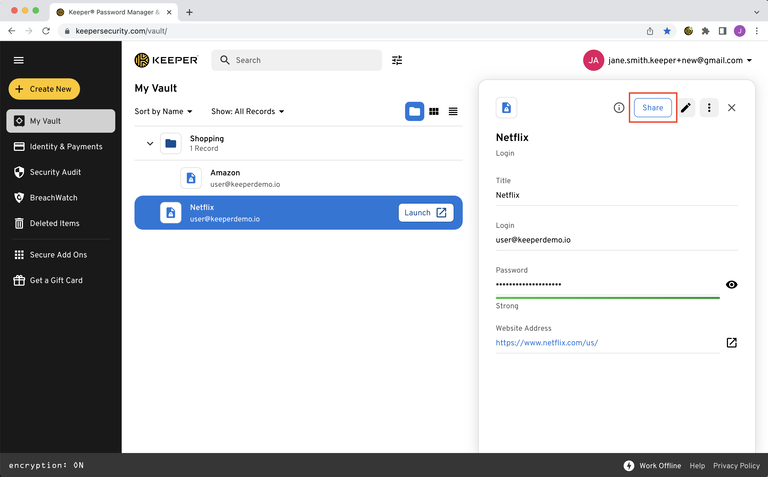
Step 1: Select the record
Open the record you want to share and click the Share button.
Step 2: Add a recipient
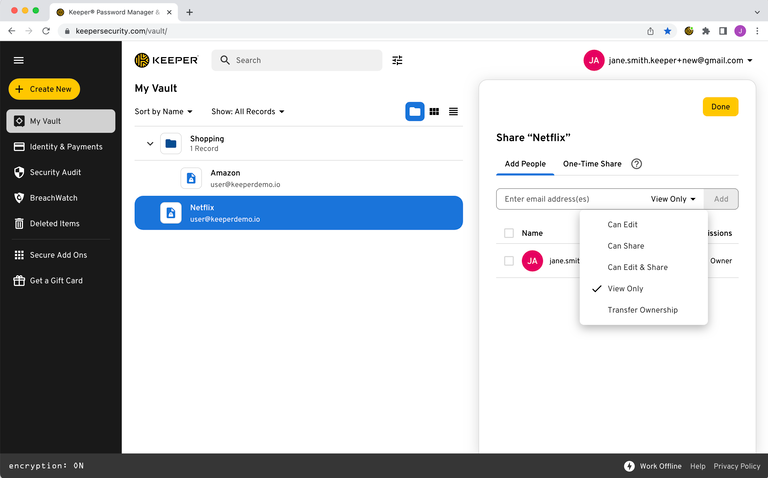
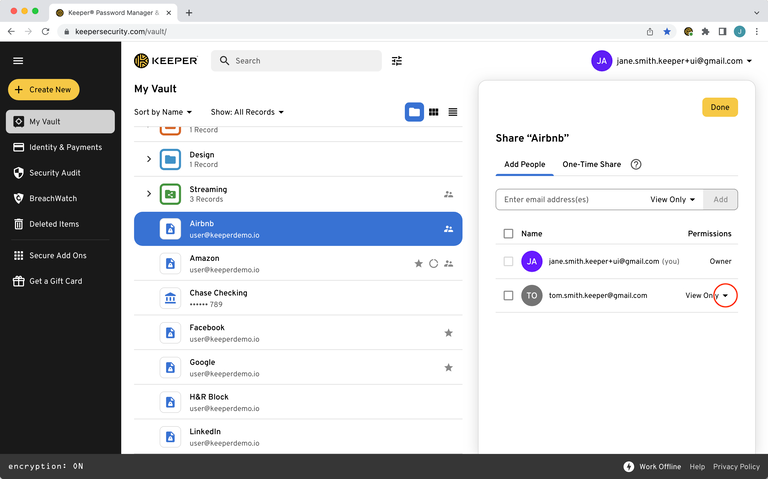
From the Add People tab, click into the email address field and enter the email address of the Keeper user you want to share the record with.
Step 3: Assign user permissions
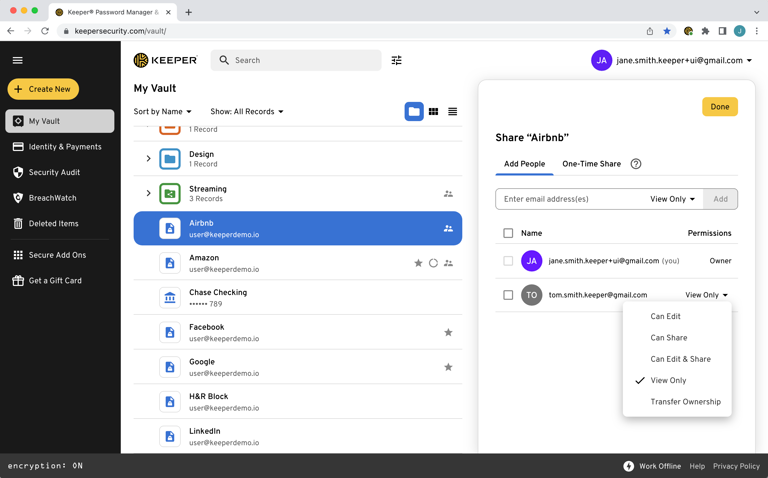
Use the permission dropdown to select the appropriate access level:
| Permission | Description |
|---|---|
| Can Edit | User can edit the record |
| Can Share | User can share the record |
| Can Edit & Share | User can edit and share the record |
| View Only | User can only view the record |
| Change Owner | User becomes the owner and controls permissions |
Step 4: Establish a sharing relationship
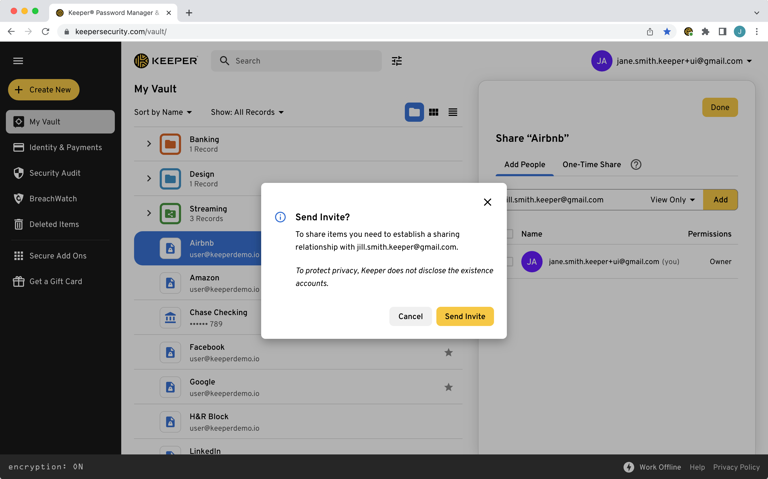
If this is your first time sharing with the user, Keeper will prompt them to accept the sharing request via email. Once accepted, the user becomes part of your trusted sharing relationship and can be selected in the future.
Keeper Business and Keeper Enterprise users within the same tenant typically already have an established sharing relationship and may not require approval.
Step 5: Manage or revoke access
Shared users appear on the record’s sharing screen, where permissions can be modified or access can be revoked at any time.
Start sharing securely with Keeper
Keeper makes secure sharing straightforward. You stay in control of access, permissions and oversight every step of the way. Whether you’re sharing a single password or collaborating across a team, Keeper helps ensure sensitive information is accessible only to the right people for the right amount of time.
Start a free personal or business trial today and experience secure sharing built for individuals, teams and enterprises.

