
 Password



Secure sharing in Keeper works by encrypting records with record-level encryption keys, enforcing granular permissions and giving administrators centralized policy control and audit visibility into how
4 min read
Published on May 05, 2026
New research shows Microsoft Edge loads all saved passwords into memory in plain text, and Keeper Forcefield is built to protect against exactly this kind of vulnerability.
A security researcher recently published a working tool called EdgeSavedPasswordsDumper that extracts credentials stored in Edge directly from the browser’s parent process memory. There is no exploit needed, just sufficient system privileges. Microsoft says the behavior is by design and hasn’t committed to fixing it, which means organizations that rely on Edge’s built-in password manager are left with an open exposure and no patch coming.
Here’s what the vulnerability actually is, why browser-based password storage creates this kind of risk in the first place and how Keeper handles it differently.
What is the Microsoft Edge password vulnerability?
When you save a password in Edge, it doesn’t just hold that credential in memory when you’re logging in somewhere. Edge loads all of your saved passwords into its parent process memory at once – every username and password sitting there in plain text any time the browser is open. An attacker, or malware with local access to the machine, can dump that memory and walk away with the full set of credentials.
The researcher also tested Chrome and Brave and didn’t see the same behavior, which suggests this is specific to how Edge integrates with Microsoft Password Manager rather than a flaw shared across Chromium-based browsers.
Standard Windows tools like Task Manager are enough to identify the right process and dump its contents. The researcher also built the Proof-of-Concept (PoC) in .NET Framework 3.5, a deliberate choice to avoid triggering modern security scanning tools like AMSI, meaning the attack can run on a compromised machine without setting off the defenses most organizations rely on.
Microsoft’s position, that this behavior is by design, leaves no remediation path for organizations waiting on a vendor fix. The only real answer is to remove passwords from being stored in Edge entirely.
Why storing passwords in your browser is a security risk
Edge’s vulnerability is a sharp example of a risk that comes with browser-based password storage. When credentials live inside a browser, they’re tied to that browser’s process. The question isn’t whether they’re in memory; they are whenever the browser is running. It’s how exposed that memory is and how hard it is to access.
Edge’s tight coupling with Microsoft Password Manager appears to make it significantly more vulnerable than other Chromium-based browsers. But the underlying problem, credentials accessible in browser memory to anyone with local access, isn’t unique to Edge. Infostealers, a category of malware built specifically to harvest credentials from browsers, have been targeting this attack surface for years.
Browser-based password management is convenient, and that’s exactly why people use it. But convenience and security pull in opposite directions here, and the Edge vulnerability is a useful illustration of what that trade-off actually looks like in practice.
How Keeper Forcefield protects against browser password theft
This is exactly the type of attack Keeper Forcefield is built to block.
On Windows, applications running under the same user account can access each other’s memory by default, which is precisely what EdgeSavedPasswordsDumper exploits. Keeper Forcefield addresses this at the kernel level by installing a lightweight driver that monitors and restricts memory access to protected applications. When an untrusted process attempts to read the memory of a protected app, the driver blocks it. Trusted system processes continue to function normally; only unauthorized access is stopped.
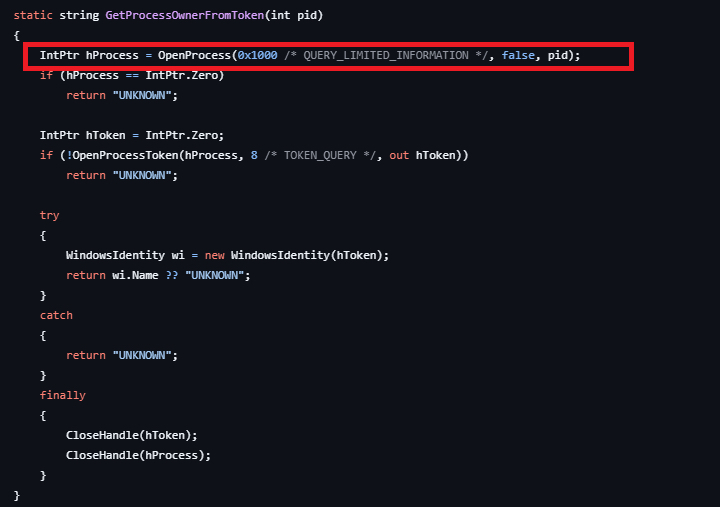
Where this becomes concrete is at the OpenProcess call highlighted in the code screenshot above. That’s the step where the dumper attempts to attach to Edge’s parent process and read its memory. On a machine running Keeper Forcefield, that call fails. The kernel driver intercepts the access request before any memory can be read, cutting the attack off at the step it depends on.
Keeper Forcefield protects both Keeper’s own applications and major browsers, including Chrome, Firefox, Edge, Brave, Opera and Vivaldi, so the protection applies regardless of which browser your organization uses. It runs silently in the background without affecting system or application performance and can be activated directly from the Keeper Desktop app or deployed silently across endpoints via Intune, Group Policy or an RMM tool.
How to protect your passwords from the Microsoft Edge vulnerability
If your organization uses Edge’s built-in password manager, any machine with Edge open has your credentials sitting in plain-text memory. On a compromised or shared machine, that’s a straightforward path to a breach.
The practical fix is to move passwords out of the browser and into a dedicated password manager like Keeper that operates independently of the browser process. If credentials are never stored in browser memory, there’s nothing to pull from it. Enabling Keeper Forcefield on top of that adds kernel-level protection across your browsers, blocking unauthorized processes from reading application memory even if malware is already running on the machine.
The bottom line
Organizations can’t wait for a vendor patch that isn’t coming. If your team uses Edge’s built-in password manager, the exposure is active right now. Move credentials into a dedicated password manager and deploy Keeper Forcefield to ensure that even if a machine is compromised, there’s nothing in browser memory to extract.
To see how Keeper Forcefield protects your organization’s endpoints, start a free Keeper Password Manager Business Trial today.

