
 Password




New research shows Microsoft Edge loads all saved passwords into memory in plain text, and Keeper Forcefield is built to protect against exactly this kind of
5 min read
Published on February 20, 2026
Many teams share credentials in Slack out of convenience, but this seemingly harmless habit introduces serious security and compliance risks. From accidental exposure to unauthorized access, sharing passwords in Slack can create major vulnerabilities across your organization.
Keeper’s Slack workflow replaces risky password sharing in Slack with secure, Just-in-Time (JIT) access requests and approvals. With the Keeper Slack app, employees can request access to records, shared folders and resources directly from Slack, eliminating the need to manually share passwords or secrets in plaintext insecurely.
Continue reading to learn why password sharing in Slack can jeopardize your organization’s security and the benefits of Keeper’s Slack integration.
Why password sharing in Slack puts your organization at risk
Slack is a useful collaboration tool, but it isn’t made to be a secure system for sensitive information, especially passwords. Despite its security limitations, many teams still share credentials in Slack channels or chats for convenience and speed. This practice of sending sensitive information via Slack increases the number of security risks organizations face. Here are some of the main risks associated with sharing credentials in Slack:
- No access controls or expiration: Once a password is sent in a Slack channel, anyone with access to the message or the channel can view and reuse it. There’s no way to enforce time limits, revoke access or control how the credentials are used after they’ve been shared.
- Limited auditability and visibility: Slack provides message-level audit logs, but it does not track how or when a shared credential is used after it has been exposed. This lack of credential-level traceability or accountability makes it impossible to audit credential usage or investigate suspicious activity.
- Permanent exposure across searchable channels: Credentials shared in Slack channels or private chats are typically retained according to workspace policies, making them easily searchable to anyone with access to the conversation. After months or even years, someone could discover old credentials, increasing the risk of unauthorized access.
- No password rotation enforcement or revocation: Slack lacks the ability to enforce password rotation or automatically revoke exposed credentials. If a shared password is compromised in Slack, you must rely on someone manually going into a channel or chat and deleting it, then rotating the credential elsewhere to prevent further misuse.
- Failure to meet compliance requirements: Regulatory frameworks such as SOC 2, ISO 27001 and HIPAA require granular access controls and the secure handling of credentials. Sharing passwords in Slack without any protection against unauthorized access can jeopardize your organization’s compliance posture.
How Keeper’s Slack app replaces password sharing in Slack
Keeper’s Slack app provides a secure alternative to sharing passwords insecurely in Slack channels or chats. Instead of pasting credentials directly into messages, users request access to sensitive resources without ever seeing or handling the credentials themselves. The app integrates with Keeper’s security architecture while preserving zero-knowledge encryption and full control over sensitive workflows. Since every action happens in Slack, requests are routed to the right approvers in real time, and access is granted or denied directly without switching tools.
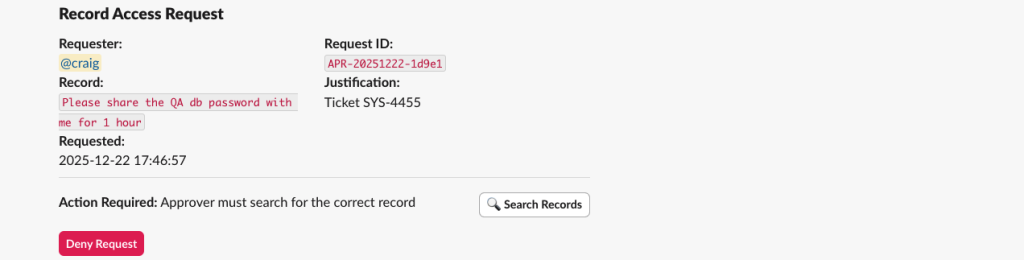
Keeper’s Slack integration supports access requests with full context, including justification and how long users need access. Teams can also generate One-Time Share links, which are self-destructing and time-limited for temporary access — ideal for third-party vendors, contractors or emergency use. Additionally, Keeper’s Slack integration handles privileged access approvals, such as endpoint privilege manager approvals or Single Sign-On (SSO) cloud device approvals, in real time without leaving Slack.
Key benefits of Keeper in Slack
With Keeper’s Slack app, users maintain strong access controls without sacrificing efficiency or collaboration, helping ensure your modern team communicates securely. Here are some benefits of integrating Keeper with Slack:
- Prevents credentials from being stored in Slack messages: Passwords are never exposed or shared in plaintext, reducing the risk of unauthorized access. Whether a user needs a one-time login to a third-party tool or temporary access to a folder, Keeper provides it via Slack without putting sensitive information at risk.
- Streamlines access without delays: By integrating secure access workflows directly into Slack, Keeper keeps credentials out of chats and unnecessary channels. Users can receive access faster, since admins can approve requests in real time with no tool switching or manual coordination necessary.
- Supports JIT access with full visibility: Every request and approval is logged, time-limited and policy-enforced, in accordance with internal security policies and compliance standards.
When to use Keeper’s Slack app
Keeper’s Slack integration helps organizations eliminate risky password sharing while streamlining secure access workflows. Some of its most common use cases include:
- Access requests tied to real Slack conversations: Users can request Keeper access directly without leaving Slack. The justification for access is already captured in the conversation, so approvers can review the request, see why access is needed and grant time-limited access in real time.
- Emergency access to production credentials: When developers or IT teams need immediate access to a production system, they can request credentials via Slack using slash commands, including justification and a set access duration. Once admins receive the request, they can approve it in real time directly in a dedicated Slack channel, eliminating delays and password exposure.
- Temporary access for contractors and third parties: Contractors often need short-term access to internal tools or systems. With Keeper’s Slack integration, teams can generate One-Time Share links for specific records directly from Slack. These self-destructing links are encrypted and governed by access policies, so users don’t have to share credentials insecurely in plaintext.
- JIT access for privileged accounts: For accounts with elevated permissions, Keeper replaces storing privileged credentials in Slack with secure JIT access requests. Users request privileged access with context and time limits, and admins approve the request directly in Slack, preserving Zero Standing Privilege (ZSP) and ensuring no credentials are ever revealed.
Take control of access with Keeper’s Slack approval workflow
Sharing passwords in Slack may be convenient, but without a secure integration like Keeper, this habit creates long-term security risks that modern organizations can easily avoid. Slack was built for collaboration, not for managing access to sensitive information like privileged credentials. Keeper provides a practical alternative by keeping credentials out of Slack messages while still giving teams the speed and flexibility they need to remain productive. Without disrupting how teams already work, Keeper provides organizations with full auditability, granular control and real-time approval workflows for access requests and password sharing.
Explore our documentation to learn how to deploy Keeper’s Slack integration and eliminate insecure credential sharing in your Slack environment today. Want to learn more from one of our security experts? Request a demo.

