
 Cybersecurity



Although Jira serves as the system of record for many DevOps and IT teams, retrieving secrets or approving requests for privileged information often occurs on other
3 min read
Published on February 17, 2026
With Keeper’s Slack workflow integration, users can request and approve secure access to credentials, records and elevated privileges directly in Slack, without switching tools or sacrificing visibility. By bringing secure access requests and approvals into Slack, Keeper delivers a simple and secure way to enforce least-privilege access through policy-driven workflows without slowing down operations.
Continue reading to learn what Keeper’s Slack workflow integration does, how it works and why you should use it in your organization.
What is Keeper’s Slack workflow integration?
Keeper’s Slack workflow integration is a secure, zero-knowledge cybersecurity solution that brings access requests and approvals directly into Slack, where teams already communicate and collaborate. Keeper’s Slack integration helps organizations enforce Zero Standing Privilege (ZSP) by ensuring access to sensitive credentials and systems is requested, approved and granted for a limited time, and only when necessary.
Rather than operating as a cloud-hosted approval service, Keeper’s Slack workflow integration works directly with the Keeper Vault to manage access requests, including standard password manager records and shared folders. To enable secure access requests, the Keeper Slack workflow integration requires either a Keeper Secrets Manager or KeeperPAM license. Requests made in Slack are securely communicated to and executed through Keeper Commander, which is customer-hosted to preserve end-to-end encryption and Keeper’s zero-knowledge architecture. Slack never gains access to the records themselves — only encrypted approval metadata is exchanged.
How the Keeper Slack app works
The Keeper Slack integration follows a secure request-and-approval process that connects Slack to Keeper via a customer-hosted workflow, ensuring access is granted only when approved and without exposing sensitive data. Here’s how the Keeper Slack integration works:
- Deploy Keeper Commander: Keeper Commander runs in Service Mode on a customer-hosted Linux Virtual Machine (VM) using Docker. It securely processes Slack requests and communicates with Keeper using outbound-only HTTPS connections.
- Configure the Keeper Slack app: The Keeper Slack app is installed in the user’s Slack workspace and connected to a private channel to handle approvals.
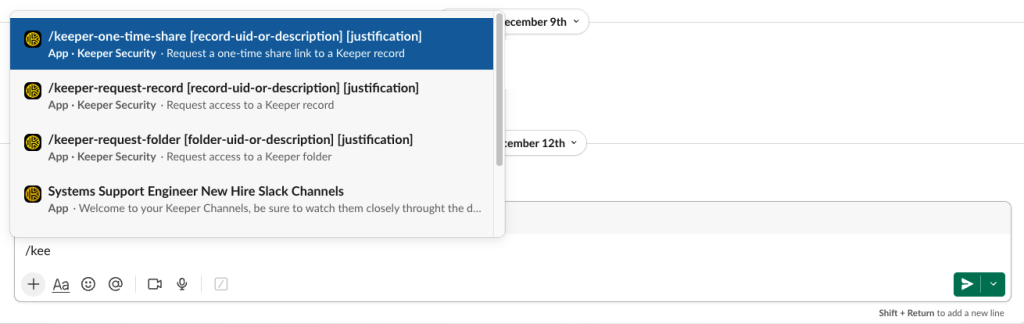
- Submit an access request in Slack: Once the Keeper bot is invited to the private approvals channel, users can request access to records, shared folders, One-Time Share links and SSO cloud device approvals using Slack slash commands and by submitting a justification for their request.
- Request is validated and routed for approval: Keeper Commander receives the access request, validates it and posts it to the designated Slack approvals channel. The request includes context such as the requester, their justification and requested access duration.
- Approvers review the request and take action in Slack: Approvers either approve or deny requests directly in Slack, and decisions are immediately sent to Keeper Commander for enforcement.
- Keeper enforces the decision automatically: If the request is approved, Keeper grants time-limited access to the user and automatically revokes it once the set time expires.
- All activity is logged for compliance and auditing purposes: Every request, approval and access change conducted via Keeper’s Slack app is recorded in Keeper. This enables security teams to maintain a detailed audit trail without manually tracking activity.
Why use Keeper’s Slack workflow integration?
Keeper’s Slack workflow integration helps organizations secure access without disrupting how modern teams work. By embedding policy-driven approvals directly into Slack, Keeper improves not only security but also productivity, maintaining its zero-knowledge architecture while fitting naturally into how users typically work.
Maintains zero knowledge
Keeper’s zero-knowledge security architecture ensures sensitive data is never exposed to Keeper or Slack. Secrets remain end-to-end encrypted and are processed only within the user’s own infrastructure, preserving control over privileged credentials.
Accelerates productivity
By integrating Keeper with Slack, secure access requests and approvals can happen where work already takes place. Rather than switching between systems or vaults, users and approvers can request, review and approve access directly in Slack. This convenience reduces friction and helps teams move faster without sacrificing security.
Reduces risk exposure
Keeper’s Slack workflow integration enforces least-privilege, Just-in-Time (JIT) access by eliminating standing privileges and insecure credential sharing. Access is granted only after approval, is limited to the minimum required permissions and is automatically revoked once it expires.
Fits into existing workflows
Slack is a tool that many teams already use regularly to collaborate and communicate. Since Keeper integrates seamlessly with Slack, there’s no need to train users on how to use a new approval tool. This makes adoption easier and ensures processes are consistently followed across the organization, reducing unsafe workarounds.
Auditable by design
Every access request, approval and enforcement action is automatically logged within Keeper. This helps security teams gain a complete understanding of what actions are being taken to support regulatory compliance requirements and incident response.
Fully automated
The Slack workflow can be configured to automate from request to enforcement. To enable this service, Keeper’s Slack integration requires either Keeper Secrets Manager or KeeperPAM. When using Keeper Secrets Manager, configuration data and secrets are retrieved securely without being handled manually, reducing the risk of misconfiguration.
Bring secure access control into Slack
Modern organizations can no longer rely on scattered tools or manually processing secure access requests and approvals. Keeper’s Slack integration brings access requests, approvals and enforcement into one secure workflow without disrupting how teams already work. By combining JIT access and zero-knowledge encryption, Keeper seamlessly integrates into Slack and helps organizations reduce unauthorized access and enhance productivity.
To see how Keeper’s self-hosted Slack workflow fits into your organization, read through the setup documentation and begin implementing secure access approvals in Slack today. Want to learn more from one of our security experts? Request a demo today.

