
 Cybersecurity


AI governance reduces security risk by enforcing least-privilege access, protecting the data and credentials AI systems handle and making every AI action auditable. This matters because
Content originally created and published by Venak Security.
Cybercriminals are increasingly adopting stealthy and advanced techniques, notably Dynamic-Link Library (DLL) side-loading and browser memory scraping, to install malware that stealthily harvests users’ passwords, credit card data, cookies, session tokens and more. These attacks blend social engineering, search manipulation and memory-level exploitation to bypass traditional defenses and compromise victims at scale.
What is DLL side-loading?
DLL side-loading is an attack technique in which a legitimate program is tricked into loading a malicious DLL due to weaknesses in how Windows searches for DLLs. This lets attackers execute harmful code under the guise of trusted software.
SEO poisoning and DLL side‑loading to steal browser data
A well-documented campaign attributed to the Black Cat cybercrime gang uses SEO poisoning to drive victims across China to bogus download pages pretending to offer popular software. Victims who click “Download” end up installing a program that orchestrates DLL side-loading, which then launches a backdoor to steal browser data, including stored passwords, credit card information, keystrokes and clipboard contents.
Between January 7 and January 20, 2026, roughly 277,800 hosts were compromised in this campaign, and attackers siphoned valuable data and crypto assets.
How does memory scraping work?
When you log in to a website, your browser decrypts stored credentials, session tokens and autofill data so they can be used seamlessly. For a brief moment, this information resides in plaintext within the browser’s process memory. Attackers exploit this window by injecting malicious code or leveraging infostealer malware that scans memory directly.
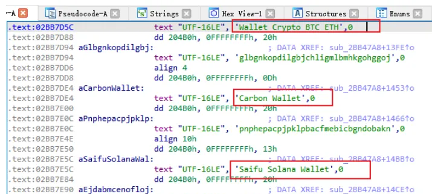
Key targets include:
- Session tokens: Allow attackers to hijack active sessions without needing a password.
- Autofilled passwords: Extracted before they are encrypted or masked.
- Credit card details: Captured during checkout processes when browsers temporarily hold them in memory.
- Crypto wallets: Many browser-based or extension-based cryptocurrency wallets (such as MetaMask or browser-integrated Web3 wallets) temporarily store private keys, seed phrases or transaction signing data in memory during use. Infostealers can scrape this sensitive information directly from the browser’s process space, enabling attackers to drain funds, impersonate wallet owners or transfer assets without authorization. Unlike traditional banking credentials, stolen wallet keys provide direct and irreversible access to digital assets, making them one of the most lucrative targets for memory scraping malware.
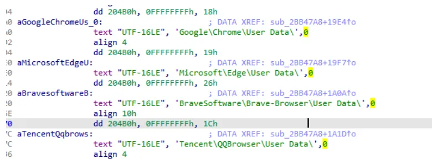
This method bypasses many traditional defenses because it doesn’t rely on files or logs; it lives entirely in the ephemeral world of RAM.
Other recent malware campaigns using DLL side-loading and data theft
PXA Stealer: Global infostealer using DLL side-loading
Security researchers uncovered a sophisticated credential-stealing malware called PXA Stealer that has infected systems in over 60 countries, including major Western and Asian regions.
Key characteristics of this campaign include:
- Delivery via phishing or malicious downloads that bundle legitimate signed software (e.g., PDF reader or Word) with a malicious DLL.
- The DLL is side-loaded into the signed program and initiates malware execution.
- The final payload exfiltrates over 200,000 stolen passwords, hundreds of credit card records and more than 4 million browser cookies.
- The data harvested includes saved credentials, browser autofill information, authentication tokens and even data from crypto wallet extensions.
- Exfiltration occurs via Telegram-based infrastructure tied to automated bots serving underground markets.
This malware shows how attackers have evolved beyond simple installers into multi-stage side-loading chains that invisibly compromise browser data, making detection extremely difficult.
GOLD BLADE/RedLoader: DLL side-loading for remote access
Another example is the GOLD BLADE threat group’s ongoing campaign, which uses remote DLL side-loading techniques to deploy a malware loader known as RedLoader. This activity, observed in mid-2026, involves delivering malicious payloads through DLL side-loading via manipulated LNK shortcuts and remote WebDAV execution.
While the primary goal of RedLoader is remote control and persistence (which often precedes additional malware installation), this technique underscores how DLL side-loading consistently serves as a stealthy execution vector for broader malicious toolkits.
Why antivirus solutions struggle
Traditional antivirus solutions are designed to detect malicious files, signatures or suspicious activity on disk. Memory scraping and DLL side-loading, however, leave no obvious footprint. Since the attack occurs in real time within the browser’s process space, detection requires advanced behavioral monitoring and memory analysis, capabilities that many legacy solutions lack.
This makes memory scraping particularly insidious:
- No disk artifacts: Harder to obtain forensic evidence.
- Stealthy execution: Minimal impact on system performance, reducing suspicion.
- Real-time theft: Credentials are stolen as they are used, not just when stored.
The growing threat of infostealer malware
Infostealers such as RedLine, Raccoon and Vidar have popularized memory scraping techniques, often sold as Malware-as-a-Service (MaaS) on underground forums. These tools are inexpensive, easy to deploy and devastatingly effective.
Attackers increasingly prefer memory scraping because:
- It bypasses password managers and browser encryption.
- It grants immediate access to live sessions, including banking portals and corporate dashboards.
- It scales easily, enabling mass theft campaigns with minimal technical expertise.
How to protect against DLL side-loading and memory scraping
1. Avoid untrusted downloads
The most common entry point for these attacks is deceptive download pages and phishing lures. Always verify the source of software downloads and avoid clicking search results that look suspicious or unfamiliar.
2. Use advanced browser protection
A specialized solution like Forcefield from Keeper Security adds an essential layer of defense by:
- Preventing unauthorized access to browser process memory
- Blocking DLL injection and side-loading techniques
- Isolating passwords, credit cards and sensitive browser data from malware attempts to scrape memory
This type of protection hardens browsers specifically against the kinds of memory-level exploits used by attackers like Black Cat and other infostealers.
The bottom line
Cybercriminals are no longer satisfied with simple phishing scams or generic malware. By combining SEO poisoning, social engineering, stealthy DLL side-loading and browser memory extraction, modern campaigns can pilfer thousands of passwords and financial details with minimal detection.
Staying secure in 2026 and beyond requires both user vigilance and advanced memory-level protections, such as browser defense software like Keeper Forcefield that stops attackers from accessing process memory — the true treasure trove of user credentials and financial data.
Want to see Keeper Forcefield in action? Download it today.

