
 Product Announcements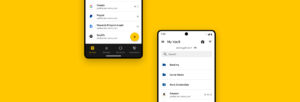

With the release of Desktop and Web Vault Update 17.4, Keeper Security’s desktop app is now available on the Linux Snap Store, bringing zero-trust, zero-knowledge password
Keeper Security is excited to announce a significant update to our Android app that we think users will love. This update is heavily focused on bringing the same fresh, modern look to our Android user interface that our Web and Desktop received earlier this year and iOS just last month. The highly anticipated release incorporates improved usability and a distinctly light and modern theme. Upon logging in, users are presented with friendly elements and a clean design for easy reading and navigation on smaller screens.
Keeper has also made Android device-specific improvements to enhance the mobile user experience, including a refresh of the bottom navigation bar to make the My Vault, Favorites, Two-Factor and BreachWatch® screens more accessible to users.
With KeeperFill®, Autofilling on Android Has Never Been Easier
If you’ve been a Keeper user for a while now, you are probably familiar with Keeper’s in-app web browser. This new release streamlines the autofill process by removing the in-app browser and instead utilizes Keeper’s native autofill feature, KeeperFill, which is integrated into your device’s keyboard. Enabling KeeperFill is easy! From Keeper’s settings menu, toggle KeeperFill on and follow the prompts that will enable Keeper as your device’s default autofill service. To fill passwords on websites and apps, simply tap the KeeperFill button that now appears above your device’s keyboard. You will also notice an option to search for a record in your vault or even create a new record. By autofilling your credentials with KeeperFill, you will best utilize all that Keeper for Android has to offer and be able to quickly and securely autofill credentials into apps and sites.
Visit the Google Play Store on your device to install the latest version of Keeper Password Manager for Android.

