功能: KeeperDB

Database access with built-in session recording, threat detection and access control

KeeperDB 以安全且可审计的访问方式,直接从 Keeper Vault 替代传统的非托管数据库工具。

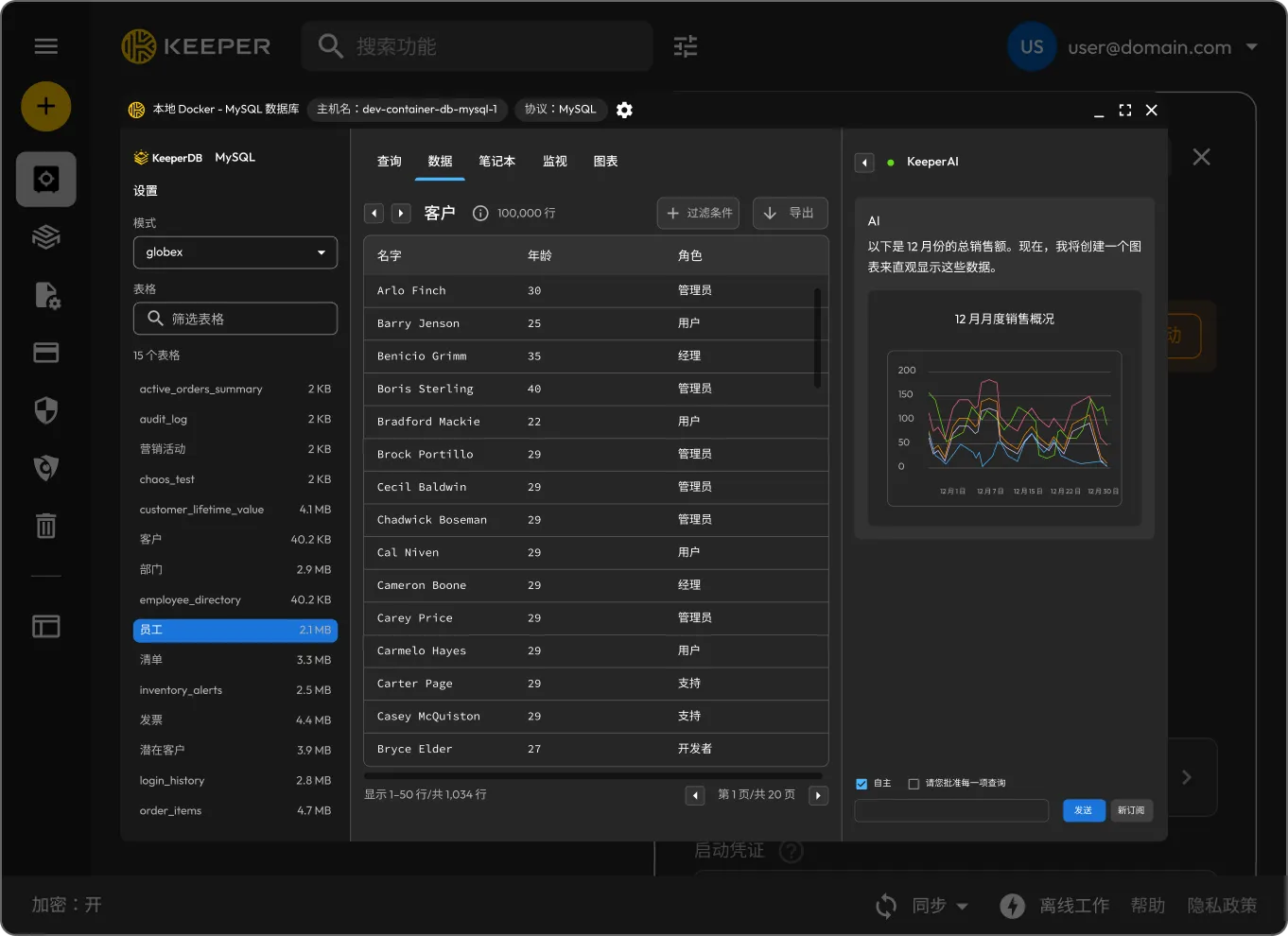
Keeper interface showing a local MySQL database table with Keeper AI generating a monthly sales visualization.
包含 ID、姓名、年龄和角色列的用户表,列出了多位人员(如 Brenda Kelley),其角色包括管理员和经理等。

What is KeeperDB?

KeeperDB 是一款内置的数据库管理界面,允许特权用户直接从 Keeper Vault 安全地访问、查询和管理数据库。

从保管库一键启动

用户可以直接从 Keeper Vault PAM 数据库资源记录启动 KeeperDB 的可视化界面。

本地 Docker MySQL PAM 数据库的连接设置,显示主机名 dev-container-db-mysql-1 与端口 3306,并配有启动 KeeperDB 按钮。
完全隔离和全面可见性

完全隔离和全面可见性

KeeperDB 完全集成在 Keeper 远程浏览器隔离环境中。用户设备上不会存储或暴露任何凭据,所有操作均会被记录。

支持多协议,并搭配现代化 AI 功能

通过统一界面与主流数据库协议进行交互,实现数据查询、在 Scratchpad 中编写与优化 SQL,并利用自动补全和 KeeperAI 聊天功能,=提升工作效率。

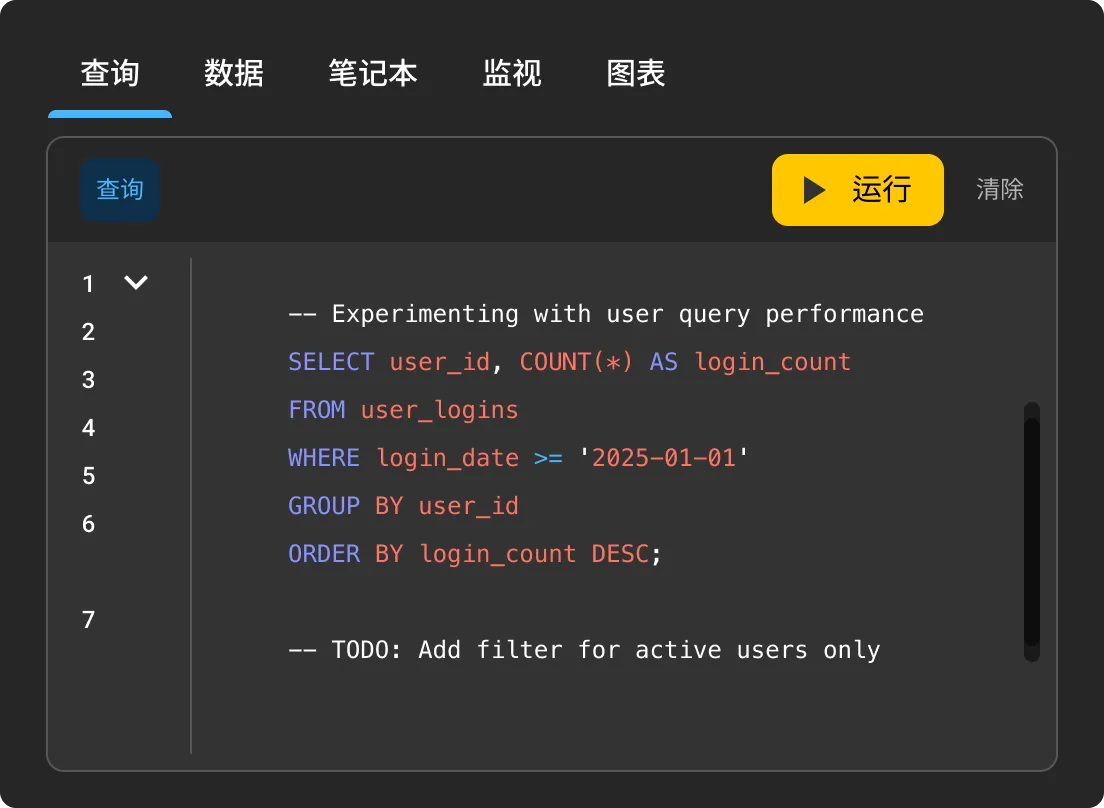
Scratchpad,包含一条 SQL 查询,用于统计 2025-01-01 以来的用户登录次数,按 user_id 分组并按 login_count 排序。
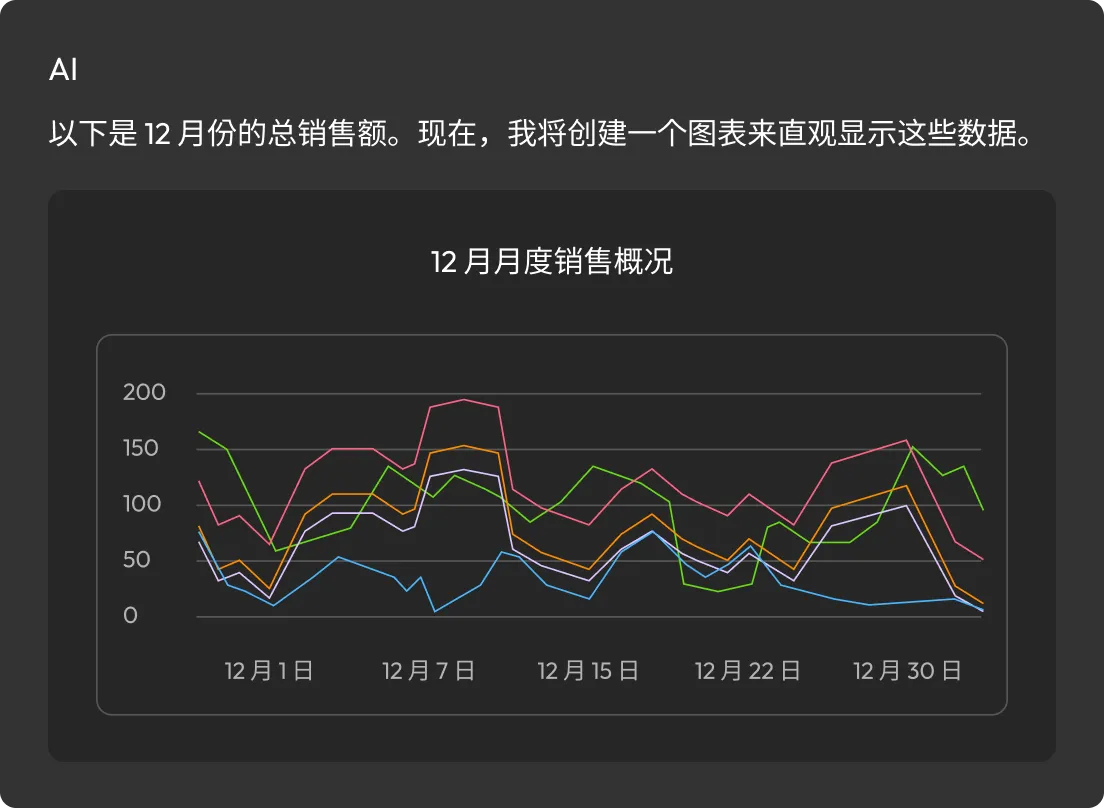
KeeperAI 聊天界面显示绘制过去 30 天平均订单金额的提示,同时展示订单金额分布的环形图。

自主 AI 助力安全数据库交互

KeeperAI 提供了一种隔离且安全的数据处理方式。用户可使用自然语言提问,生成并优化 SQL,还能直接从保管库将查询结果转化为图表或摘要。

实时 (JIT) 访问

通过 Slack、Jira、ServiceNow 和 Teams 等热门平台,使用具有限时访问权限的临时帐户申请并审批数据库访问权限。

Security shield connected to Slack, Microsoft Teams, Jira, and a chat support icon.
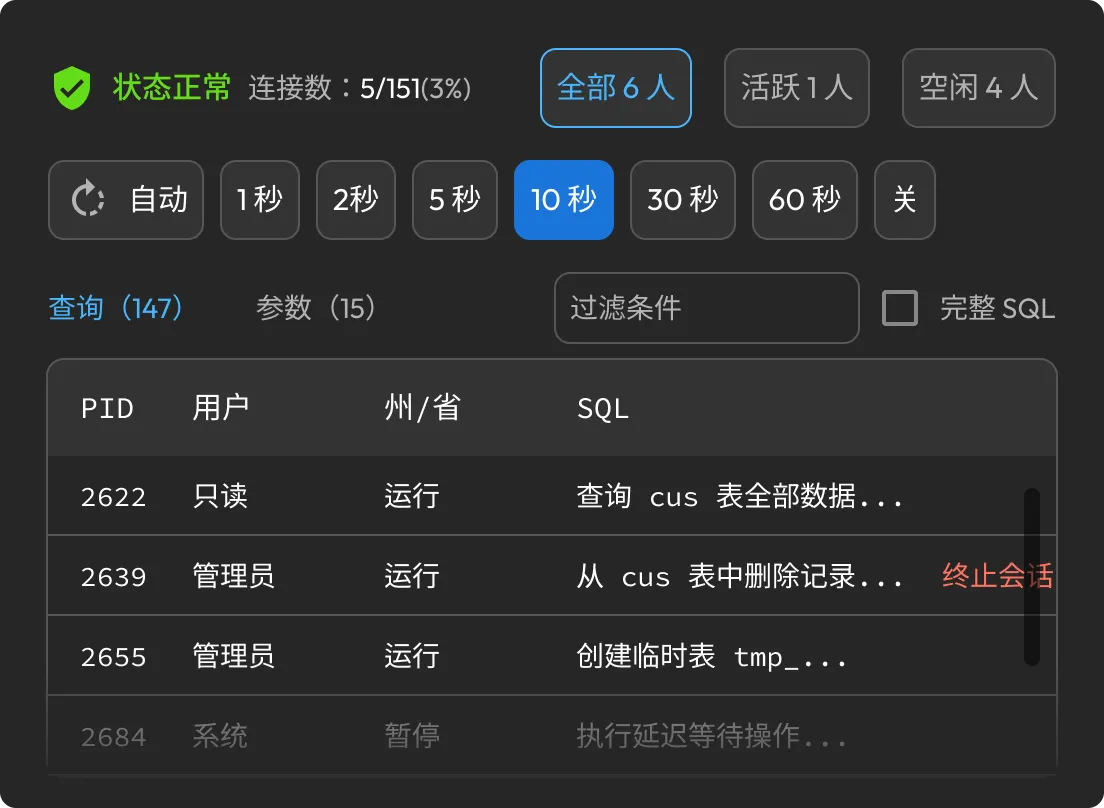
Database monitor dashboard showing connection health, query filters, and running SQL processes.

Real-time database monitoring and query management

Monitor and manage live activity across all protected databases with real-time query analysis, blocking query and lock detection, active process visibility, instant query termination, continuous health monitoring and an AI-powered assistant for performance analysis, issue identification and remediation guidance.

KeeperDB 与其他数据库工具有何区别?

Database graph view showing an active orders summary table with column names and data types.

现代化数据库体验

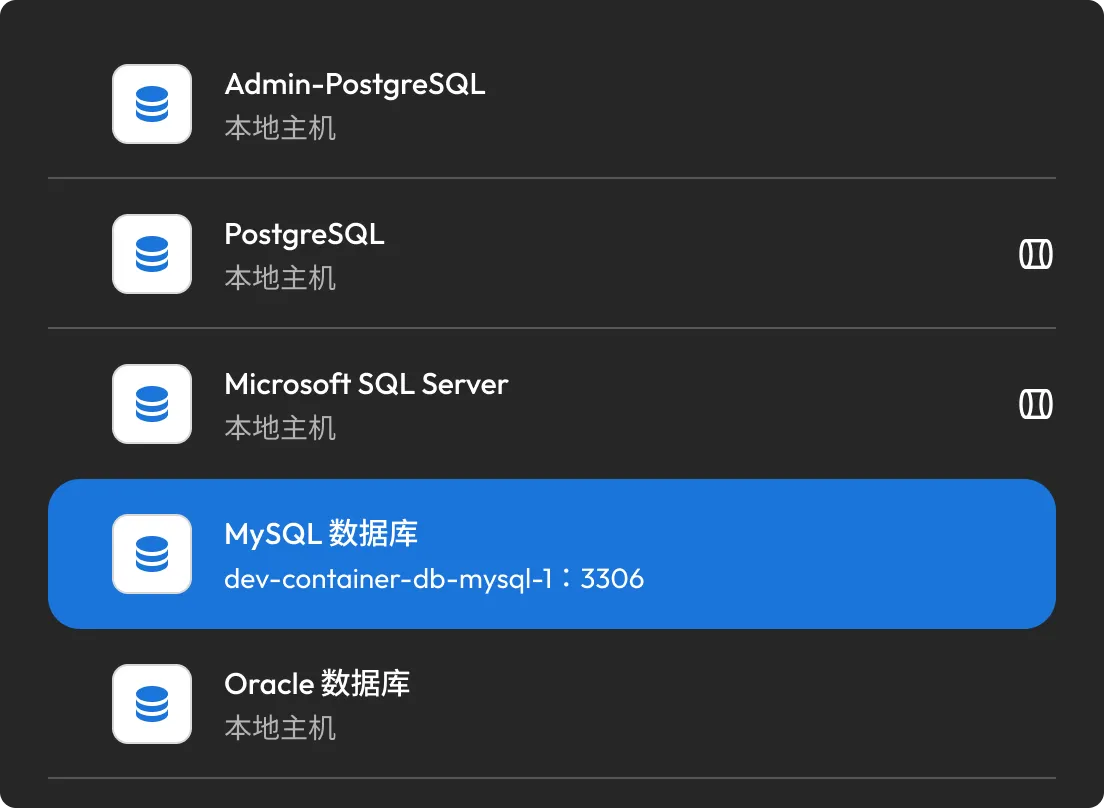
KeeperDB 为 CLI 和传统工具提供替代方案,采用现代化实现数据库界面的可视化。用户可以轻松浏览表格、执行查询并与数据源进行交互。

数据库连接列表,展示 PostgreSQL、Microsoft SQL Server、MySQL 和 Oracle。

无需暴露凭据即可实现更强的安全性

数据库凭据永远不会在用户设备上共享或存储。所有活动均实现无密码、零信任并完整记录,同时制定策略防范数据外泄。

用户标签页包含用于搜索电子邮件或团队名称的搜索栏,表格展示 Engineering East、Engineering West 团队及其权限设置。

为分布式团队提供简单、安全的访问权限

用户可在任意网络浏览器中,直接从 Keeper Vault 访问数据库。无需使用 VPN、桌面工具,也无需进行本地设置。

录音列表展示电子邮件名称、时间戳、时长及播放/下载图标。

内置可审计能力,满足合规要求

KeeperDB 将数据库访问转变为完全可审计的流程,提供会话录制、详细日志与持续监督。

专为需要访问敏感数据的团队设计

DBAs and DevOps teams

Manage production and staging databases with zero-trust, passwordless access. All activity is fully screen recorded and governed by centralized policies, with no local credentials or unmanaged tools.

Support and customer success

Grant short-lived, tightly scoped access to internal or customer databases for troubleshooting. Read-only permissions, full session recording and exfiltration controls protect sensitive data.

Regulated and high-security environments

Enforce strict database access controls across regulated industries such as finance and healthcare. All access is logged, recorded and centrally governed without scattering tools or credentials across endpoints.

常见问题解答

KeeperDB 能否替代数据库工具?

KeeperDB 可替代日常访问、查询和故障排查常用的多款数据库工具,如 MySQL Workbench、DBeaver 和 SQL Server Management Studio,在需要安全、审计和访问控制的场景中尤为适用。

尽管部分团队仍可能使用专用工具处理高级工作流程,但 KeeperDB 将安全的数据库访问整合至 Keeper Vault,消除了对非托管桌面工具、共享凭据和管理盲区的依赖。

KeeperDB 相比传统数据库工具,安全性体现在哪些方面?

传统数据库工具会在本地暴露凭据,且对用户操作的可见性不足。KeeperDB 提供无密码访问,执行集中化策略并录制所有会话。

KeeperDB 是否支持多种数据库类型?

是的,KeeperDB 支持主流数据库平台,包括 MySQL、PostgreSQL 和 Microsoft SQL Server,所有连接均采用统一的界面和策略模型。

与 CLI 访问相比,是否存在功能限制?

KeeperDB 具备与 CLI 数据库访问完全一致的功能。CLI 支持的所有功能,KeeperDB 均已支持,同时还增强了界面功能。

Keeper 是否支持使用原生数据库工具?

是的,KeeperPAM 支持“隧道”功能,允许用户使用本地安装的数据库应用程序,如 MySQL Workbench。查询通过 Keeper 平台进行安全代理并录制会话,无需共享凭据。

访问权限是否可以受限?

可以,管理员可以授予短期访问权限、强制执行只读会话,并控制数据导出、导入等数据移动操作。

注册免费试用

立即购买