Keeper 对比 1Password:
谁更胜一筹?

探索 Keeper 与 1Password 之间的终极对比。了解哪款密码管理器在安全性、功能和可用性方面更胜一筹。获取所需见解,以便为您的员工、设备和数据选择合适的保护措施。

起价仅
 
 
/用户/月 *zzgl MwSt *Includes GST
个人用户

额外福利!包含为每位团队成员提供免费 Family 方案。

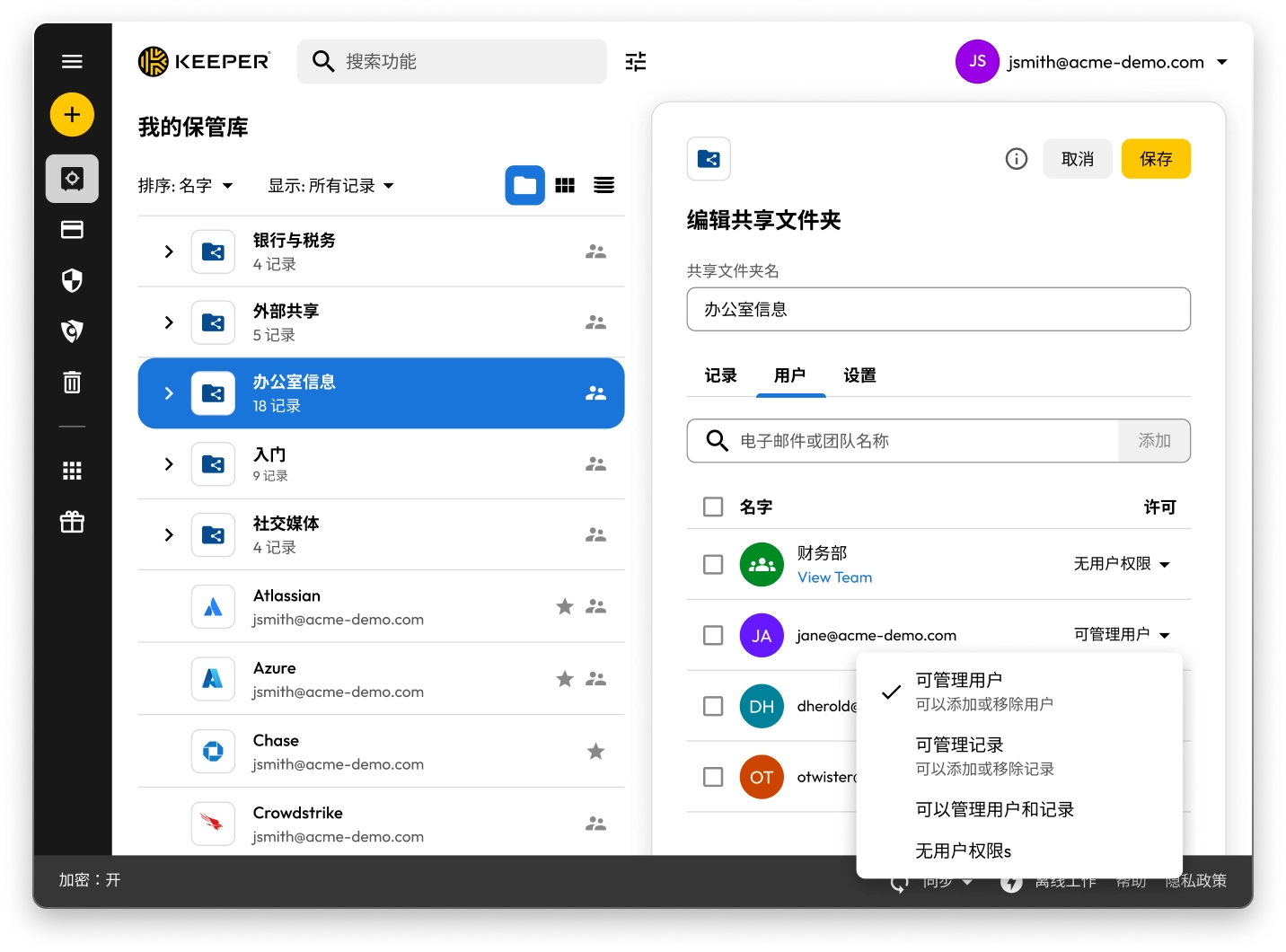
显示共享文件夹和记录的 Keeper 保管库界面。“办公室信息”的“编辑共享文件夹”面板已打开,显示用户权限,并提供管理用户、管理记录或不分配权限的选项。

Keeper vs 1Password: Side-by-side comparison

Keeper
1Password
Security architecture and encryption model

Keeper's zero-knowledge architecture encrypts every individual record and folder with its own unique AES-256 key, with all encryption and decryption performed locally on the user's device. Keeper's "Transmission Security" adds a second layer – TLS 1.3/1.2 plus an additional 256-bit AES transmission key – covering all data communications, not just authentication. HSM integration in AWS provides super-encryption at rest.

Keeper Forcefield technology protects against memory-based attacks that specifically target password managers.

Keeper's self-managed BreachWatch® dark web monitoring runs entirely within its own infrastructure using an HSM-protected architecture, so breached passwords are never correlated against vault data outside Keeper's systems.

Keeper holds 10 issued U.S. patents covering its zero-knowledge architecture, SSO, breach detection and secure messaging, with four more pending.

Based on publicly available documentation, 1Password uses a vault-key-based encryption model: individual items are encrypted using keys derived from that vault key, rather than each having an independently generated key. Its SRP protocol handles authentication; data in transit is protected by TLS, though this operates separately from 1Password's credential encryption architecture.

For dark web monitoring, 1Password's Watchtower feature integrates with Have I Been Pwned using a k-anonymity API, which transmits only a partial hash rather than the full credential.

1Password provides basic memory protection only, leaving users more exposed to advanced malware techniques that target password managers.

1Password (AgileBits Inc.) holds at least one issued U.S. patent.

Authentication, Single Sign-On (SSO) and provisioning

Keeper uses multi-layered authentication that combines a master password with device verification, providing an approach that is both attack-resistant and simple for end users.

Keeper has been in enterprise SSO production since 2016, holds patents on its SSO implementation and supports complex multi-provider configurations with no additional software required.

SCIM provisioning works directly with any Identity Provider (IdP) without any software installation.

Based on publicly available documentation, 1Password's dual-factor approach, an account password plus a secret key, can introduce complexity and potential access issues.

SSO support has expanded to multiple identity providers, though deployment requires additional configuration steps compared to Keeper's no-software-installation approach.

SCIM provisioning requires deploying a self-hosted SCIM Bridge in either an on-premises or cloud environment, though 1Password now offers hosted provisioning for Entra ID and Okta users.

Platform capabilities and Privileged Access Management (PAM)

KeeperPAM combines enterprise password management, secrets management, connection management, privileged session management and Remote Browser Isolation (RBI) in a single cloud-native, zero-knowledge interface.

Remote Browser Isolation creates isolated browser sessions for internal and cloud applications, eliminating the need for VPNs.

Keeper Endpoint Privilege Manager enforces Just-In-Time (JIT) access and least privilege directly on user devices, with automatic privilege revocation on session termination.

Keeper Secrets Manager is fully cloud-based with CLI, REST APIs, Terraform and CI/CD pipeline support. No on-premises infrastructure is required.

Keeper also offers over 80 distinct permissions across 14 categories for granular enterprise access control.

1Password is a password manager that has expanded into an Extended Access Management platform covering device trust, SaaS visibility and app access governance. It does not offer the privileged access management capabilities that enterprises typically require, including RBI, JIT or zero-standing privilege capabilities, or the ability to enforce least privilege on endpoints.

For secrets management, 1Password Secrets Automation offers two paths: Service Accounts for lighter use cases or a self-hosted Connect Server deployed in the customer's own infrastructure for teams needing more control, scalability and higher request limits. Both require configuration and ongoing maintenance within the customer's environment.

1Password has 12 vault-based permissions with limited granularity for enterprise access control.

Database access management

KeeperDB provides secure, zero-knowledge remote access to databases, including MySQL, PostgreSQL, SQL Server and more, directly through the browser with no client software required. Access is governed by role-based policies, full session recording and audit logging, ensuring every database interaction is tracked and compliant. Credential injection means users never see or handle the underlying database passwords directly.

Based on publicly available documentation, 1Password has no database access or management capabilities. Organizations using 1Password for database credentials must rely on manual credential retrieval and separate tooling to manage and audit database sessions, with no native session recording or policy enforcement.

AI-powered security and automation

KeeperAI brings intelligent automation to privileged access management. It monitors privileged sessions in real time and can automatically terminate a session when suspicious activity is detected. KeeperAI also assists with policy creation, access reviews and anomaly detection, reducing the manual overhead of managing a large privileged access environment while continuously strengthening security posture.

Based on publicly available documentation, 1Password has no AI-powered privileged session monitoring, real-time anomaly detection within sessions or automated security response capabilities such as automatic session termination upon detecting suspicious activity.

While 1Password's recently launched Unified Access platform provides credential audit trails and visibility into AI agent activity, it does not offer the integrated session intelligence that KeeperAI delivers natively within a full PAM platform.

Sharing, account management and MSP

Keeper supports time-limited record and folder sharing with automatic credential rotation, plus bidirectional one-time sharing to both users and non-users with real-time sync. Its node-based organizational architecture supports isolation between business units and multiple identity providers within the same tenant.

Enterprises have multiple account recovery pathways, including SSO Recovery, Account Transfer Policy, a 24-word recovery phrase and Commander CLI automation.

Keeper's MSP platform, launched in 2019, combines password management with full PAM capabilities in a unified, multi-tenant interface.

1Password requires users to create separate vaults for sharing, producing copies of records rather than real-time, synced data. It has no node structure or organizational units, and guest accounts are limited to a single vault with no time controls or automated security measures.

There is no direct vault transfer between user accounts, and offboarding relies on employees manually moving items before they leave, with account recovery as an admin fallback that requires access to the departing employee's email address.

1Password's MSP offering focuses solely on password management with no PAM features.

Compliance and certifications

Keeper is FedRAMP High Certified and GovRAMP High Authorized, FIPS 140-3 validated, ISO 27001/17/18 certified, ITAR compliant and holds the longest-standing SOC 2 Type II certification in the industry.

Based on publicly available information, 1Password holds no FedRAMP, GovRAMP or FIPS authorization, limiting its use in regulated industries and government.

* 截至 2025 年 10 月 27 日的数据

Keeper 与 1Password 对比:用户评分和评论

Keeper
1Password
iOS App Store

iOS App Store

4.9 分(满分 5 分),224,000 条评论

4.9 分(满分 5 分),224,000 条评论

4.6 out of 5 and 20K Reviews

4.6 out of 5 and 20K Reviews

Microsoft 商店应用

Microsoft 商店应用

4.9 分(满分 5 分),1,460 条评论

4.9 分(满分 5 分),1,460 条评论

4.4 out of 5 and 10 Reviews

4.4 out of 5 and 10 Reviews

Chrome 扩展程序

Chrome 扩展程序

4.8 分(满分 5 分),8,500 条评论

4.8 分(满分 5 分),8,500 条评论

2.9 out of 5 and 2,700 Reviews

2.9 out of 5 and 2,700 Reviews

Android

Android

4.7 分(满分 5 分),11 万条评论

4.7 分(满分 5 分),11 万条评论

3.5 out of 5 and 17.6K Reviews

3.5 out of 5 and 17.6K Reviews

* 截至 2025 年 10 月 27 日的数据

已经在使用 1Password 了?迁移至 Keeper 很简单。

将密码从 1Password 迁移至 Keeper 既简单又安全。只需点击几下,即可将存储在 1Password 中的信息(包括密码、文件夹、子文件夹、自定义字段、TOTP 代码、备注和帐户)迁移至 Keeper。

常见问题解答

如何将密码从 1Password 导入到 Keeper?

您可以通过以下简单步骤将密码从 1Password 导入至 Keeper Security:

  • 登录至您的 1Password 帐户
  • 选择您所需的保管库或订阅
  • 导出数据
  • 通过 Web 或桌面应用登录至 Keeper
  • 点击您的帐户图标 > 设置 > 导入
  • 从列表中选择 1Password,并将导出的文件拖到“拖放文件至此处”窗口

查看这份分步骤的设备专属指南,详细了解从 1Password 进行导入的更多信息。

如何取消 1Password 订阅?

如果您不想继续订阅 1Password,请按照以下三个步骤进行操作:

  • 登录至您的 1Password 帐户。
  • 在右上角选择您的姓名,然后点击“我的个人资料”。
  • 在页面底部,选择“永久删除帐户”。

在关闭您的帐户之前,请务必记得导出您的凭据,然后将其导入至您选择的 1Password 替代方案。

Keeper 是一个综合性 PAM 平台。这是否意味着它仅适用于大型企业?

否。虽然 Keeper 提供了满足企业需求的全面 PAM 功能,但它的设计目标是从个人用户扩展到大型组织。

Keeper Business 在不影响安全性的前提下,为小型组织提供简化且易于使用的凭据管理解决方案。

Keeper 还提供用于个人密码管理和安全文件存储的个人方案,以及用于家庭成员共享密码管理的家庭方案

平台灵活的架构允许用户从基础密码管理开始,随着需求增长逐步扩展到企业级 PAM 功能。这意味着个人可以受益于与 Keeper Business 解决方案相同的安全基础,而组织可以在需要时访问复杂的特权访问控制。

1Password Family 与 Keeper Family 套餐:有何区别?

Keeper Family 允许您安全存储和共享无限数量的家庭密码,提供五个私人保管库、10 GB 文件存储空间,不限设备数量,支持紧急访问和 24/7 全天候客户支持。Keeper Family 每月费用仅为 美元。

1Password 也允许家庭安全地存储密码、导出数据和共享密码,但需要创建多个保管库方可进行共享。Keeper 支持单条记录共享和文件夹共享。1Password 仅提供 1 GB 文档存储空间,而 Keeper 则提供 10 GB 存储空间。

撤销 Cookie 同意我们重视您的隐私

我们的网站使用 cookies 为您提供最佳的浏览体验、提供有关我们产品和内容的个性化广告,并分析网站流量。 如需了解更多信息,请参阅我们的隐私政策

注册免费试用

立即购买