Keeper a 1Password:
Które rozwiązanie jest lepsze?

Przedstawiamy porównanie Keeper i 1Password. Dzięki niemu dowiedzą się Państw, który menedżer haseł wygrywa pod względem bezpieczeństwa, funkcji i użyteczności. Uzyskają Państwo również informacje potrzebne do wyboru odpowiedniej ochrony dla swoich pracowników, urządzeń i danych.

Już od
 
 
za użytkownika/miesiąc *zzgl MwSt *Includes GST

Bonus! Zawiera Darmowy Plan Family dla każdego członka zespołu.
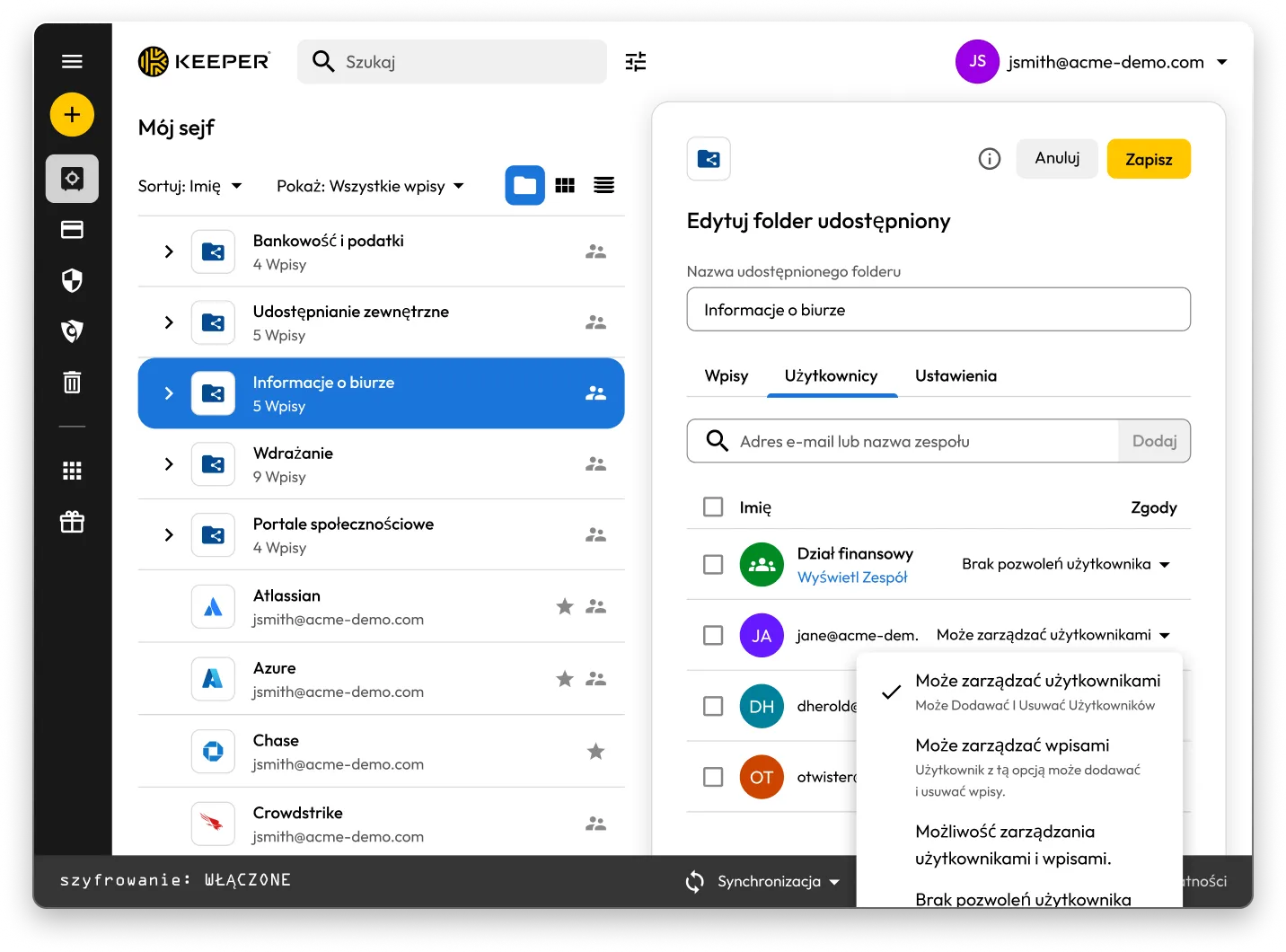
Interfejs Keeper Vault pokazujący udostępnione foldery i rekordy. Panel „Edytuj folder udostępniony” dla „Informacje o biurze” jest otwarty i wyświetla uprawnienia użytkowników z opcjami zarządzania użytkownikami, zarządzania rekordami lub nieprzypisywania żadnych uprawnień.

Keeper vs 1Password: Side-by-side comparison

Keeper
1Password
Security architecture and encryption model

Keeper's zero-knowledge architecture encrypts every individual record and folder with its own unique AES-256 key, with all encryption and decryption performed locally on the user's device. Keeper's "Transmission Security" adds a second layer – TLS 1.3/1.2 plus an additional 256-bit AES transmission key – covering all data communications, not just authentication. HSM integration in AWS provides super-encryption at rest.

Keeper Forcefield technology protects against memory-based attacks that specifically target password managers.

Keeper's self-managed BreachWatch® dark web monitoring runs entirely within its own infrastructure using an HSM-protected architecture, so breached passwords are never correlated against vault data outside Keeper's systems.

Keeper holds 10 issued U.S. patents covering its zero-knowledge architecture, SSO, breach detection and secure messaging, with four more pending.

Based on publicly available documentation, 1Password uses a vault-key-based encryption model: individual items are encrypted using keys derived from that vault key, rather than each having an independently generated key. Its SRP protocol handles authentication; data in transit is protected by TLS, though this operates separately from 1Password's credential encryption architecture.

For dark web monitoring, 1Password's Watchtower feature integrates with Have I Been Pwned using a k-anonymity API, which transmits only a partial hash rather than the full credential.

1Password provides basic memory protection only, leaving users more exposed to advanced malware techniques that target password managers.

1Password (AgileBits Inc.) holds at least one issued U.S. patent.

Authentication, Single Sign-On (SSO) and provisioning

Keeper uses multi-layered authentication that combines a master password with device verification, providing an approach that is both attack-resistant and simple for end users.

Keeper has been in enterprise SSO production since 2016, holds patents on its SSO implementation and supports complex multi-provider configurations with no additional software required.

SCIM provisioning works directly with any Identity Provider (IdP) without any software installation.

Based on publicly available documentation, 1Password's dual-factor approach, an account password plus a secret key, can introduce complexity and potential access issues.

SSO support has expanded to multiple identity providers, though deployment requires additional configuration steps compared to Keeper's no-software-installation approach.

SCIM provisioning requires deploying a self-hosted SCIM Bridge in either an on-premises or cloud environment, though 1Password now offers hosted provisioning for Entra ID and Okta users.

Platform capabilities and Privileged Access Management (PAM)

KeeperPAM combines enterprise password management, secrets management, connection management, privileged session management and Remote Browser Isolation (RBI) in a single cloud-native, zero-knowledge interface.

Remote Browser Isolation creates isolated browser sessions for internal and cloud applications, eliminating the need for VPNs.

Keeper Endpoint Privilege Manager enforces Just-In-Time (JIT) access and least privilege directly on user devices, with automatic privilege revocation on session termination.

Keeper Secrets Manager is fully cloud-based with CLI, REST APIs, Terraform and CI/CD pipeline support. No on-premises infrastructure is required.

Keeper also offers over 80 distinct permissions across 14 categories for granular enterprise access control.

1Password is a password manager that has expanded into an Extended Access Management platform covering device trust, SaaS visibility and app access governance. It does not offer the privileged access management capabilities that enterprises typically require, including RBI, JIT or zero-standing privilege capabilities, or the ability to enforce least privilege on endpoints.

For secrets management, 1Password Secrets Automation offers two paths: Service Accounts for lighter use cases or a self-hosted Connect Server deployed in the customer's own infrastructure for teams needing more control, scalability and higher request limits. Both require configuration and ongoing maintenance within the customer's environment.

1Password has 12 vault-based permissions with limited granularity for enterprise access control.

Database access management

KeeperDB provides secure, zero-knowledge remote access to databases, including MySQL, PostgreSQL, SQL Server and more, directly through the browser with no client software required. Access is governed by role-based policies, full session recording and audit logging, ensuring every database interaction is tracked and compliant. Credential injection means users never see or handle the underlying database passwords directly.

Based on publicly available documentation, 1Password has no database access or management capabilities. Organizations using 1Password for database credentials must rely on manual credential retrieval and separate tooling to manage and audit database sessions, with no native session recording or policy enforcement.

AI-powered security and automation

KeeperAI brings intelligent automation to privileged access management. It monitors privileged sessions in real time and can automatically terminate a session when suspicious activity is detected. KeeperAI also assists with policy creation, access reviews and anomaly detection, reducing the manual overhead of managing a large privileged access environment while continuously strengthening security posture.

Based on publicly available documentation, 1Password has no AI-powered privileged session monitoring, real-time anomaly detection within sessions or automated security response capabilities such as automatic session termination upon detecting suspicious activity.

While 1Password's recently launched Unified Access platform provides credential audit trails and visibility into AI agent activity, it does not offer the integrated session intelligence that KeeperAI delivers natively within a full PAM platform.

Sharing, account management and MSP

Keeper supports time-limited record and folder sharing with automatic credential rotation, plus bidirectional one-time sharing to both users and non-users with real-time sync. Its node-based organizational architecture supports isolation between business units and multiple identity providers within the same tenant.

Enterprises have multiple account recovery pathways, including SSO Recovery, Account Transfer Policy, a 24-word recovery phrase and Commander CLI automation.

Keeper's MSP platform, launched in 2019, combines password management with full PAM capabilities in a unified, multi-tenant interface.

1Password requires users to create separate vaults for sharing, producing copies of records rather than real-time, synced data. It has no node structure or organizational units, and guest accounts are limited to a single vault with no time controls or automated security measures.

There is no direct vault transfer between user accounts, and offboarding relies on employees manually moving items before they leave, with account recovery as an admin fallback that requires access to the departing employee's email address.

1Password's MSP offering focuses solely on password management with no PAM features.

Compliance and certifications

Keeper is FedRAMP High Certified and GovRAMP High Authorized, FIPS 140-3 validated, ISO 27001/17/18 certified, ITAR compliant and holds the longest-standing SOC 2 Type II certification in the industry.

Based on publicly available information, 1Password holds no FedRAMP, GovRAMP or FIPS authorization, limiting its use in regulated industries and government.

*Dane na dzień 27 października 2025 r.

Keeper a 1Password: oceny i opinie użytkowników

Keeper
1Password
App Store dla iOS

App Store dla iOS

4,9 na 5 – 224 000 recenzji

4,9 na 5 – 224 000 recenzji

4.6 out of 5 and 20K Reviews

4.6 out of 5 and 20K Reviews

Aplikacja z Microsoft Store

Aplikacja z Microsoft Store

4,9 na 5 – 1460 recenzji

4,9 na 5 – 1460 recenzji

4.4 out of 5 and 10 Reviews

4.4 out of 5 and 10 Reviews

Rozszerzenie Chrome

Rozszerzenie Chrome

4,8 na 5 – 8500 recenzji

4,8 na 5 – 8500 recenzji

2.9 out of 5 and 2,700 Reviews

2.9 out of 5 and 2,700 Reviews

Android

Android

4,7 na 5 – 110 000 recenzji

4,7 na 5 – 110 000 recenzji

3.5 out of 5 and 17.6K Reviews

3.5 out of 5 and 17.6K Reviews

*Dane na dzień 27 października 2025 r.

Korzystasz z 1Password? Przejdź na Keeper z łatwością.

Przeniesienie haseł z 1Password do Keeper jest proste i bezpieczne. Wystarczy kilka kliknięć, aby przenieść do Keeper swoje informacje przechowywane w 1Password, w tym hasła, foldery, podfoldery, pola niestandardowe, kody TOTP, notatki i konta.

Często zadawane pytania (FAQ)

Jak mogę zaimportować hasła z 1Password do Keeper?

Możesz zaimportować hasła z 1Password do Keeper Security, wykonując te proste kroki:

  • Zaloguj się na swoje konto 1Password.
  • Wybierz żądany sejf lub subskrypcję.
  • Wyeksportuj dane.
  • Zaloguj się do Keeper w przeglądarce lub aplikacji na komputer.
  • Kliknij ikonę swojego konta i wybierz opcje Ustawienia > Import.
  • Wybierz 1Password z listy i przeciągnij wyeksportowany plik do okna „Upuść plik”.

Dowiedz się więcej na temat importowania z 1Password, korzystając z tego szczegółowego przewodnika specyficznego dla urządzenia .

Jak anulować subskrypcję 1Password?

Jeśli nie potrzebujesz już subskrypcji 1Password, wykonaj ten proces składający się z trzech kroków:

  • Zaloguj się na swoje konto 1Password.
  • W prawym górnym rogu wybierz swoją nazwę i kliknij Mój profil.
  • U dołu strony wybierz opcję Trwale usuń konto.

Pamiętaj, aby przed zamknięciem konta wyeksportować swoje dane uwierzytelniające, a następnie zaimportować je do wybranej alternatywy dla rozwiązania 1Password.

Keeper to wszechstronna platforma PAM. Czy to oznacza, że jest przeznaczona tylko dla dużych przedsiębiorstw?

Nie. Chociaż platforma Keeper oferuje kompleksowe funkcje PAM, które zaspokajają potrzeby przedsiębiorstw, została zaprojektowana, aby skalować się od indywidualnych użytkowników do dużych organizacji.

Keeper Business zapewnia mniejszym organizacjom usprawnione, łatwe w użyciu rozwiązanie do zarządzania poświadczeniami bez kompromisów w zakresie bezpieczeństwa.

Keeper oferuje również plany osobiste do indywidualnego zarządzania hasłami i bezpiecznego przechowywania plików, a także plany rodzinne do wspólnego zarządzania hasłami przez wszystkich członków gospodarstwa domowego.

Elastyczna architektura platformy pozwala użytkownikom zacząć od podstawowego zarządzania hasłami i rozszerzać je do funkcji PAM klasy korporacyjnej w miarę wzrostu ich potrzeb. Oznacza to, że osoby fizyczne mogą korzystać z tej samej podstawy bezpieczeństwa, która napędza rozwiązania Keeper Business, podczas gdy organizacje mogą uzyskać dostęp do zaawansowanych uprzywilejowanych kontroli dostępu w razie potrzeby.

Pakiety 1Password Family i Keeper Family: jaka jest różnica?

Keeper Family umożliwia zabezpieczenie i udostępnianie nieograniczonej liczby haseł dla gospodarstw domowych dzięki pięciu prywatnym sejfom, 10 GB miejsca na pliki, nieograniczonej liczbie urządzeń, dostępowi awaryjnemu i pomocy technicznej przez całą dobę, 7 dni w tygodniu. Keeper Family kosztuje tylko USD miesięcznie.

1Password pozwala również rodzinom bezpiecznie przechowywać hasła, eksportować dane i udostępniać hasła, ale wymaga utworzenia wielu sejfów do udostępniania. Keeper umożliwia indywidualne udostępnianie wpisów i udostępnianie folderów. 1Password zapewnia tylko z 1 GB miejsca do przechowywania dokumentów, podczas gdy Keeper oferuje 10 GB miejsca.

Wycofaj zgodę dot. plików cookieDbamy o prywatność użytkowników

Wykorzystujemy na naszej stronie pliki cookie na potrzeby zapewnienia jak najlepszej jakości przeglądania, wyświetlania spersonalizowanych reklam dotyczących naszych produktów i treści oraz analizy ruchu na stronie. Aby uzyskać więcej informacji, zapoznaj się z naszą polityką prywatności.

Zarejestruj się na darmowy okres próbny

Kup teraz