Keeperと1Password
徹底比較ガイド

Keeperと1Passwordをセキュリティ、機能、使いやすさの観点から、どちらのパスワードマネージャーが優れているのかを明らかにします。組織の従業員、デバイス、データを守るために最適なソリューションを選ぶための重要なポイントをご確認ください。

たったこれだけ
 
 
ユーザーごと/月額 *zzgl MwSt *Includes GST
個人向け

ボーナス特典! 各チームメンバーに 無料の Family プラン を進呈いたします。
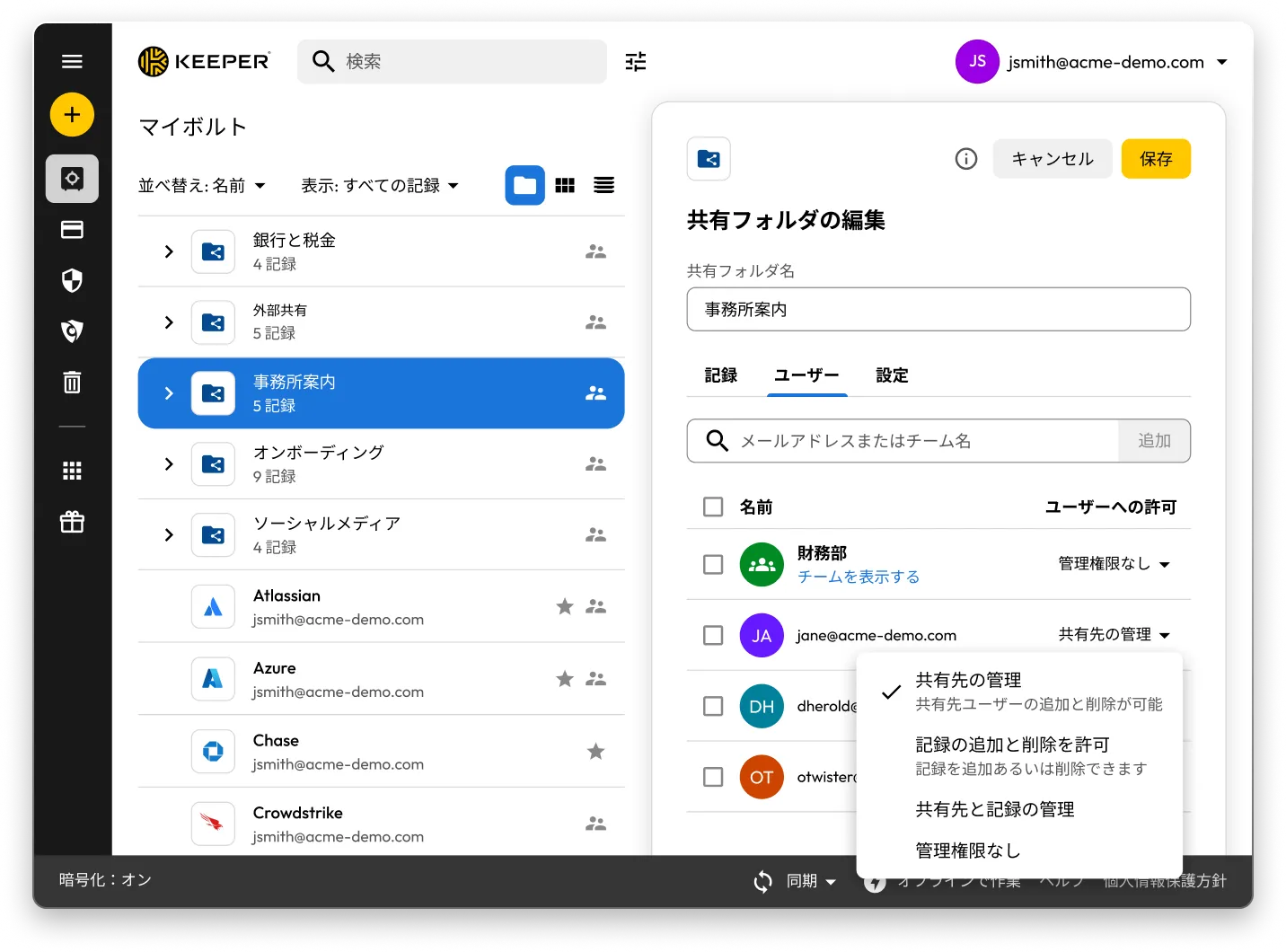
共有フォルダやレコードが表示されているKeeperボルトの画面。「Office Information」の「共有フォルダの編集」パネルが開いており、ユーザー権限としてユーザー管理、レコード管理、権限なしの選択肢が表示されている。

Keeper vs 1Password: Side-by-side comparison

Keeper
1Password
Security architecture and encryption model

Keeper's zero-knowledge architecture encrypts every individual record and folder with its own unique AES-256 key, with all encryption and decryption performed locally on the user's device. Keeper's "Transmission Security" adds a second layer – TLS 1.3/1.2 plus an additional 256-bit AES transmission key – covering all data communications, not just authentication. HSM integration in AWS provides super-encryption at rest.

Keeper Forcefield technology protects against memory-based attacks that specifically target password managers.

Keeper's self-managed BreachWatch® dark web monitoring runs entirely within its own infrastructure using an HSM-protected architecture, so breached passwords are never correlated against vault data outside Keeper's systems.

Keeper holds 10 issued U.S. patents covering its zero-knowledge architecture, SSO, breach detection and secure messaging, with four more pending.

Based on publicly available documentation, 1Password uses a vault-key-based encryption model: individual items are encrypted using keys derived from that vault key, rather than each having an independently generated key. Its SRP protocol handles authentication; data in transit is protected by TLS, though this operates separately from 1Password's credential encryption architecture.

For dark web monitoring, 1Password's Watchtower feature integrates with Have I Been Pwned using a k-anonymity API, which transmits only a partial hash rather than the full credential.

1Password provides basic memory protection only, leaving users more exposed to advanced malware techniques that target password managers.

1Password (AgileBits Inc.) holds at least one issued U.S. patent.

Authentication, Single Sign-On (SSO) and provisioning

Keeper uses multi-layered authentication that combines a master password with device verification, providing an approach that is both attack-resistant and simple for end users.

Keeper has been in enterprise SSO production since 2016, holds patents on its SSO implementation and supports complex multi-provider configurations with no additional software required.

SCIM provisioning works directly with any Identity Provider (IdP) without any software installation.

Based on publicly available documentation, 1Password's dual-factor approach, an account password plus a secret key, can introduce complexity and potential access issues.

SSO support has expanded to multiple identity providers, though deployment requires additional configuration steps compared to Keeper's no-software-installation approach.

SCIM provisioning requires deploying a self-hosted SCIM Bridge in either an on-premises or cloud environment, though 1Password now offers hosted provisioning for Entra ID and Okta users.

Platform capabilities and Privileged Access Management (PAM)

KeeperPAM combines enterprise password management, secrets management, connection management, privileged session management and Remote Browser Isolation (RBI) in a single cloud-native, zero-knowledge interface.

Remote Browser Isolation creates isolated browser sessions for internal and cloud applications, eliminating the need for VPNs.

Keeper Endpoint Privilege Manager enforces Just-In-Time (JIT) access and least privilege directly on user devices, with automatic privilege revocation on session termination.

Keeper Secrets Manager is fully cloud-based with CLI, REST APIs, Terraform and CI/CD pipeline support. No on-premises infrastructure is required.

Keeper also offers over 80 distinct permissions across 14 categories for granular enterprise access control.

1Password is a password manager that has expanded into an Extended Access Management platform covering device trust, SaaS visibility and app access governance. It does not offer the privileged access management capabilities that enterprises typically require, including RBI, JIT or zero-standing privilege capabilities, or the ability to enforce least privilege on endpoints.

For secrets management, 1Password Secrets Automation offers two paths: Service Accounts for lighter use cases or a self-hosted Connect Server deployed in the customer's own infrastructure for teams needing more control, scalability and higher request limits. Both require configuration and ongoing maintenance within the customer's environment.

1Password has 12 vault-based permissions with limited granularity for enterprise access control.

Database access management

KeeperDB provides secure, zero-knowledge remote access to databases, including MySQL, PostgreSQL, SQL Server and more, directly through the browser with no client software required. Access is governed by role-based policies, full session recording and audit logging, ensuring every database interaction is tracked and compliant. Credential injection means users never see or handle the underlying database passwords directly.

Based on publicly available documentation, 1Password has no database access or management capabilities. Organizations using 1Password for database credentials must rely on manual credential retrieval and separate tooling to manage and audit database sessions, with no native session recording or policy enforcement.

AI-powered security and automation

KeeperAI brings intelligent automation to privileged access management. It monitors privileged sessions in real time and can automatically terminate a session when suspicious activity is detected. KeeperAI also assists with policy creation, access reviews and anomaly detection, reducing the manual overhead of managing a large privileged access environment while continuously strengthening security posture.

Based on publicly available documentation, 1Password has no AI-powered privileged session monitoring, real-time anomaly detection within sessions or automated security response capabilities such as automatic session termination upon detecting suspicious activity.

While 1Password's recently launched Unified Access platform provides credential audit trails and visibility into AI agent activity, it does not offer the integrated session intelligence that KeeperAI delivers natively within a full PAM platform.

Sharing, account management and MSP

Keeper supports time-limited record and folder sharing with automatic credential rotation, plus bidirectional one-time sharing to both users and non-users with real-time sync. Its node-based organizational architecture supports isolation between business units and multiple identity providers within the same tenant.

Enterprises have multiple account recovery pathways, including SSO Recovery, Account Transfer Policy, a 24-word recovery phrase and Commander CLI automation.

Keeper's MSP platform, launched in 2019, combines password management with full PAM capabilities in a unified, multi-tenant interface.

1Password requires users to create separate vaults for sharing, producing copies of records rather than real-time, synced data. It has no node structure or organizational units, and guest accounts are limited to a single vault with no time controls or automated security measures.

There is no direct vault transfer between user accounts, and offboarding relies on employees manually moving items before they leave, with account recovery as an admin fallback that requires access to the departing employee's email address.

1Password's MSP offering focuses solely on password management with no PAM features.

Compliance and certifications

Keeper is FedRAMP High Certified and GovRAMP High Authorized, FIPS 140-3 validated, ISO 27001/17/18 certified, ITAR compliant and holds the longest-standing SOC 2 Type II certification in the industry.

Based on publicly available information, 1Password holds no FedRAMP, GovRAMP or FIPS authorization, limiting its use in regulated industries and government.

※2025年10月27日時点のデータです

Keeperと1Passwordのユーザー評価・レビュー

Keeper
1Password
iOS App Store

iOS App Store

4.9 / 5 (22万4千件のレビュー)

4.9 / 5 (22万4千件のレビュー)

4.6 out of 5 and 20K Reviews

4.6 out of 5 and 20K Reviews

Microsoft Store アプリ

Microsoft Store アプリ

4.9 / 5 (1460件のレビュー)

4.9 / 5 (1460件のレビュー)

4.4 out of 5 and 10 Reviews

4.4 out of 5 and 10 Reviews

Chrome拡張機能

Chrome拡張機能

4.8 / 5 (8500件のレビュー)

4.8 / 5 (8500件のレビュー)

2.9 out of 5 and 2,700 Reviews

2.9 out of 5 and 2,700 Reviews

Android

Android

4.7 / 5 (11万件のレビュー)

4.7 / 5 (11万件のレビュー)

3.5 out of 5 and 17.6K Reviews

3.5 out of 5 and 17.6K Reviews

※2025年10月27日時点のデータです

すでに 1Password をお使いですか?Keeper へと簡単に移行することができます。

1PasswordからKeeperへのパスワードの移行は簡単で安全です。パスワード、フォルダ、サブフォルダ、カスタムフィールド、TOTPコード、メモ、アカウントなど、1Passwordに保存されている情報は、わずか数クリックでKeeperへと移行されます。

よくある質問

1PasswordからKeeperへパスワードをインポートするには?

以下の手順で、1PasswordからKeeper Securityへとパスワードをインポートすることができます。

  • 1Passwordアカウントにサインインします。
  • インポートしたいボルトまたはサブスクリプションを選択します。
  • データをエクスポートします。
  • ウェブまたはデスクトップアプリでKeeperにログインします。
  • アカウントアイコン > [設定] > [インポート] をクリックします。
  • [1Password] を選択し、エクスポートしたファイルを「ここにファイルをドロップ」ウィンドウにドラッグします。

1Passwordからのインポートについては、ステップごとに解説したデバイス別ガイドをご覧ください。

1Passwordをキャンセルするには?

1Passwordのサブスクリプションを維持する必要がなくなった場合は、次の3つのステップに従ってください。

  • 1Passwordアカウントにログインします。
  • 右上にある、自分の名前を選択し [マイプロフィール] をクリックします。
  • ページ下部の [アカウントを完全に削除] を選択します。

アカウントを閉じる前に、認証情報をエクスポートし、選択した1Password代替製品にインポートすることを忘れずに行ってください。

Keeperは包括的なPAMプラットフォームですが、大企業専用の製品なのでしょうか?

いいえ。Keeperはエンタープライズ向けの高度なPAM機能を備えていますが、個人ユーザーから大規模組織まで幅広く利用できます。

Keeperビジネスは、中小規模の組織向けにセキュリティを損なうことなく、シンプルで使いやすい認証情報管理ソリューションを実現します。

またKeeperには、個人のパスワード管理や安全なファイル保管に対応する個人向けプラン、家族間でのパスワード共有に対応するファミリープランも用意されています。

Keeperの柔軟なアーキテクチャにより、まずは基本的なパスワード管理から始め、必要に応じてエンタープライズレベルのPAM機能へ段階的に拡張することができます。つまり、個人ユーザーもKeeperのビジネスソリューションと同じ強固なセキュリティ基盤を利用でき、組織は必要に応じて高度な特権アクセス制御を活用できます。

1PasswordファミリーパッケージとKeeperファミリープランの違いとは?

Keeperファミリープランは、5つの個人用ボルト (保管庫)、10GBのファイルストレージ、無制限のデバイス、緊急アクセス、24時間365日のサポートにより、家族で無制限のパスワードを保護・共有できます。料金はわずか¥755/月です。

1Passwordも家族でパスワードを安全に保存し、データをエクスポートし、パスワードを共有することができますが、共有のために複数のボルトを作成する必要があります。Keeperでは個々のレコードの共有とフォルダの共有が可能です。1Passwordには1GBのドキュメントストレージしかありませんが、Keeperでは10GBのストレージを利用できます。

Cookie を無効にする弊社はお客様のプライバシーを大切にしています

当サイトでは、閲覧体験の最適化、弊社の製品や内容に関する個別広告の表示、ウェブサイトの利用状況の分析のためにクッキーを使用しています。詳しくは、プライバシーポリシーをご覧ください。

無料トライアルにサインアップ

今すぐ購入