Keeper vs. 1Password:
Wer ist besser?

Entdecken Sie den ultimativen Vergleich zwischen Keeper und 1Password. Finden Sie heraus, welcher Passwortmanager in puncto Sicherheit, Funktionen und Benutzerfreundlichkeit die Nase vorn hat. Erhalten Sie die nötigen Einblicke, um den richtigen Schutz für Ihre Mitarbeiter, Geräte und Daten auszuwählen.

Bereits ab
 
 
pro Benutzer/Monat *zzgl MwSt *Includes GST
Für Privatpersonen

Bonus! Enthält ein Kostenloses Family-Abonnement für jedes Teammitglied.
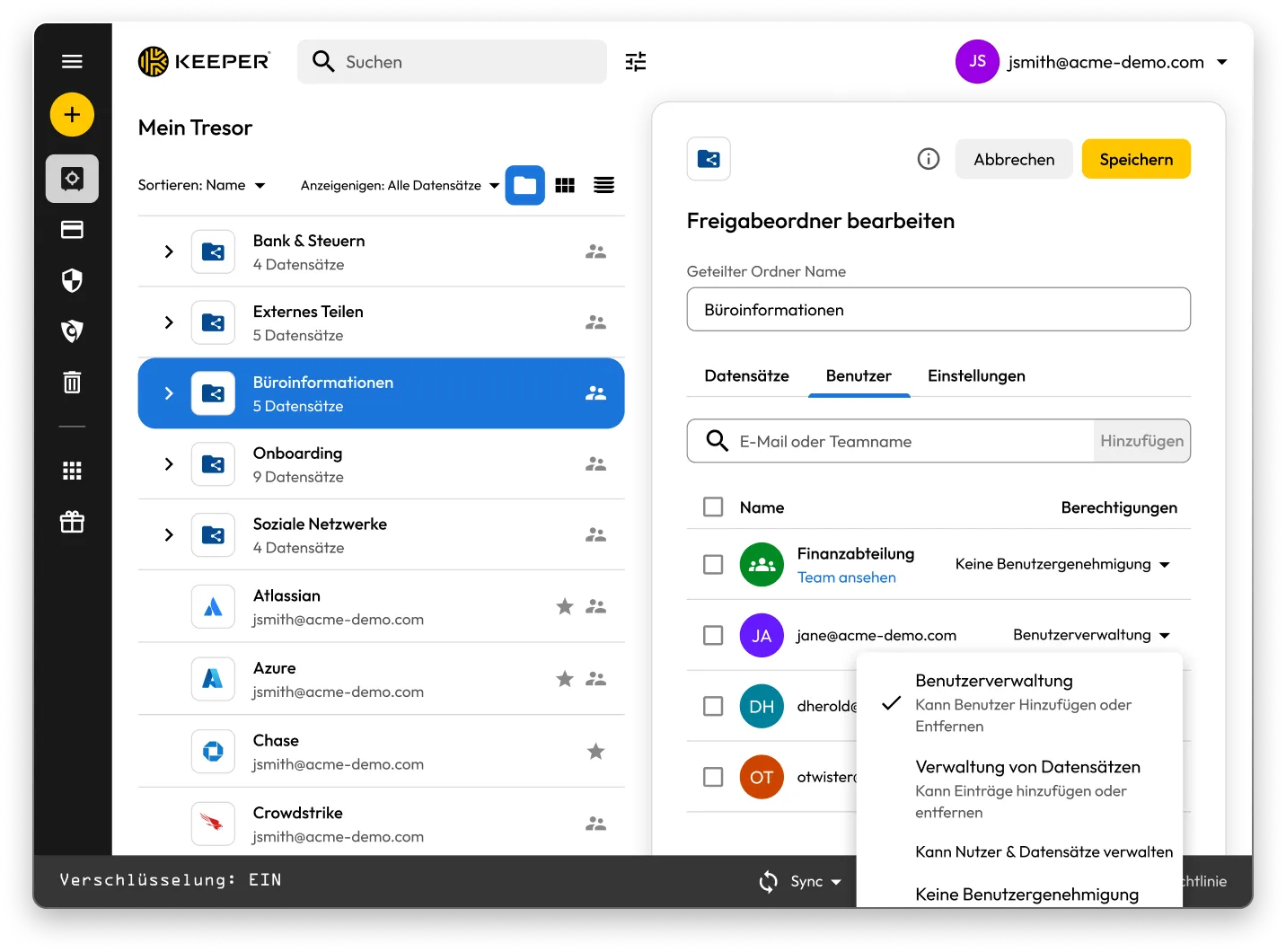
Keeper-Tresoroberfläche mit angezeigtem geteilten Ordner und Datensätzen. Das Bedienfeld „Geteilten Ordner bearbeiten“ für „Office-Informationen“ ist geöffnet und zeigt Benutzerberechtigungen mit Optionen zum Verwalten von Benutzern, Verwalten von Datensätzen oder Zuweisen von keinen Berechtigungen an.

Keeper vs 1Password: Side-by-side comparison

Keeper
1Password
Security architecture and encryption model

Keeper's zero-knowledge architecture encrypts every individual record and folder with its own unique AES-256 key, with all encryption and decryption performed locally on the user's device. Keeper's "Transmission Security" adds a second layer – TLS 1.3/1.2 plus an additional 256-bit AES transmission key – covering all data communications, not just authentication. HSM integration in AWS provides super-encryption at rest.

Keeper Forcefield technology protects against memory-based attacks that specifically target password managers.

Keeper's self-managed BreachWatch® dark web monitoring runs entirely within its own infrastructure using an HSM-protected architecture, so breached passwords are never correlated against vault data outside Keeper's systems.

Keeper holds 10 issued U.S. patents covering its zero-knowledge architecture, SSO, breach detection and secure messaging, with four more pending.

Based on publicly available documentation, 1Password uses a vault-key-based encryption model: individual items are encrypted using keys derived from that vault key, rather than each having an independently generated key. Its SRP protocol handles authentication; data in transit is protected by TLS, though this operates separately from 1Password's credential encryption architecture.

For dark web monitoring, 1Password's Watchtower feature integrates with Have I Been Pwned using a k-anonymity API, which transmits only a partial hash rather than the full credential.

1Password provides basic memory protection only, leaving users more exposed to advanced malware techniques that target password managers.

1Password (AgileBits Inc.) holds at least one issued U.S. patent.

Authentication, Single Sign-On (SSO) and provisioning

Keeper uses multi-layered authentication that combines a master password with device verification, providing an approach that is both attack-resistant and simple for end users.

Keeper has been in enterprise SSO production since 2016, holds patents on its SSO implementation and supports complex multi-provider configurations with no additional software required.

SCIM provisioning works directly with any Identity Provider (IdP) without any software installation.

Based on publicly available documentation, 1Password's dual-factor approach, an account password plus a secret key, can introduce complexity and potential access issues.

SSO support has expanded to multiple identity providers, though deployment requires additional configuration steps compared to Keeper's no-software-installation approach.

SCIM provisioning requires deploying a self-hosted SCIM Bridge in either an on-premises or cloud environment, though 1Password now offers hosted provisioning for Entra ID and Okta users.

Platform capabilities and Privileged Access Management (PAM)

KeeperPAM combines enterprise password management, secrets management, connection management, privileged session management and Remote Browser Isolation (RBI) in a single cloud-native, zero-knowledge interface.

Remote Browser Isolation creates isolated browser sessions for internal and cloud applications, eliminating the need for VPNs.

Keeper Endpoint Privilege Manager enforces Just-In-Time (JIT) access and least privilege directly on user devices, with automatic privilege revocation on session termination.

Keeper Secrets Manager is fully cloud-based with CLI, REST APIs, Terraform and CI/CD pipeline support. No on-premises infrastructure is required.

Keeper also offers over 80 distinct permissions across 14 categories for granular enterprise access control.

1Password is a password manager that has expanded into an Extended Access Management platform covering device trust, SaaS visibility and app access governance. It does not offer the privileged access management capabilities that enterprises typically require, including RBI, JIT or zero-standing privilege capabilities, or the ability to enforce least privilege on endpoints.

For secrets management, 1Password Secrets Automation offers two paths: Service Accounts for lighter use cases or a self-hosted Connect Server deployed in the customer's own infrastructure for teams needing more control, scalability and higher request limits. Both require configuration and ongoing maintenance within the customer's environment.

1Password has 12 vault-based permissions with limited granularity for enterprise access control.

Database access management

KeeperDB provides secure, zero-knowledge remote access to databases, including MySQL, PostgreSQL, SQL Server and more, directly through the browser with no client software required. Access is governed by role-based policies, full session recording and audit logging, ensuring every database interaction is tracked and compliant. Credential injection means users never see or handle the underlying database passwords directly.

Based on publicly available documentation, 1Password has no database access or management capabilities. Organizations using 1Password for database credentials must rely on manual credential retrieval and separate tooling to manage and audit database sessions, with no native session recording or policy enforcement.

AI-powered security and automation

KeeperAI brings intelligent automation to privileged access management. It monitors privileged sessions in real time and can automatically terminate a session when suspicious activity is detected. KeeperAI also assists with policy creation, access reviews and anomaly detection, reducing the manual overhead of managing a large privileged access environment while continuously strengthening security posture.

Based on publicly available documentation, 1Password has no AI-powered privileged session monitoring, real-time anomaly detection within sessions or automated security response capabilities such as automatic session termination upon detecting suspicious activity.

While 1Password's recently launched Unified Access platform provides credential audit trails and visibility into AI agent activity, it does not offer the integrated session intelligence that KeeperAI delivers natively within a full PAM platform.

Sharing, account management and MSP

Keeper supports time-limited record and folder sharing with automatic credential rotation, plus bidirectional one-time sharing to both users and non-users with real-time sync. Its node-based organizational architecture supports isolation between business units and multiple identity providers within the same tenant.

Enterprises have multiple account recovery pathways, including SSO Recovery, Account Transfer Policy, a 24-word recovery phrase and Commander CLI automation.

Keeper's MSP platform, launched in 2019, combines password management with full PAM capabilities in a unified, multi-tenant interface.

1Password requires users to create separate vaults for sharing, producing copies of records rather than real-time, synced data. It has no node structure or organizational units, and guest accounts are limited to a single vault with no time controls or automated security measures.

There is no direct vault transfer between user accounts, and offboarding relies on employees manually moving items before they leave, with account recovery as an admin fallback that requires access to the departing employee's email address.

1Password's MSP offering focuses solely on password management with no PAM features.

Compliance and certifications

Keeper is FedRAMP High Certified and GovRAMP High Authorized, FIPS 140-3 validated, ISO 27001/17/18 certified, ITAR compliant and holds the longest-standing SOC 2 Type II certification in the industry.

Based on publicly available information, 1Password holds no FedRAMP, GovRAMP or FIPS authorization, limiting its use in regulated industries and government.

*Datenstand: 27. Oktober 2025

Keeper und 1Password im vergleich: Nutzerbewertungen und rezension

Keeper
1Password
iOS App-Store

iOS App-Store

4,9 von 5 Sternen und 224.000 Bewertungen

4,9 von 5 Sternen und 224.000 Bewertungen

4.6 out of 5 and 20K Reviews

4.6 out of 5 and 20K Reviews

App aus dem Microsoft Store

App aus dem Microsoft Store

4,9 von 5 Sternen und 1.460 Bewertungen

4,9 von 5 Sternen und 1.460 Bewertungen

4.4 out of 5 and 10 Reviews

4.4 out of 5 and 10 Reviews

Chrome-Erweiterung

Chrome-Erweiterung

4,8 von 5 Sternen und 8.500 Bewertungen

4,8 von 5 Sternen und 8.500 Bewertungen

2.9 out of 5 and 2,700 Reviews

2.9 out of 5 and 2,700 Reviews

Android

Android

4,7 von 5 Sternen und 110.000 Bewertungen

4,7 von 5 Sternen und 110.000 Bewertungen

3.5 out of 5 and 17.6K Reviews

3.5 out of 5 and 17.6K Reviews

*Datenstand: 27. Oktober 2025

Nutzen sie 1Password? Wechseln sie ganz leicht zu Keeper!

Das Verschieben Ihrer Passwörter von 1Password zu Keeper ist einfach und sicher. Ihre in 1Password gespeicherten Informationen, einschließlich Passwörter, Ordner, Unterordner, benutzerdefinierte Felder, TOTP-Codes, Notizen und Konten, werden mit nur wenigen Klicks zu Keeper migriert.

Häufig gestellte fragen

Wie kann ich Passwörter von 1Password in Keeper importieren?

Sie können Passwörter von 1Password in Keeper Security mit diesen einfachen Schritten importieren:

  • Melden Sie sich bei Ihrem 1Password-Konto an
  • Wählen Sie den Tresor oder das Abonnement aus, das Sie möchten
  • Exportieren Sie die Daten
  • Melden Sie sich in der Web- oder Desktop-App bei Keeper an
  • Klicken Sie auf Ihr Kontosymbol > Einstellungen > Importieren
  • Wählen Sie 1Password aus der Liste und ziehen Sie die exportierte Datei in das Fenster "Datei ablegen".

Erfahren Sie mehr über den Import von 1Password mit dieser gerätespezifischen Schritt-für-Schritt-Anleitung.

Wie kündige ich 1Password?

Befolgen Sie diese drei Schritte, wenn Sie 1Password nicht mehr verwenden und löschen wollen:

  • Melden Sie sich bei Ihrem 1Password-Konto an.
  • Wählen Sie in der oberen rechten Ecke Ihren Namen aus und klicken Sie auf Mein Profil.
  • Wählen Sie unten auf der Seite Konto endgültig löschen aus.

Denken Sie daran, Ihre Anmeldeinformationen zu exportieren und in die von Ihnen gewählte 1Password-Alternative zu importieren, bevor Sie Ihr Konto schließen.

Keeper ist eine umfassende PAM-Plattform. Heißt das, dass es nur für große Unternehmen gedacht ist?

Nein. Keeper bietet zwar umfassende PAM-Funktionen, die den Anforderungen von Unternehmen gerecht werden, ist aber so konzipiert, dass es von einzelnen Benutzern bis hin zu großen Organisationen skalierbar ist.

Keeper Business bietet kleineren Organisationen eine optimierte, benutzerfreundliche Zugangsdatenverwaltungslösung ohne Kompromisse bei der Sicherheit.

Keeper bietet außerdem persönliche Tarife für die individuelle Passwortverwaltung und sichere Dateispeicherung sowie Familientarife für die gemeinsame Passwortverwaltung für alle Haushaltsmitglieder an.

Die flexible Architektur der Plattform ermöglicht es den Benutzern, mit einer grundlegenden Passwortverwaltung zu beginnen und diese bei wachsenden Anforderungen auf PAM-Funktionen der Enterprise-Klasse auszuweiten. Dies bedeutet, dass Einzelpersonen von der gleichen Sicherheitsgrundlage profitieren können, die auch Keeper Business Lösungen zugrunde liegt, während Organisationen bei Bedarf auf anspruchsvolle privilegierte Zugriffskontrollen zugreifen können.

1Password Family vs. Keeper Family Paket: Was ist der Unterschied?

Keeper Family ermöglicht es Ihnen, unbegrenzt Passwörter für Haushalte zu sichern und zu teilen, mit fünf privaten Tresoren, 10 GB Dateispeicher, unbegrenzten Geräten, Notfall-Zugang und 24/7-Support. Keeper Family kostet nur pro Monat.

1Password ermöglicht es Familien auch, Passwörter sicher zu speichern, Daten zu exportieren und Passwörter zu teilen, erfordert jedoch die Erstellung mehrerer Tresore für die gemeinsame Nutzung. Keeper ermöglicht das Teilen von einzelnen Datensätzen und Ordnern. 1Password verfügt über nur 1 GB Dokumentenspeicher, während Keeper über 10 GB Speicherplatz verfügt.

Einverständnis zur Cookie-Nutzung widerrufenWir schätzen Ihre Privatsphäre

Wir verwenden Cookies auf unserer Website, um Ihnen das beste Browser-Erlebnis zu bieten, personalisierte Anzeigen zu unseren Produkten und Inhalten zu bieten und den Website-Datenverkehr zu analysieren. Um mehr zu erfahren, lesen Sie bitte unsere Datenschutzrichtlinie.

Für die kostenlose Testversion anmelden

Jetzt kaufen